


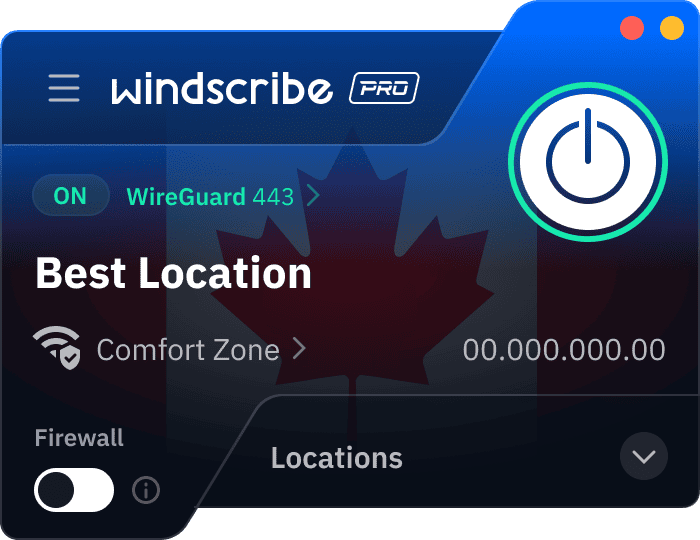
Step 1
Get Windscribe
Step 2
Optimize for Calls
Step 3
Connect & Talk
What Can Windscribe Do for Your VoIP Calls?
Windscribe uses fast, modern protocols like WireGuard that keep the latency low and your calls smooth, so conversations feel natural instead of delayed or choppy.

Use our Split Tunneling feature to send Zoom, WhatsApp, or Teams through the VPN while everything else stays on your regular connection.

With our global servers in 69+ countries, you can connect through less restrictive regions, so your calls still go through if you live somewhere where calling apps are restricted.
Windscribe encrypts your traffic to make it harder for ISPs, network admins, and public Wi-Fi lurkers to see that you’re calling someone on the other side of the planet.

If the VPN disconnects unexpectedly, our Firewall blocks traffic instantly, so your real IP and other data don’t leak onto unsecured networks.


Do You Actually Need a VPN for VoIP?

If FaceTime, WhatsApp, Zoom, or other VoIP apps are restricted in your country, a VPN lets you route your connection through places where those services still work.

Some ISPs deliberately interfere with VoIP traffic to manage bandwidth. A VPN encrypts your traffic, making it harder for your ISP to identify voice and video calls and slow them down.

Hotel, airport, café, and coworking Wi-Fi are not built for privacy. If you're taking calls on a shared network, a VPN helps keep your conversations and connection away from unwanted eyes.



Features

VoIP-Optimized Protocol (WireGuard)
System-Wide Firewall
Split Tunneling
No Email Required
Features

Other VPNs
VoIP-Optimized Protocol (WireGuard)
System-Wide Firewall
Split Tunneling
No Email Required
Using VoIP in Countries That Block It
If your call never gets past “Connecting…”, the problem may not be your app. Here’s how to use Windscribe in restricted countries.
UAE
- Use the Stealth protocol
- Connect to Cyprus or Israel
- Open WhatsApp, FaceTime, or Skype
- Place your call
- Switch nearby locations if needed
China
- Use WStunnel or Stealth
- Connect before opening your app
- Retry with the other protocol if needed
- Keep the app updated before travel
Egypt/Oman/Qatar
- Turn on Stealth protocol
- Connect to a nearby server
- Open your calling app
- Test the connection with a short call
- Switch servers if the call doesn’t go through
Iran
- Use WStunnel
- Connect before opening your app
- Start with a short test call
- Reconnect if the call drops
- Avoid switching networks mid-call
Frequently Asked Questions About VoIP VPN
Does a VPN slow down VoIP calls?


It can, but it should not be noticeable. A VPN adds up to 100ms of latency depending on the protocol and the server you’re connecting to. WireGuard is the leanest protocol, adding only 2-10ms, which is imperceptible for most callers. If your base connection is already struggling, connect to a nearby server and use Split Tunneling to ensure only your VoIP app uses the VPN tunnel.
Can I use a free VPN for VoIP calls?
Most free VPNs are data-harvesting operations with tiny 500MB data caps that will die in the middle of a sentence. Windscribe’s free tier gives you 10GB per month and the same strict no-logging policy as our paid users. It is perfect for testing your call quality in a restricted region, but for daily heavy lifting or long video meetings, our Build-a-Plan option starts at just $3 per month.
Which VPN protocol is best for VoIP?
WireGuard is the gold standard for VoIP because it offers the lowest latency and highest speeds. However, if you’re on a mobile device and constantly switching between Wi-Fi and 5G, IKEv2 is better at maintaining a stable connection without dropping the call. And for those in countries that actively hunt and block VPN traffic, Stealth or WStunnel are the best ways to disguise your data as regular web traffic.
Can I use WhatsApp calls in the UAE with a VPN?
WhatsApp text messaging works fine in the UAE, but the government blocks the voice and video components to protect local telecom revenue. Using Windscribe with the Stealth protocol disguises your traffic and bypasses these blocks. While VPNs are legal in the UAE, using them to circumvent telecom blocks is a legal gray area, though there are no known prosecutions for personal use.
Does a VPN protect my calls from hackers?
Most modern apps like Signal or FaceTime already use end-to-end encryption for the actual content of your call. A VPN adds an essential layer of protection for your metadata, such as who you are calling and your physical location. It also secures your entire connection on public Wi-Fi, where unencrypted business VoIP systems are otherwise vulnerable to packet sniffing and local eavesdropping.
Can my ISP see that I am making VoIP calls?
Without a VPN, your ISP uses Deep Packet Inspection (DPI) to identify VoIP traffic patterns, so they can throttle your bandwidth during peak hours. With Windscribe active, your ISP sees nothing but a stream of encrypted data. They cannot distinguish a high-stakes video meeting from a regular file download, which prevents them from selectively slowing down your connection or interfering with your call quality.
Does Windscribe work with Zoom, Teams, and business VoIP?
Yes, our service is fully compatible with all major conferencing platforms and SIP-based business phone systems. We recommend using Split Tunneling to route only your specific business communication apps through the VPN while letting your other background traffic run directly. This configuration maintains maximum performance for your meetings while keeping your professional conversations shielded from prying eyes on any network.