


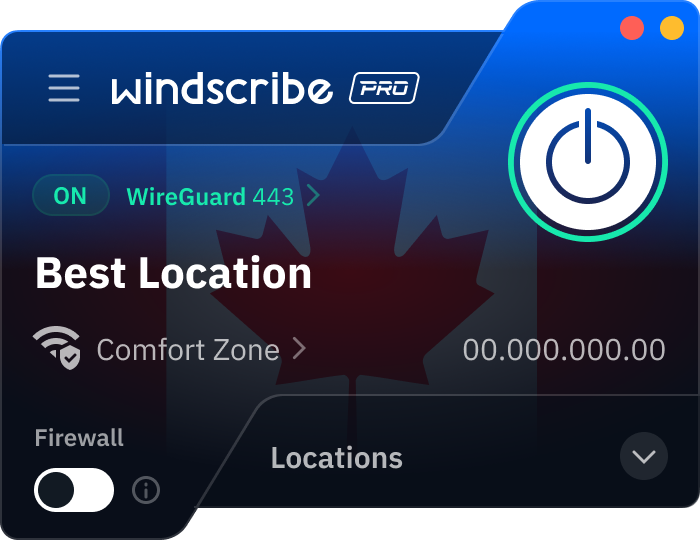



Waarom Windscribe de juiste VPN is voor openbare wifi-netwerken:

Je browsegeschiedenis? Een open boek.

Gratis virussen inbegrepen (zonder dat je erom vroeg).

Inloggegevens, bankgegevens, persoonlijke informatie — weg.

Kwaadwillende actoren onderscheppen je gegevens.
We zetten niet gewoon het woord 'veilig' op een website en laten het daarbij. Dit is wat je echt veilig houdt:
- Eersteklas encryptie: Je internetverkeer is beter vergrendeld dan Fort Knox.
- No-logs-beleid: We volgen je niet. Het kan ons niet schelen wat je doet. Simpel.
- Automatisch verbinden: Stel Windscribe in om automatisch verbinding te maken op openbare wifi.
- Firewallbescherming: Als de VPN wegvalt, stopt je verbinding direct.

- Houd je gegevens privé: Cybercriminelen, internetproviders en nieuwsgierige café-bezoekers kunnen niet zien wat je doet.
- Blijf anoniem: Verberg je echte IP. Wees wie je wilt. Zelfs een kat. We oordelen niet.
- Deblokkeer content: Geen 'deze website is niet beschikbaar in jouw regio' meer.
- Ultrasnelle snelheden: Omdat veiligheid geen traag internet mag betekenen.

- Maak altijd eerst verbinding met een VPN.
- Vermijd toegang tot gevoelige informatie, zoals je bankrekeningen.
- Log uit bij alle apps, diensten en e-mailproviders als je klaar bent.
- Maak alleen verbinding met websites met 'veilige HTTPS' om onversleutelde verbindingen te vermijden.

In een zee van opties kan het kiezen van de beste VPN ingewikkeld zijn. Dit is waar je op moet letten:
- Eersteklas privacy en beveiliging met geavanceerde encryptieprotocollen.
- Servers in 69+ landen en 135+ steden, geoptimaliseerd voor snelheid.
- Responsieve en nuttige klantenondersteuning.
- Meerwaarde-functies, zoals een advertentieblokker.

Stap 1
Stap 2
Registreer je
Stap 3
Verbind
Geliefd en vertrouwd door meer dan 100 miljoen gebruikers



Functies

6 versleutelingsprotocollen
Het breedste serverbereik
De meeste 10 Gbps-servers
Toonaangevende ad-blocker
Privacy: geaudit en in de rechtbank bewezen
Functies

Andere VPN's
6 versleutelingsprotocollen
Het breedste serverbereik
De meeste 10 Gbps-servers
Toonaangevende ad-blocker
Privacy: geaudit en in de rechtbank bewezen





Veelgestelde vragen
Waarom is openbare wifi gevaarlijk voor je persoonlijke gegevens?


Openbare wifi-netwerken creëren het perfecte jachtgebied voor cybercriminelen vanwege hun inherent onveilige aard. In tegenstelling tot je thuisnetwerk ontbreekt bij deze hotspots doorgaans goede versleuteling en authenticatiemaatregelen, waardoor je gegevens kwetsbaar zijn voor onderschepping.
Het grootste gevaar schuilt in hoe deze netwerken zijn opgebouwd — iedereen die met hetzelfde netwerk verbonden is, kan je verkeer potentieel monitoren. Hackers gebruiken technieken zoals packet sniffing om gegevens die over het netwerk stromen te onderscheppen en zo mogelijk je wachtwoorden, creditcardgegevens en persoonlijke berichten bloot te leggen.
Veel openbare netwerken hebben ook last van verouderde beveiligingsprotocollen of helemaal geen beveiliging. Sommige cafés of luchthavens hebben de firmware van hun router jarenlang niet bijgewerkt, waardoor bekende kwetsbaarheden ongepatched blijven.
Nep-hotspots zijn een andere ernstige bedreiging. Deze 'evil twin'-netwerken imiteren legitieme verbindingen (zoals 'Starbucks_WiFi'), maar worden in werkelijkheid gemaakt door hackers die vlakbij zitten. Verbind je met zo'n netwerk en alles wat je verstuurt, gaat eerst via hun apparaat.
Wat zijn de grootste beveiligingsbedreigingen bij het gebruik van wifi op een luchthaven of in een café?
-
De gevaarlijkste bedreiging op openbare wifi is de man-in-the-middle-aanval, waarbij cybercriminelen zich positioneren tussen jou en het verbindingspunt. Dit geeft hen de mogelijkheid je gegevens te onderscheppen zonder dat je het merkt. Op drukke luchthavens of in populaire cafés zijn deze aanvallen bijzonder gebruikelijk vanwege het hoge aantal potentiële slachtoffers.
-
Packet sniffing vormt een ander significant risico. Met gemakkelijk beschikbare softwaretools kunnen hackers datapakketten die over het netwerk reizen onderscheppen en analyseren. Deze passieve aanval is bijzonder zorgwekkend omdat het geen zichtbare sporen achterlaat terwijl het mogelijk je e-mails, berichten en browseactiviteit blootlegt.
-
Sessie-kaping is steeds geavanceerder geworden op openbare netwerken. Aanvallers stelen browsercookies die je inloggegevens bevatten, waardoor ze actieve sessies op je bank-, e-mail- of social media-accounts kunnen overnemen zonder je wachtwoord te kennen.
-
Malwaredistributie gedijt in deze omgevingen. Onbeveiligde netwerken maken het voor aanvallers eenvoudiger om kwaadaardige code te injecteren in websites die je bezoekt of nep software-updates te verzoeken. Wifi-gebruikers op luchthavens zijn bijzonder kwetsbaar omdat ze vaak afgeleid zijn en haast hebben om informatie te controleren voor hun vluchten.
-
SSL stripping-aanvallen downgraden veilige HTTPS-verbindingen naar onversleuteld HTTP zonder dat je het weet, waardoor gevoelige informatie wordt blootgesteld waarvan je dacht dat het veilig werd verzonden. Deze geavanceerde techniek omzeilt standaard beveiligingsmaatregelen waarop veel reizigers vertrouwen.
Hoe weet ik of mijn VPN correct werkt op openbare wifi?
De eenvoudigste manier om te controleren of je VPN werkt, is het VPN-pictogram in de statusbalk van je apparaat of in de systeemlade te zoeken. Op de meeste apparaten zie je een sleutel- of slotsymbool dat een actieve verbinding aangeeft. De Windscribe-app toont ook een duidelijke verbonden status met je huidige virtuele locatie.
Voor een meer definitieve controle, bezoek een tool voor IP-adrescontrole zoals de Windscribe IP-checker. Je weergegeven locatie moet overeenkomen met de locatie van je VPN-server, niet met je werkelijke fysieke locatie. Als je op een luchthaven in Chicago bent maar je IP toont dat je in New York bent, bevestigt dat dat je VPN je werkelijke locatie maskeert.
Probeer toegang te krijgen tot regiospecifieke content als een andere praktische test. Als je verbonden bent met een Britse server, zou je BBC iPlayer of andere Britse exclusieve diensten moeten kunnen openen. Dit bevestigt dat je verkeer daadwerkelijk wordt gerouterd via de VPN-serverlocatie die je hebt geselecteerd.
Welke functies moet ik zoeken in een VPN voor beveiliging op openbare wifi?
Sterke encryptie is niet onderhandelbaar voor beveiliging op openbare wifi. Zoek naar AES-256-encryptie, de industriestandaard die wordt gebruikt door overheden en militaire organisaties. Dit garandeert dat je gegevens ondoordringbaar blijven, zelfs als ze worden onderschept.
Een strikt no-logs-beleid blijkt cruciaal bij het selecteren van een VPN. De provider moet expliciet verklaren dat hij je browsegeschiedenis, verbindingstijden of IP-adressen niet bijhoudt of opslaat. Dit voorkomt dat je gegevens later gecompromitteerd worden als het VPN-bedrijf een datalek heeft.
Een automatische kill switch of firewall biedt essentiële bescherming door je internetverbinding onmiddellijk te verbreken als de VPN onverwacht uitvalt. Dit voorkomt dat gegevens per ongeluk over het onbeveiligde openbare netwerk worden overgedragen, zelfs voor een paar seconden.
DNS-lekbescherming is essentieel omdat het ervoor zorgt dat al je DNS-verzoeken (die verraden welke websites je bezoekt) binnen de versleutelde tunnel blijven. Zonder deze functie kan je browseactiviteit worden blootgesteld ondanks een actieve VPN-verbinding.
Split tunneling-mogelijkheden stellen je in staat bepaalde apps via je normale verbinding te routeren terwijl gevoelige activiteiten beschermd blijven. Dit optimaliseert de prestaties terwijl kritieke gegevens veilig worden gehouden.
Windscribe heeft dit alles, en meer! Gebruik het gratis of upgrade voor slechts $3 USD/maand.
Hoe beschermt een VPN je tegen hackers op openbare wifi?
Een VPN creëert een veilige, versleutelde tunnel tussen je apparaat en het internet, waarmee je gegevens effectief worden beschermd tegen hackers op openbare wifi. Deze versleuteling werkt als een privé gang waar niemand anders in kan kijken of toegang toe heeft.
Wanneer je verbinding maakt met een VPN, wordt deze beschermingstunnel opgezet voordat je gegevens je apparaat verlaten. Zelfs als iemand het openbare netwerk monitort, ziet hij alleen versleutelde, onleesbare informatie. Je gevoelige details zoals wachtwoorden en creditcardnummers blijven volledig onzichtbaar voor potentiële aanvallers.
Een kwaliteits-VPN zoals Windscribe gaat verder dan basisversleuteling door geavanceerde beveiligingsfuncties te implementeren. De ingebouwde firewall blokkeert automatisch alle verbindingen als de VPN uitvalt, waardoor elke onbedoelde blootstelling van je gegevens wordt voorkomen. Deze kill switch-functie zorgt ervoor dat je nooit onbewust onbeschermd surft.
De VPN beschermt je ook tegen veelvoorkomende aanvallen op openbare wifi zoals man-in-the-middle-exploits, waarbij hackers zich positioneren tussen jou en je doelwebsite om communicatie te onderscheppen. Met goede versleuteling worden deze aanvallen vrijwel onmogelijk uit te voeren.