

Waar kan ik mijn WireGuard-configuraties vinden?

Winder S
Feb 25, 2026

Zodra je op onze website bent ingelogd op je account, kun je je WireGuard-configuraties downloaden op het tabblad Configuratiegenerator in Mijn account.
WireGuard-configuraties zijn alleen beschikbaar voor gebruikers met een betaald account. Met een Pro-account heb je toegang tot WireGuard-configuraties voor alle locaties.
Met een Build-a-Plan-account heb je alleen toegang tot WireGuard-configuraties voor je betaalde locaties.
Open het tabblad WireGuard van de kaart.
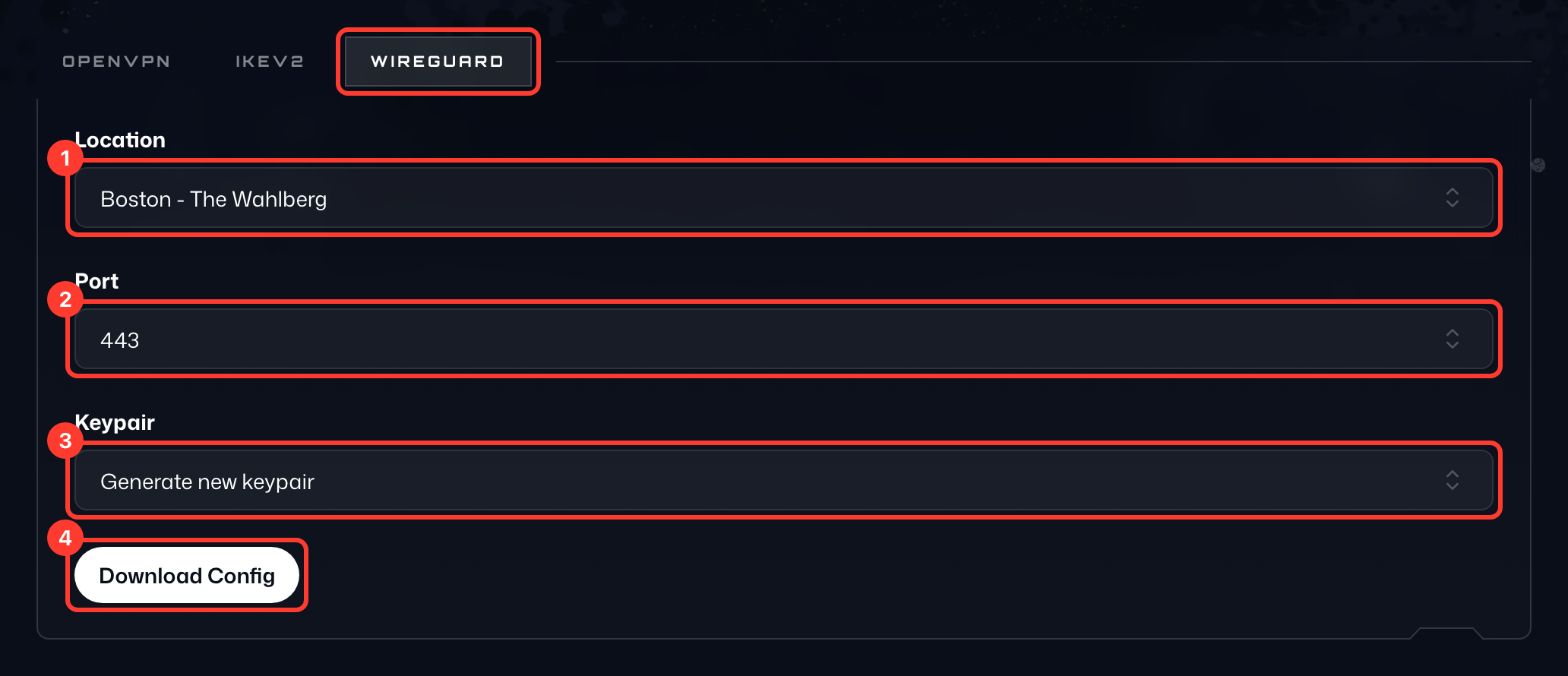
- Om de configuratie te krijgen, selecteer je eerst de Locatie (1) waarmee je verbinding wilt maken.
- Kies daarna een Poort (2); gebruik 443 als je het niet zeker weet.
- Laat bij Sleutelpaar (3) de optie Nieuw sleutelpaar genereren staan of kies een sleutelpaar dat je eerder hebt gegenereerd.
- Druk ten slotte op Config downloaden (4) om het WireGuard-configuratiebestand te krijgen. Je kunt dit bestand in een teksteditor openen om alle details te bekijken.
De sleutelparen die je hebt gegenereerd, staan in de kaart Gegenereerde sleutelparen (5) eronder, waar je ze kunt kopiëren of verwijderen.