Op welke waarde moet ik de MTU-grootte instellen?


Simpel gezegd is MTU of Maximum Transmission Unit de maximale hoeveelheid gegevens die in één pakket kan worden geplaatst. Met andere woorden, je kunt dit zien als de pakketgrootte.
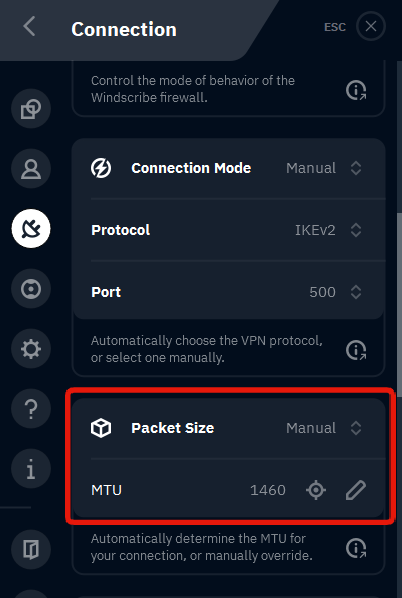
Normaal gesproken moet de MTU met rust worden gelaten, omdat de standaardinstellingen bijna altijd prima werken. Het wijzigen ervan kan verbindingen verbeteren op sommige netwerken die problemen hebben met grotere pakketten. Als je dit wilt wijzigen, kun je dat doen in de Windscribe-app door naar Voorkeuren > Verbinding > Pakketgrootte te gaan.
Hier kun je de instelling wijzigen naar Handmatig en vervolgens op het doelpictogram drukken om de app de ideale pakketgrootte voor je automatisch te laten detecteren. Of je kunt de pakketgrootte zelf invoeren door deze in te typen. Pakketgroottes liggen doorgaans in het bereik van 1300 tot 1500. Als je de jouwe wilt verlagen, probeer deze dan te verlagen in stappen van 50.