TCP-socket beëindiging


Een TCP-socket is een actieve verbinding tussen je computer en een webservice waarmee je interacteert. Het openhouden van TCP-sockets kan soms een probleem zijn, omdat de bestaande sockets na het verbinden met de VPN gekoppeld zijn aan je werkelijke IP-adres en niet aan het VPN IP-adres dat je zojuist bent gaan gebruiken, waardoor je problemen kunt ondervinden bij het gebruik van sites of services.
Daarom hebben we besloten een achtergrondfunctie toe te voegen aan de Windscribe-desktopapp die alle TCP-sockets sluit wanneer je verbinding maakt met de VPN, zodat ze correct opnieuw worden ingesteld op het VPN IP-adres.
Helaas verwerken sommige applicaties dit evenement niet correct. Wanneer Windscribe de TCP-socket van een verbinding sluit, kan de applicatie die de socket gebruikte een CPU-piek veroorzaken, wat op zijn beurt problemen kan veroorzaken bij het gebruik van je computer.
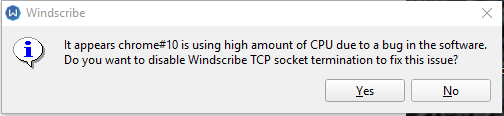
Om die reden hebben we de Windscribe-app bijgewerkt zodat de sockets nog steeds worden gesloten zoals voorheen, maar ook het CPU-gebruik wordt bewaakt om te controleren of er na een VPN-verbinding een significante piek is. Als dat gebeurt, verschijnt de onderstaande waarschuwing dat een applicatie of service op je pc een hoog CPU-gebruik heeft, mogelijk doordat we zijn TCP-socket hebben gesloten.
Met de waarschuwing kun je dit gedrag uitschakelen zodat er geen TCP-sockets worden gesloten bij het verbinden (houd er rekening mee dat dit een risico voor je privacy kan zijn). Je kunt dit ook uitschakelen onder Voorkeuren > Verbinding > Alle TCP-sockets na verbinding geforceerd sluiten