

Geen internet tenzij Windscribe aanstaat


De meest waarschijnlijke oorzaak van dit probleem is dat de Windscribe Firewall is ingeschakeld. Mogelijk heb je de Firewall per ongeluk aangezet of vergeten de Firewallmodus te wijzigen. Probeer de Firewallschakelaar uit te zetten en kijk of dit het probleem oplost:
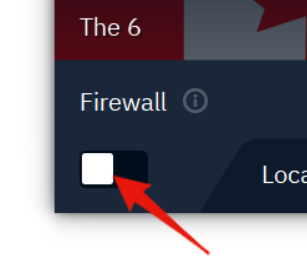
De Firewall wordt normaal gesproken automatisch in- en uitgeschakeld samen met de VPN-verbinding, maar je kunt de schakelaar ook zelf bedienen. Als dit het geval is, verlies je plotseling de connectiviteit tenzij je de Firewall uitschakelt of opnieuw verbinding maakt met de VPN. Dit geldt met name als je onze Altijd aan-firewallinstelling hebt geselecteerd.
Als je na het uitschakelen van de Firewall nog steeds geen verbinding hebt, probeer dan je computer opnieuw op te starten, omdat sommige achtergrondservices mogelijk niet goed functioneren.
Als een herstart niet helpt, probeer dan een volledige de-installatie en herinstallatie van de applicatie, met een systeemherstart tussenin. Dit zal waarschijnlijk alle problemen oplossen. Zorg er altijd voor dat je de firewall uitschakelt voordat je de applicatie verwijdert.
Als je nog steeds problemen hebt daarna, neem dan contact op met de support.
Voor meer informatie over onze firewall en de instellingen, bekijk deze geweldige uitlegvideo.