Een domein op de witte lijst plaatsen in R.O.B.E.R.T.

Winder S
Oct 20, 2025

U kunt elk domein in uw R.O.B.E.R.T.-instellingen toestaan (op de witte lijst plaatsen) of blokkeren. Log hiervoor in op onze website, open Mijn account, selecteer R.O.B.E.R.T. in de zijbalk en open vervolgens het tabblad Aangepaste regels (hier is een directe link naar die pagina).
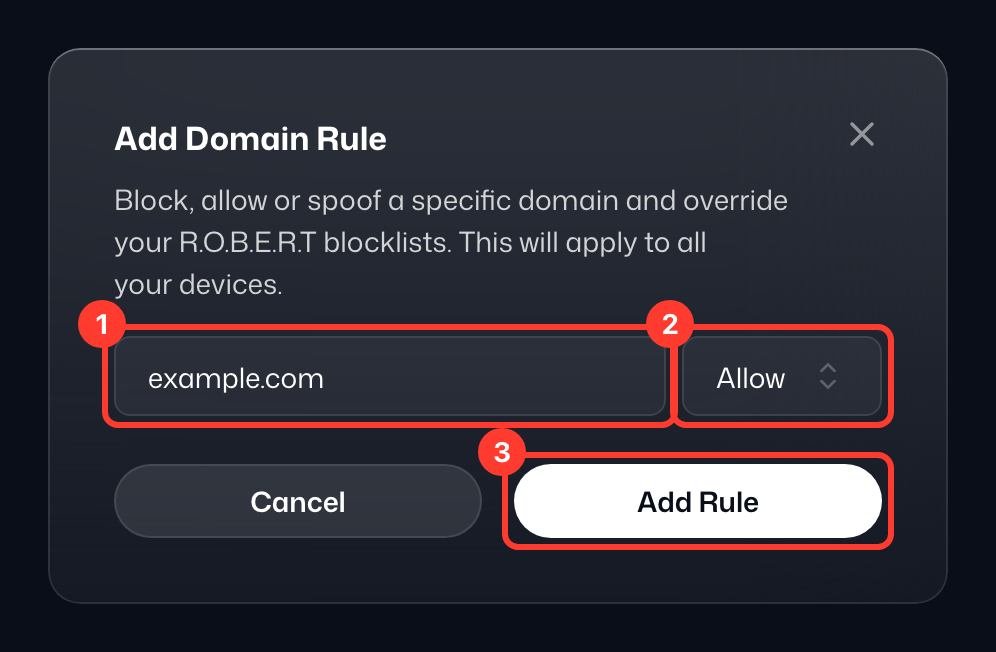
Blijf op het tabblad Aangepaste regels bij Domeinregels (kies IP-regels voor een IP-adres of netwerk) en klik op Domeinregel toevoegen. Voer daarna de volgende stappen uit:
- Voer het domein in dat u wilt toestaan (of blokkeren). In dit voorbeeld hebben we "example.com" ingevoerd.
- Open de vervolgkeuzelijst, die standaard op Blokkeren staat, en kies wat er moet gebeuren. In dit voorbeeld kiezen we Toestaan.
- Klik op Regel toevoegen om de regel op te slaan.