Een e-mailadres toevoegen aan uw Windscribe-account

Winder S
Oct 17, 2025

Wilt u een e-mailadres aan uw Windscribe-account toevoegen? Zo gaat u te werk:
- Log in op de Windscribe-website en open het tabblad Account van Mijn account
- Klik in de kaart Accountgegevens op Toevoegen in de rij E-mail (heeft uw account al een e-mailadres dat u wilt wijzigen, klik dan in plaats daarvan op Bewerken, het potloodpictogram)
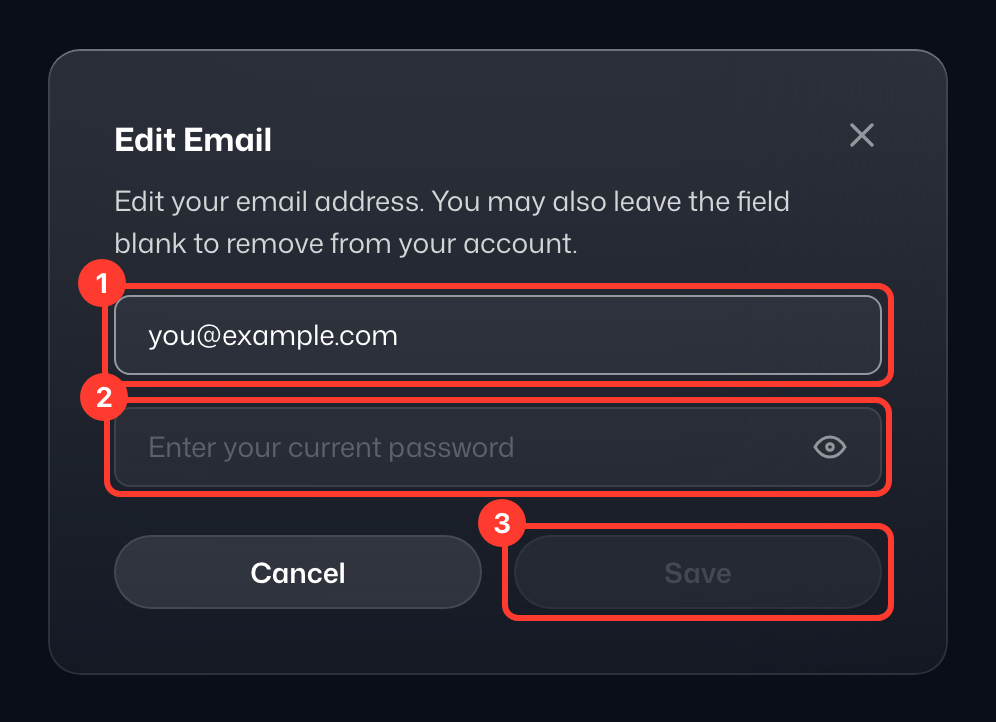
- Voer in het venster Voeg een e-mailadres toe onder Nieuw e-mailadres (1) het e-mailadres in dat u wilt gebruiken, bevestig het voor de veiligheid door uw wachtwoord in te vullen bij Huidig wachtwoord (2) en klik op Opslaan (3)
- Belangrijk: Controleer uw inbox en spammap op een e-mail met een bevestigingslink. Volg de instructies in die e-mail om het adres te bevestigen en u bent klaar. Tot die tijd staat het adres in de rij E-mail gemarkeerd als Onbevestigd; klik ernaast op Opnieuw verzenden als u een nieuwe bevestigingsmail nodig hebt.