Windscribe
FunctiesAbonnementenDownloadenInloggen
Windscribe
DownloadenWijzigingslogboekPrijzenShopOndersteuningFunctiesOpen sourceEen vriend uitnodigenGratis DNSEthiek en filosofieVPN-servers
Apps
VPN voor WindowsVPN voor AndroidVPN voor MacVPN voor LinuxVPN voor ChromeVPN voor FireTVVPN voor FirefoxVPN voor Apple TVVPN voor MS EdgeVPN voor HuaweiVPN voor iPhoneVPN voor routersWindscribe F-Droid
Bedrijf
Over onsPrivacyVoorwaardenVDPVacaturesBlogInfoGang
Windscribe logo
YouTube
Reddit
Discord
X
Telegram
Instagram
TikTok
© 2026 Windscribe Limited
How to enable/disable notifications from the Windscribe desktop app?
Author
Winder S
Oct 20, 2025
Divider
Help
>
Guides

The Windscribe app will send you notifications when the VPN connects or disconnects. This is quite useful in cases where the VPN might disconnect unexpectedly, and gives you a chance to open the app and reconnect.

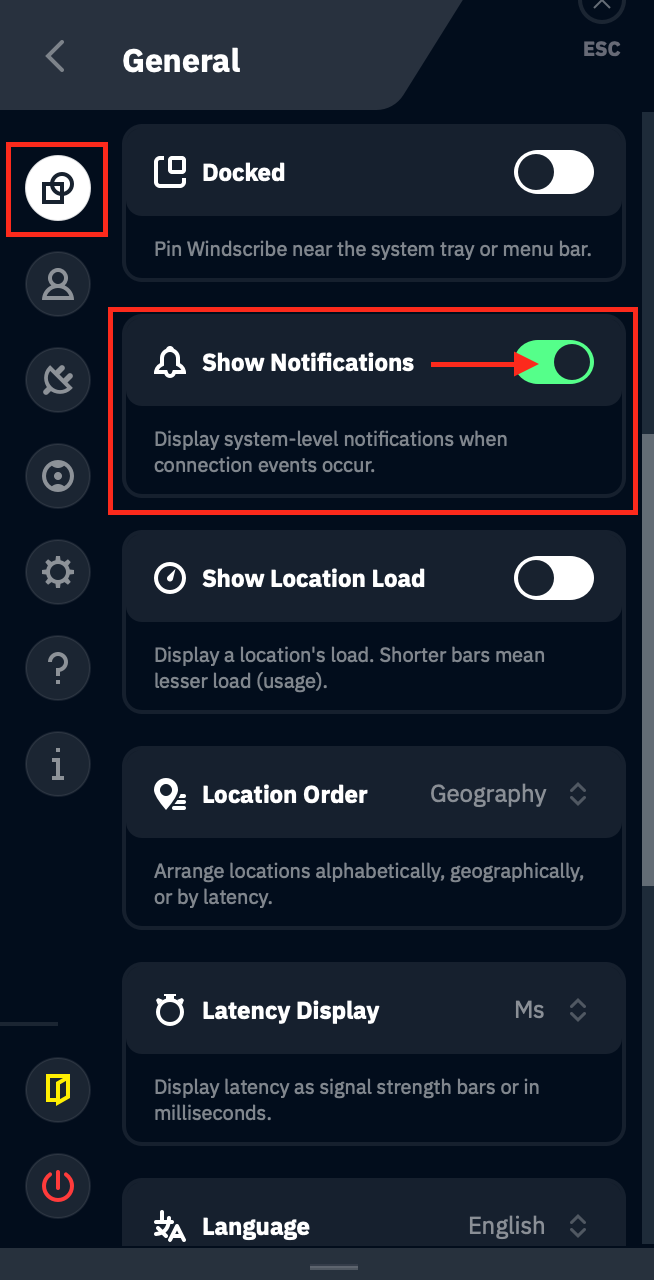
You can turn the notifications on or off in your Windscribe app by opening the Preferences menu, going to General, scrolling down to Show Notifications and turning the toggle to on/off:

Disable notifications toggle location

Get in touch

r/Windscribe

Find solutions, discuss ideas and share your feelings on our subreddit.

Discord

Join the discussion with our active community and make real friends!

Contact Support

Feeling completely lost? Contact Support.