Windscribe
FunctiesAbonnementenDownloadenInloggen
Windscribe
DownloadenWijzigingslogboekPrijzenShopOndersteuningStatusFunctiesOpen sourceEen vriend uitnodigenGratis DNSEthiek en filosofieVPN-servers
Apps
VPN voor WindowsVPN voor AndroidVPN voor MacVPN voor LinuxVPN voor ChromeVPN voor FireTVVPN voor FirefoxVPN voor Apple TVVPN voor MS EdgeVPN voor HuaweiVPN voor iPhoneVPN voor routersWindscribe F-Droid
Bedrijf
Over onsPrivacyVoorwaardenVDPVacaturesBlogInfoGang
Windscribe logo
YouTube
Reddit
Discord
Twitter
Telegram
Instagram
TikTok
© 2026 Windscribe Limited
How do I turn off adblock in the Windscribe extension?
Author
Winder S
Nov 4, 2025
Divider
Help
>
Technical Issues

Turning off the AdBlocker in our extension is very easy.

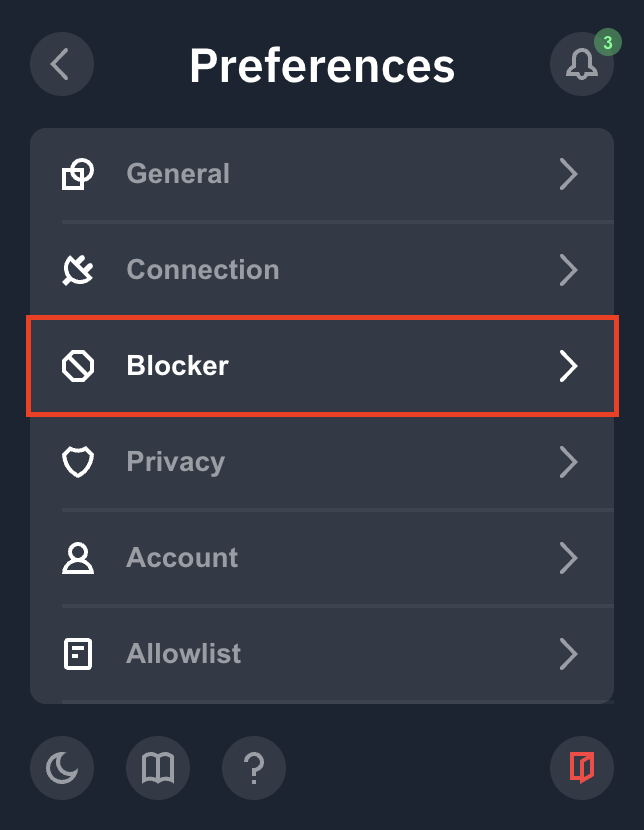
First step, go to the extension and click open Preferences (burger menu in top-left corner)

Preference menu

Second, scroll down the menu options and click "Blocker"

Blocker Settings

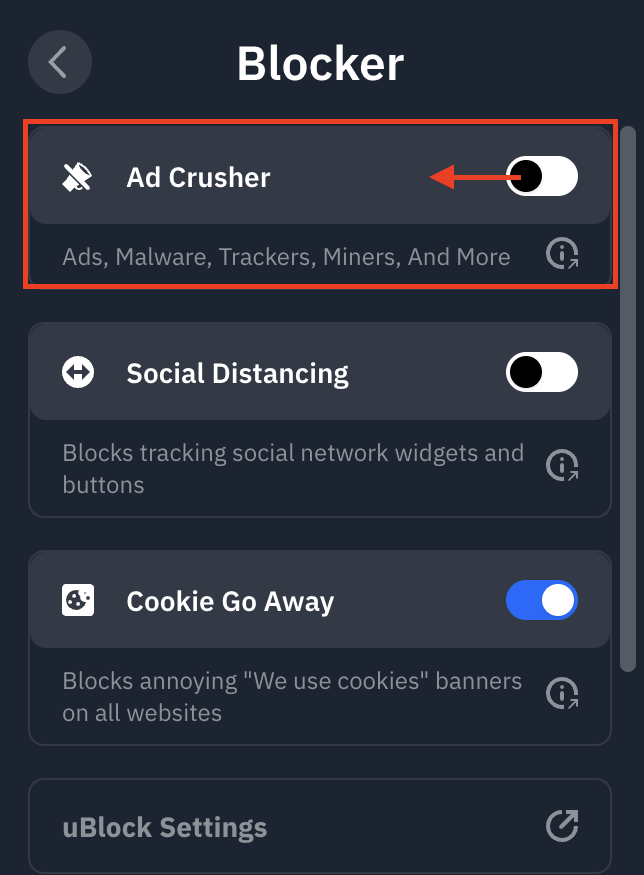
Lastly, toggle off the Ad Crusher option to disable it and just refresh your page
(the white toggle seen here is in the off position; a blue toggle indicates the on position)

Ad Crusher Toggle

And you're all set! If you want, you can disable the Tracker Eradicator and Malware Evader toggles as well if you don't want any domain filtering at all. 

Get in touch

r/Windscribe

Find solutions, discuss ideas and share your feelings on our subreddit.

Discord

Join the discussion with our active community and make real friends!

Contact Support

Feeling completely lost? Contact Support.