

Où puis-je accéder à mes configurations WireGuard ?

Winder S
Feb 25, 2026

Une fois connecté à votre compte sur notre site, vous pouvez télécharger vos configurations WireGuard dans l’onglet Générateur de configuration de Mon compte.
Les configurations WireGuard sont réservées aux utilisateurs ayant un compte payant. Avec un compte Pro, vous avez accès aux configurations WireGuard de tous les emplacements.
Avec un compte Build-a-Plan, vous n’avez accès qu’aux configurations WireGuard de vos emplacements payés.
Ouvrez l’onglet WireGuard de la carte.
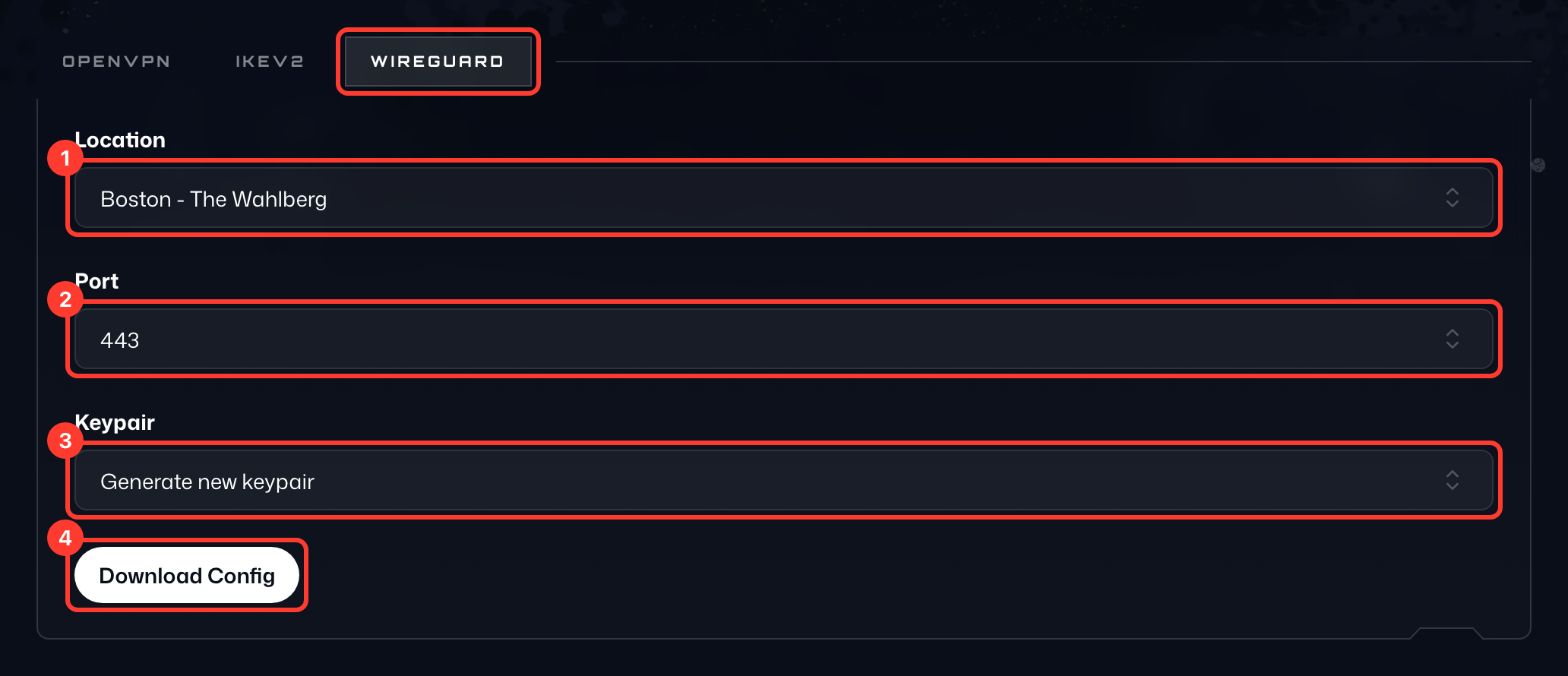
- Pour obtenir la configuration, sélectionnez d’abord l’Emplacement (1) auquel vous voulez vous connecter.
- Choisissez ensuite un Port (2) ; utilisez 443 en cas de doute.
- Sous Paire de clés (3), gardez Générer une nouvelle paire de clés ou choisissez une paire de clés générée précédemment.
- Enfin, appuyez sur Télécharger la config (4) pour obtenir le fichier de configuration WireGuard. Vous pouvez ouvrir ce fichier dans un éditeur de texte pour voir tous les détails.
Les paires de clés que vous avez générées sont listées dans la carte Paires de clés générées (5) en dessous, où vous pouvez les copier ou les supprimer.