

Où puis-je accéder à mes identifiants OpenVPN ?

Winder S
Feb 25, 2026

Vous pouvez obtenir vos identifiants OpenVPN dans l’onglet Générateur de configuration de Mon compte. Vous devez être connecté à votre compte et avoir un forfait payant (Pro ou Build-a-Plan) pour l’utiliser.
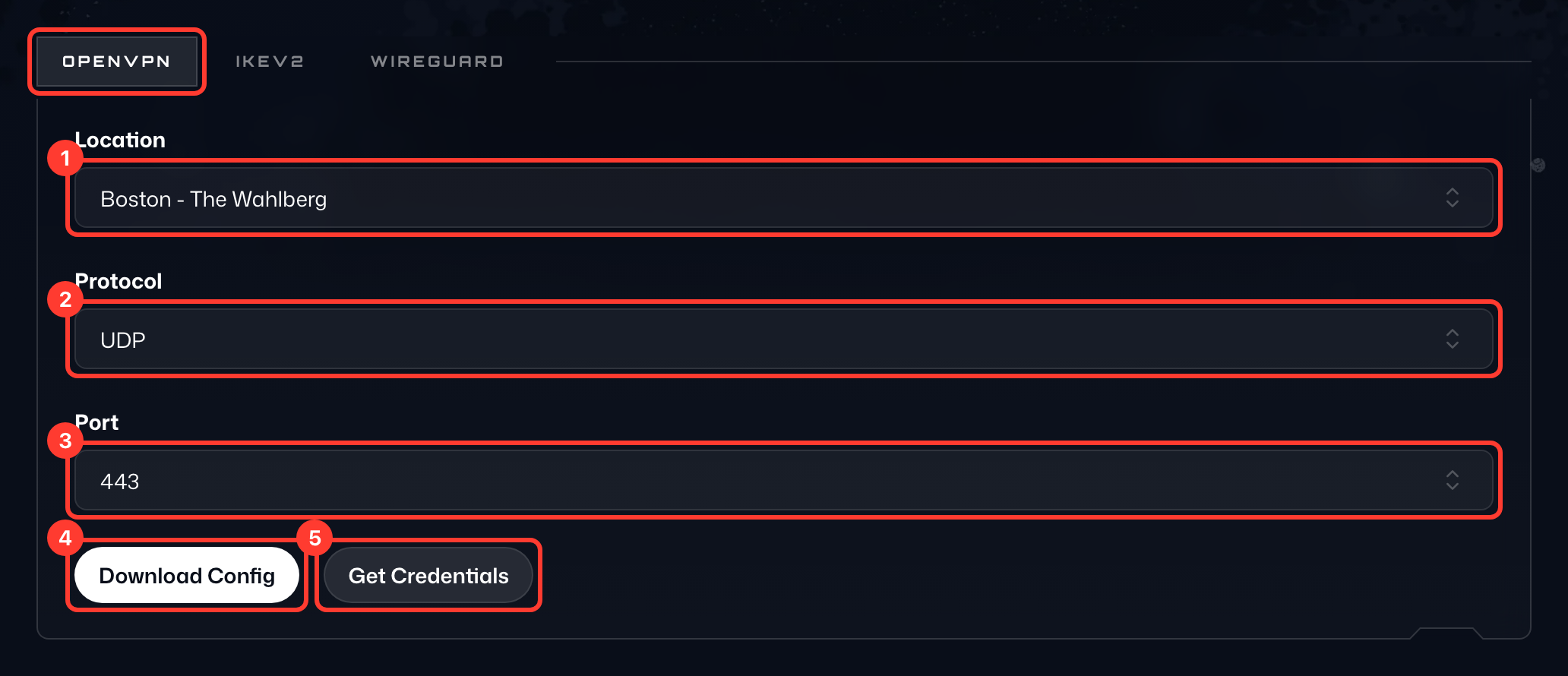
Ouvrez l’onglet OpenVPN de la carte, puis :
- Sélectionnez l’Emplacement (1) de votre choix dans la liste déroulante. Si vous choisissez l’une de vos IP statiques, sélectionnez aussi son Appareil.
- Sélectionnez votre Protocole (2), UDP ou TCP.
- Sélectionnez votre Port (3) ; utilisez 443 en cas de doute.
- Appuyez sur Télécharger la config (4) pour enregistrer la configuration sur votre appareil.
- Appuyez sur Obtenir les identifiants (5) pour afficher le Nom d’utilisateur et le Mot de passe (6) de la connexion sous les boutons. Ce ne sont pas ceux que vous utilisez pour vous connecter à Windscribe.