Quelle taille MTU dois-je configurer ?


En termes simples, le MTU ou Unité maximale de transmission est la quantité maximale de données pouvant être placée dans un seul paquet. En d'autres termes, vous pouvez le considérer comme la taille des paquets.
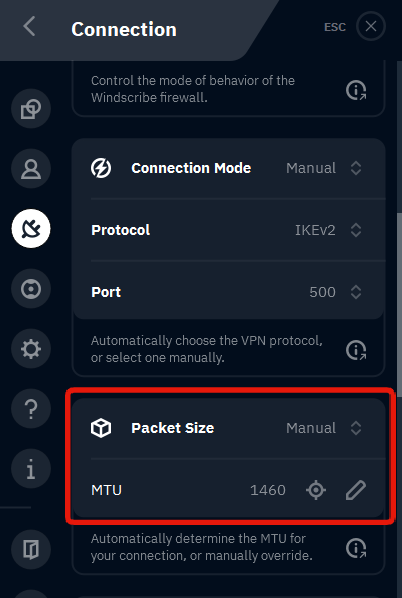
En règle générale, le MTU doit être laissé tel quel, car les paramètres par défaut fonctionnent presque toujours bien. Le modifier pourrait améliorer les connexions sur certains réseaux ayant des problèmes avec des paquets plus volumineux. Si vous souhaitez modifier cela, vous pouvez le faire dans l'application Windscribe en allant dans Préférences > Connexion > Taille des paquets.
Ici, vous pouvez changer le paramètre sur Manuel, puis appuyer sur l'icône cible pour que l'application tente de détecter automatiquement la taille de paquet idéale pour vous. Ou vous pouvez saisir vous-même la taille des paquets en la tapant. Les tailles de paquets sont généralement comprises entre 1300 et 1500. Si vous souhaitez réduire le vôtre, essayez de le diminuer par incréments de 50.