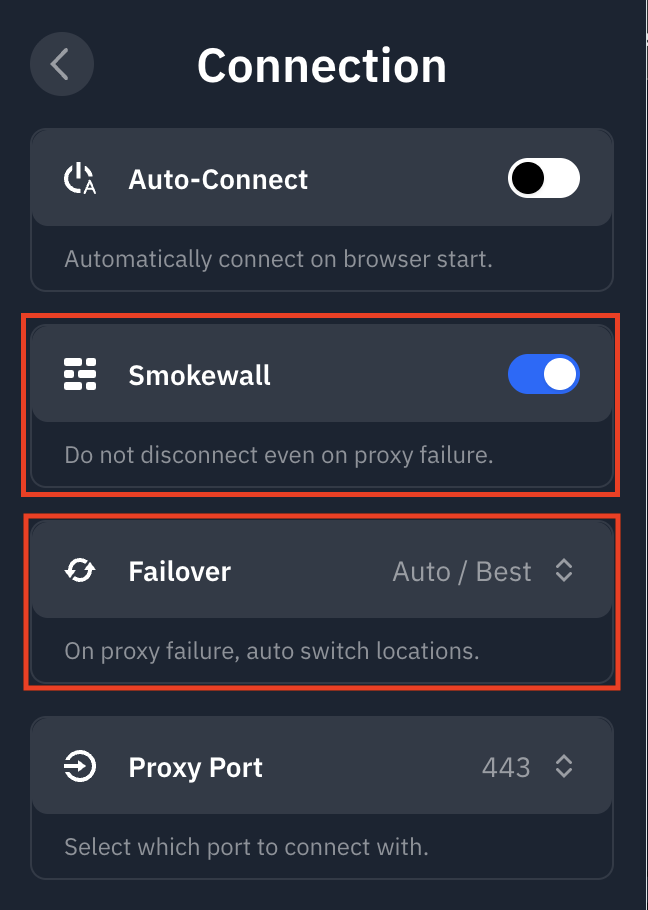
Qu'est-ce que la fonctionnalité Smokewall dans l'extension Windscribe ?


Comme l'extension de navigateur ne peut contrôler que le trafic entrant/sortant dans le navigateur, elle ne peut pas prendre en charge un pare-feu au sens traditionnel.
Notre fonctionnalité Smokewall est une alternative réservée au navigateur qui refusera essentiellement tout le trafic entrant/sortant du navigateur si vous êtes déconnecté de l'emplacement proxy Windscribe choisi pour quelque raison que ce soit. De plus, le paramètre Failover vous permet de choisir quel sera votre emplacement de secours en cas de déconnexion, vous offrant ainsi une flexibilité supplémentaire.
Si la fonctionnalité Smokewall est désactivée, en cas de déconnexion du proxy Windscribe, l'extension se désactivera et le navigateur repassera à l'IP de votre système. Si vous avez également un VPN de bureau actif à ce moment-là, ce sera votre IP VPN ; sinon, votre IP fournie par votre FAI sera utilisée jusqu'à ce que vous vous reconnectiez à un emplacement dans l'extension.
Les options Smokewall et Failover se trouvent en ouvrant l'extension et en allant dans Préférences > Connexion :