

Qu'est-ce que « Cookie Go Away » dans l'extension navigateur ?


La fonctionnalité Cookie Go Away de l'extension navigateur Windscribe bloque toutes ces banderoles agaçantes « Nous utilisons des cookies » sur les sites que vous visitez.
Vous pouvez accéder à cette fonctionnalité dans l'extension en ouvrant le menu Bloqueur depuis le coin supérieur droit de l'interface principale de l'extension, puis en faisant défiler vers le bas pour trouver Cookie Go Away. 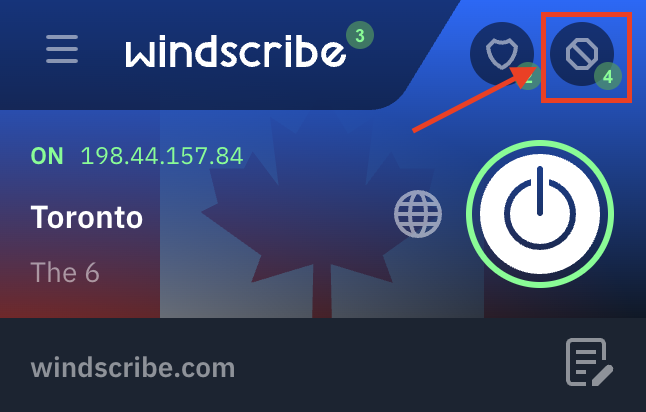
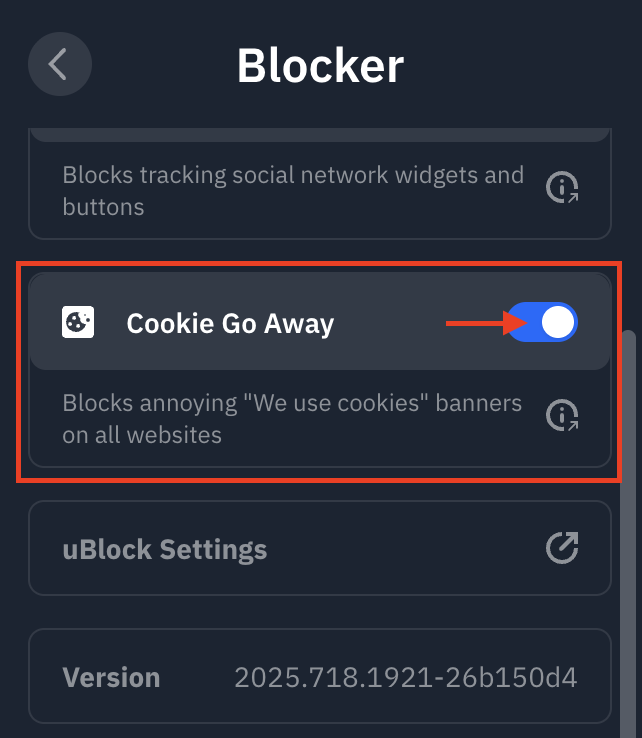
Le bouton bascule apparaîtra en bleu lorsque cette fonctionnalité est activée.
Rassurez-vous, nous ne disons pas secrètement « Oui » à tous les cookies. Cette fonctionnalité active une liste de filtres (en utilisant l'utilitaire uBlock intégré dans l'extension Windscribe) qui bloque/supprime les popups de cookies connus, de sorte que la requête n'est tout simplement jamais émise par les pages que vous consultez.
Cookie Go Away n'est qu'une des nombreuses fonctionnalités de confidentialité disponibles dans notre Windscribe VPN pour Chrome, conçu pour vous donner un contrôle total sur votre expérience de navigation.