Comment mettre un domaine en liste blanche dans R.O.B.E.R.T.

Winder S
Oct 20, 2025

Vous pouvez autoriser (mettre en liste blanche) ou bloquer n'importe quel domaine dans vos paramètres R.O.B.E.R.T. Pour y accéder, connectez-vous sur notre site web, ouvrez Mon compte, sélectionnez Sécurité dans la barre latérale, puis ouvrez Règles personnalisées (voici un lien direct vers cette page).
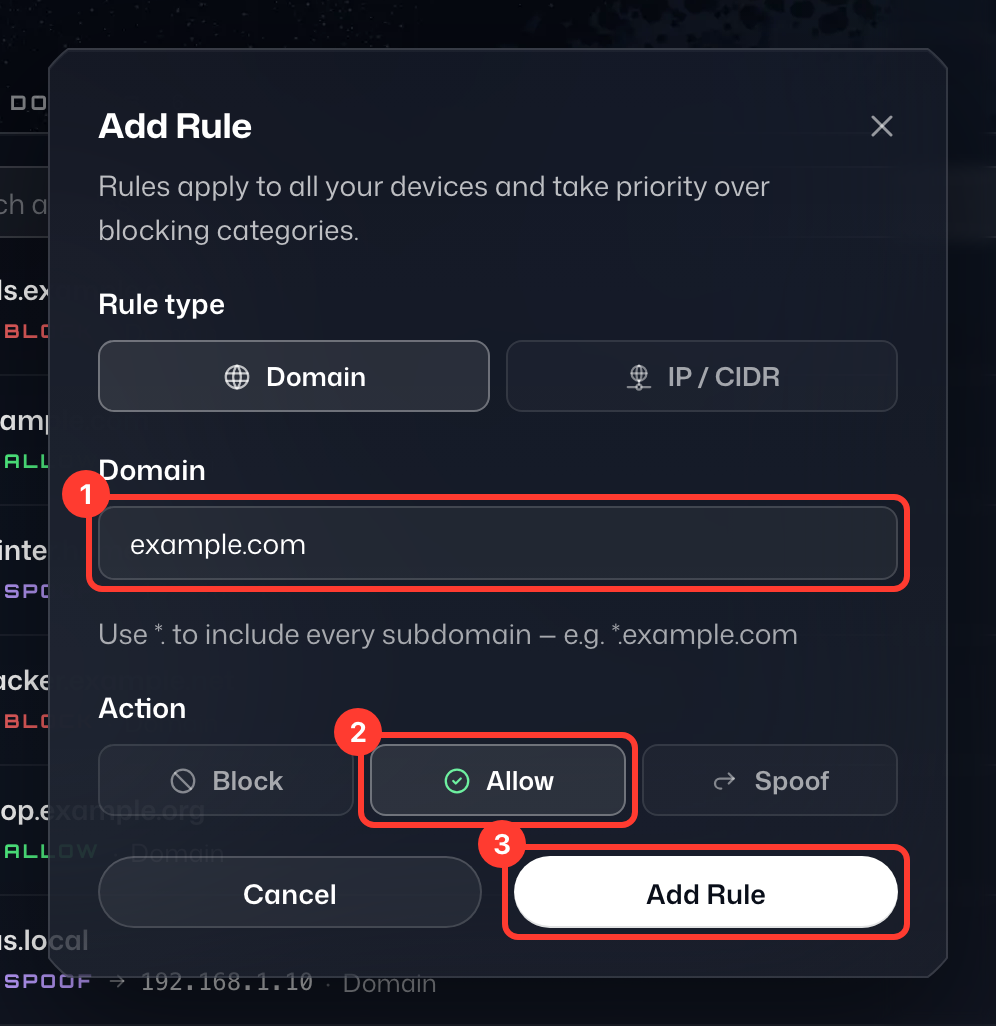
Sur la page Règles personnalisées, cliquez sur Ajouter une règle et laissez le Type de règle sur Domaine (choisissez IP / CIDR pour une adresse IP ou un réseau). Suivez ensuite ces étapes :
- Saisissez le domaine que vous souhaitez autoriser (ou bloquer). Dans cet exemple, nous avons saisi « example.com ».
- Sous Action, réglée par défaut sur Bloquer, choisissez le comportement souhaité. Dans cet exemple, nous sélectionnerions Autoriser.
- Cliquez sur Ajouter une règle pour enregistrer la règle.