

Comment configurer l'épinglage d'IP

Rebecca Rosenberg
Nov 26, 2025

L'épinglage d'IP vous permet de vous connecter à la même adresse IP à chaque fois que vous vous connectez à un emplacement spécifique. C'est utile pour les services qui n'apprécient pas les nouvelles IP à chaque session, comme les services bancaires en ligne ou les tableaux de bord professionnels.
Remarque : cette fonctionnalité est réservée aux utilisateurs Pro et aux utilisateurs de Build A Plan (emplacements payants uniquement)
Comment l'activer dans l'application :
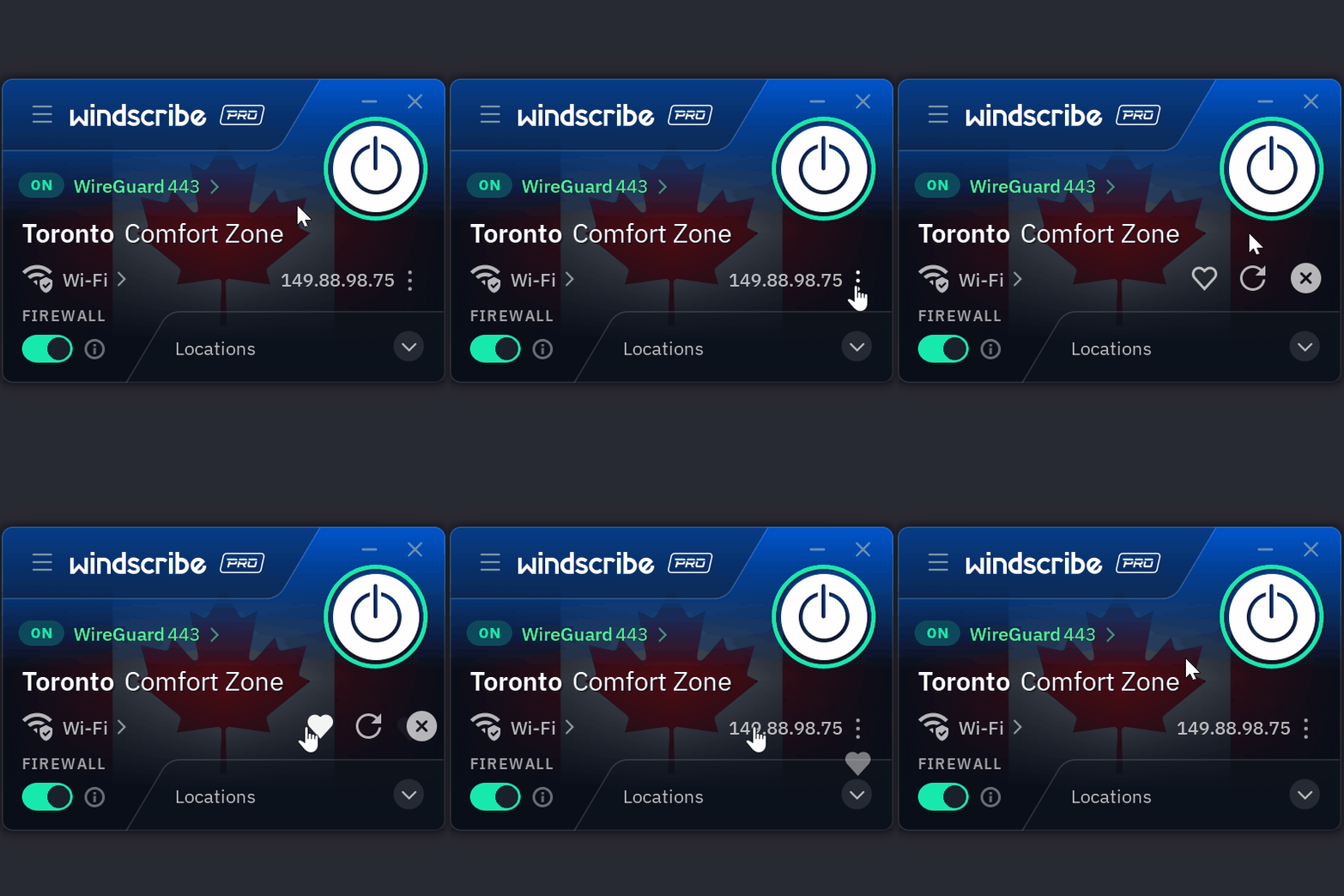
- Lorsque vous êtes connecté dans l'application Windscribe, cliquez sur les trois points à côté de votre IP connectée
- Cliquez sur l'icône Cœur
- Votre IP est maintenant épinglée
Windscribe fera de son mieux pour vous reconnecter à cette même IP à chaque fois.
Vous voulez plus de détails ? Lisez l'article de blog complet ici.
Avertissement : les IP épinglées sont en mode meilleur effort. Si l'IP est retirée, vous devrez en choisir une nouvelle.