Comment ajouter une adresse e-mail à votre compte Windscribe

Winder S
Oct 17, 2025

Si vous souhaitez ajouter une adresse e-mail à votre compte Windscribe, voici les étapes à suivre :
- Connectez-vous au site Windscribe et ouvrez l'onglet Compte de Mon compte
- Dans la carte Informations du compte, cliquez sur Ajouter dans la ligne E-mail (si votre compte a déjà une adresse e-mail que vous souhaitez changer, cliquez plutôt sur Modifier, l'icône en forme de crayon)
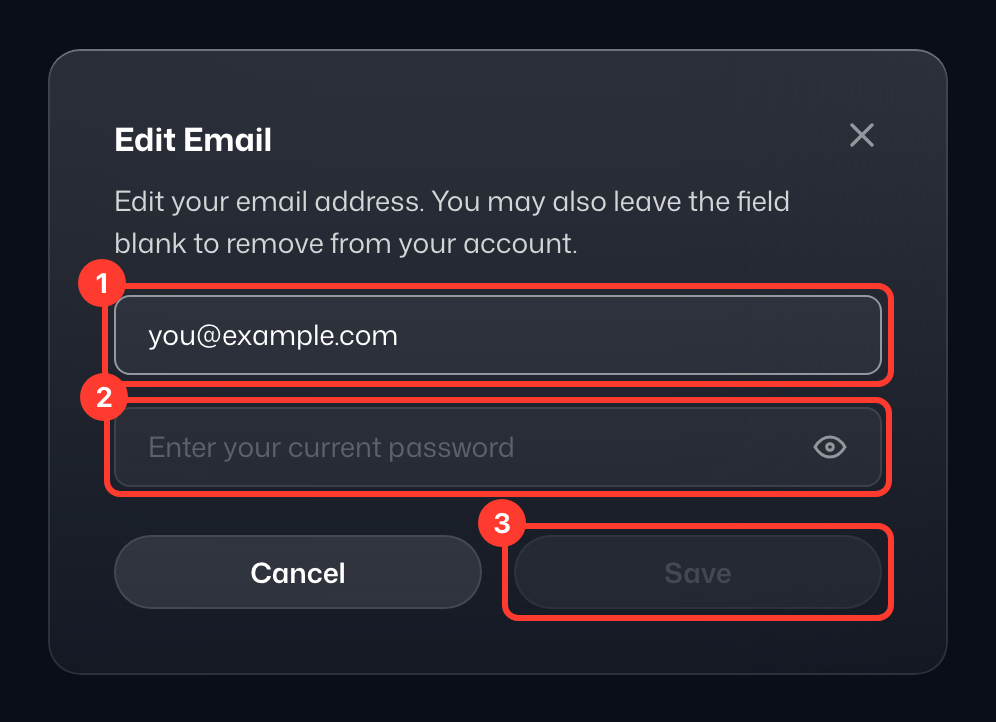
- Dans la fenêtre Ajouter une adresse e-mail, saisissez l'adresse e-mail que vous souhaitez utiliser sous Nouvelle adresse e-mail (1), confirmez-la en saisissant votre Mot de passe actuel (2) par sécurité, puis cliquez sur Enregistrer (3)
- Important : consultez votre boîte de réception et votre dossier de spam pour trouver un e-mail contenant un lien de confirmation. Suivez les instructions de cet e-mail pour confirmer l'adresse, et le tour est joué. En attendant, la ligne E-mail affiche la mention Non confirmé ; cliquez sur Renvoyer à côté si vous avez besoin d'un nouvel e-mail de confirmation.