

Quelle est la différence entre les modes de Pare-feu ?


Pour une aide visuelle approfondie afin de comprendre comment fonctionne notre pare-feu, regardez cette excellente vidéo explicative que nous avons créée. Si vous préférez lire, continuez ci-dessous !
La fonction Pare-feu est l'un des composants clés de l'application de bureau sur Windows et Mac. Elle vous permet d'ajouter une couche de protection supplémentaire à votre connexion VPN afin d'éviter toute fuite accidentelle de votre IP personnelle.
Vous pouvez trouver les paramètres du pare-feu dans Préférences > Connexion > Mode Pare-feu.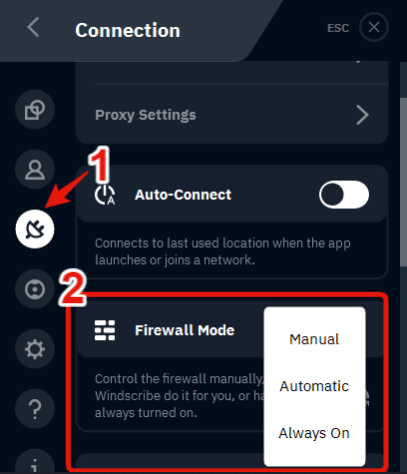
Les trois modes sont :
Automatique
Cela activera le pare-feu lorsque vous vous connectez à un emplacement Windscribe et le désactivera lorsque vous vous déconnectez. Il maintient votre connexion sécurisée en désactivant votre connectivité internet si l'application Windscribe plante de manière inattendue ou si la connexion au serveur VPN est interrompue. Vous pouvez également sélectionner une préférence pour que le pare-feu s'active Avant la Connexion ou Après la Connexion aux serveurs de Windscribe.
Manuel
Cela vous donne un contrôle total sur le moment où vous souhaitez activer et désactiver le pare-feu. Gardez à l'esprit que si vous l'activez vous-même, vous n'avez internet que lorsque vous êtes connecté au VPN ou jusqu'à ce que vous désactiviez le pare-feu. La fermeture de l'application désactivera le pare-feu, mais seulement si vous la fermez vous-même, pas si elle plante.
Toujours actif
Cela limitera entièrement votre internet à l'utilisation du VPN, avec ou sans l'application Windscribe en cours d'exécution. Votre connexion internet sera complètement désactivée jusqu'à ce que vous vous connectiez à un emplacement VPN. Si l'application plante ou que vous la quittez entièrement, vous n'aurez pas internet jusqu'à ce que vous vous reconnectiez à un serveur Windscribe. Même si votre ordinateur redémarre complètement, il n'y aura aucune connectivité car le pare-feu fonctionne au niveau du système d'exploitation. C'est le mode le plus sécurisé et ne devrait jamais révéler votre vraie IP s'il est activé.