




But when should you use one over the other, and, perhaps most importantly, when should you use both? In this guide, we’ll break down the technical trade-offs and show you the best solution to the Smart DNS vs. VPN problem.
What Is Smart DNS and How Does It Work?
Every domain you access on the internet has a name, but those names only make sense to you. On the internet side of things, these names are translated into numbers (IP addresses). That’s what the Domain Name System (DNS) is.
It’s the internet's phonebook, translating a name like funnycats.com into a numerical address like 192.168.1.1 (those are completely made up, by the way).
A Smart DNS is a specialized version of this system. While a standard DNS simply tells you where a website is, a Smart DNS is smart because it knows how to spot requests for specific streaming services and reroute them.
How Does DNS Redirection Bypass Geo-Restrictions
Let’s assume you’re trying to access Netflix. When you type netflix.com into your browser, a DNS returns the IP address of Netflix’s servers and redirects you to the site.
On the other side, your ISP assigns you default DNS servers that can see every site you try to access.
This means two things: the ISP knows exactly which site you’re trying to reach, and the site knows your IP address, which reveals your physical location.
Smart DNS changes this by intercepting those specific DNS requests (to streaming services, specifically) and routing them through proxy servers in another country, which tricks the site into thinking you are accessing it from somewhere else. If you're trying to place this on the wider map, we've compared DNS proxy vs a VPN head to head.
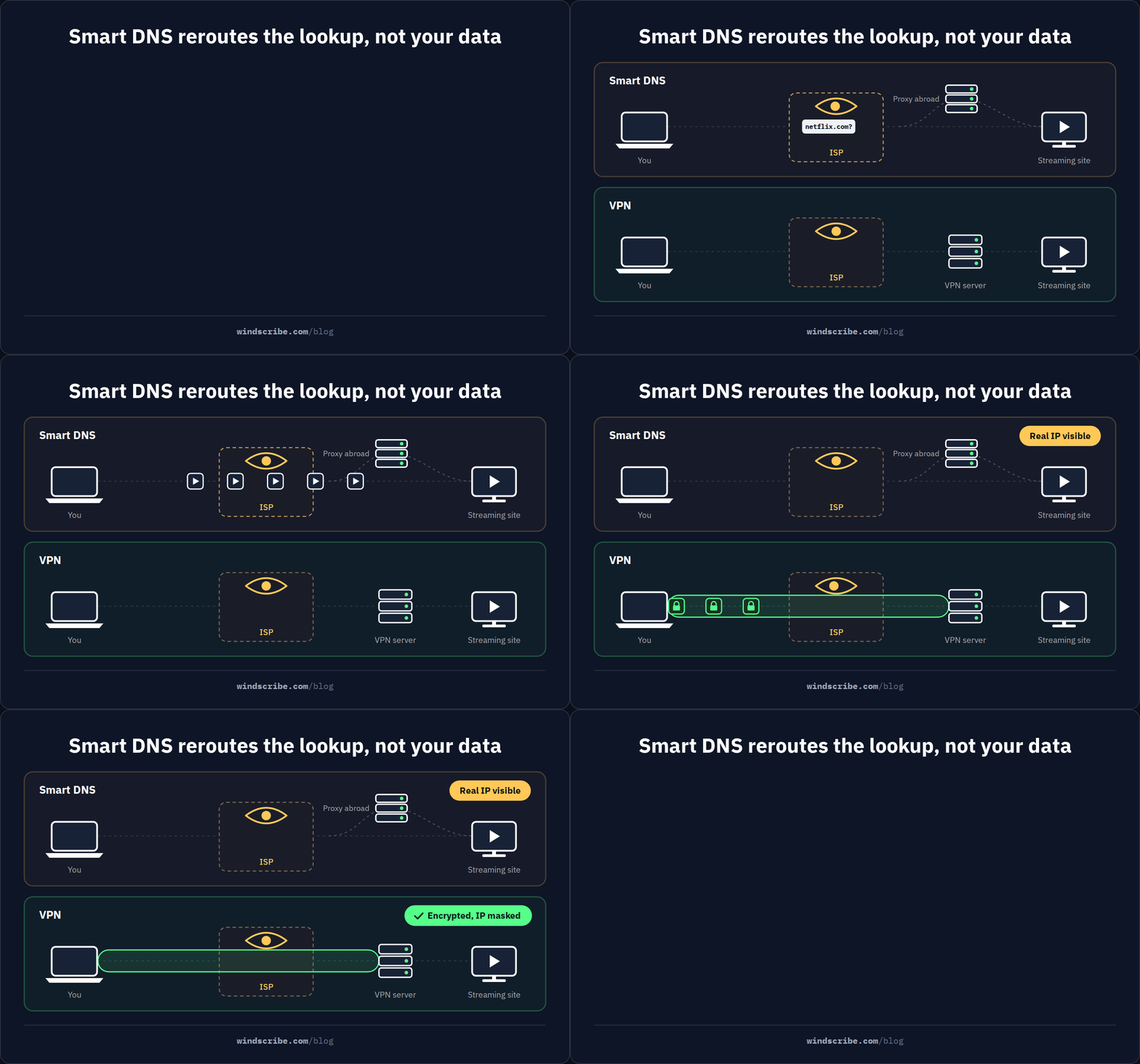
Smart DNS only redirects the DNS query portion of your connection. Your actual data traffic, such as video streams, downloads, and uploads, still travels directly between your device and the content server without any detour.
This is why Smart DNS has virtually zero speed impact: it doesn’t reroute or encrypt your actual data, it just handles the digital handshake to get you through the door.
What Smart DNS Does NOT Do
Unlike a VPN (we’ll get to that in a minute), smart DNS doesn’t encrypt any of your traffic, whether it's the data moving between you and a website or the traffic from the apps on your computer.
No encryption means that your ISP, network administrator, and anyone on the same Wi-Fi network can still see what you’re doing online. No encryption also means that your data is exposed on public networks.
What’s more, smart DNS doesn’t mask your IP, so it stays visible to every website and service you visit.
Because your ISP can see both your real IP and the unencrypted traffic passing through your device, they can still easily categorize and throttle certain types of data, like streaming or gaming, whenever they see fit.
Also, if you’re planning on using smart DNS to unblock a few streaming sites, keep in mind that many traditional Smart DNS services only support a fixed list of streaming platforms. If the service you want is not on their list, a standard Smart DNS simply won’t be able to help you.

What Is a VPN and How Does It Work?
A VPN (Virtual Private Network) creates a secure, encrypted tunnel between your device and a private server. It also hides your IP address and scrambles all your data, protecting everything from your browser to your apps. But, how does a VPN differ from Smart DNS, specifically?
Full-Tunnel Encryption vs DNS-Only Redirection
The fundamental difference between these two tools lies in how much of your data they actually handle.
Smart DNS is surgical. It only touches the DNS queries, aka the address requests, required to trick a streaming service into thinking you’re in a different region. Everything else, like your actual video data and personal information, travels out in the open.
A VPN, by contrast, uses a full-tunnel approach. This means every single bit of data leaving your device, from your web browser and email client to your background apps, is wrapped in a layer of heavy-duty encryption and sent through a private tunnel.
VPN Advantages Over Smart DNS
With a VPN, all of your traffic is encrypted, and your IP is effectively masked.
This means that your ISP, websites, apps, and even third parties snooping on the internet cannot see where you’re browsing from, where your traffic is headed, or the data that’s passing through the tunnel. And because your ISP cannot see anything, they cannot selectively slow down your streaming or gaming traffic.
Because of this full-tunnel encryption, a VPN also protects you on public networks, which are often unsecured. And yes, most sites and apps you access use HTTPS, but that’s not enough to protect your data from metadata leaks or sophisticated Man-in-the-Middle attacks that can still see which domains you’re visiting. Without a VPN, none of that deep-level privacy exists, even if you have a smart DNS service enabled.
On top of that, a VPN can also change your IP address to a country or city of your choice. At Windscribe, for instance, we have servers in 69+ countries and 115+ cities.
This gives you the ability to virtually teleport anywhere and bypass geo-blocks. So, if you want to watch Netflix Germany from Toronto, you can, just like you can with a Smart DNS, but with the added benefit of knowing your actual identity is hidden behind encryption and a different IP address.
VPN Tradeoffs
While a VPN is the heavy-duty option for privacy, it does come with a couple of practical hurdles. The first is speed overhead. Because a VPN has to scramble and unscramble every single packet of data you send, it requires some processing power.
In the past, this could lead to significant lag, but modern protocols like WireGuard have changed the game, minimizing this impact to just 5-15% in most cases, which is so small a speed difference that most users won't even notice it while streaming or gaming.
The second tradeoff is device compatibility. A VPN is an app, and some devices, like certain Smart TVs, older Roku boxes, or gaming consoles, don't allow you to install third-party apps. You can get around this by installing a VPN on your router to cover the whole house, but that can be a technical headache for some.
This is exactly where Smart DNS fills the gap for those specific devices by allowing you to bypass geo-blocks without needing to install an app at all.
Smart DNS vs VPN: Full Comparison
By now, you should have a pretty good idea of which weapon fits your current needs. But if you’re still torn between the surgical speed of a Smart DNS and the full-armor protection of a VPN, we’ve laid it all out below.
| Feature | Smart DNS | VPN |
|---|---|---|
| Encryption | None. Traffic is unencrypted. | Full encryption of all device traffic (AES-256 or ChaCha20 with WireGuard). |
| IP address masking | No. Your real IP is visible. | Yes. VPN server's IP replaces yours. |
| Speed impact | Near zero. Only DNS queries are redirected. | 5-15% with modern protocols (WireGuard). |
| Geo-unblocking | Supported streaming services only (platform list varies by provider). | Any service. Change your IP to another country. |
| Streaming detection | Increasingly detected. Netflix began flagging Smart DNS in late 2025. | More reliable. IP change matches DNS, so no mismatch to detect. |
| Device compatibility | Any device with DNS settings (Smart TVs, consoles, routers). No app needed. | Requires app or router config. Some devices cannot install VPN apps. |
| Public Wi-Fi security | None. Traffic is fully exposed. | Full protection. All traffic is encrypted. |
| ISP throttling | Not prevented. ISP can see and throttle traffic. | Prevented. ISP cannot see the traffic. |
| Setup complexity | Simple. Change the DNS address in device settings. | Simple on supported devices (install app, connect). Router setup is more complex. |
| Gaming latency | No impact on gameplay ping. Only the DNS lookup is affected. | Adds 5-15ms with WireGuard. Also prevents ISP throttling and DDoS attacks. |
| Ad/tracker blocking | Some modern DNS services (e.g., Control D) offer this. Traditional Smart DNS does not. | Some VPNs offer this (e.g., Windscribe R.O.B.E.R.T.). Not universal. |
| Typical cost | $2-5/mo standalone. Free options exist but are limited. | $2-12/mo depending on plan and provider. |
Smart DNS Is Getting Detected by Streaming Services
Even though Smart DNS is literally built to help you unblock streaming libraries from other countries, its success is never guaranteed. In fact, as of late, those success stories are becoming less frequent.
Let’s face it: streaming services do not want you to bypass their restrictions. They’re implementing increasingly advanced detection methods to keep you within your borders.
Typically, they catch a Smart DNS by checking for DNS/IP mismatches. If your DNS resolution says you’re in the US, but your actual IP address (which Smart DNS doesn’t change) says you are in London, the platform flags the inconsistency and blocks your access immediately.
In late 2025, Netflix began a massive campaign to flag Smart DNS traffic originating from European servers. Many users reported suddenly losing access to their favorite US libraries without having changed a single thing in their setup.
HBO Max and Paramount+ have followed suit with their own mismatch detection, and BBC iPlayer has been notoriously aggressive for years.
With a VPN, you’re much more likely to succeed at bypassing these blocks. Because a VPN masks your actual IP address and replaces it with the server's, your DNS and your IP finally point to the same country. There’s no mismatch for the platform to detect.
This does not mean VPNs are 100% immune to detection, as platforms still try to block known VPN IP ranges. But the mechanism is fundamentally harder for them to enforce.
Smart DNS vs VPN for Gaming
If you’re a gamer, you’ve probably seen the pitch: “Use our Smart DNS for lower ping” or “Boost your gaming speeds.” Sounds nice, but that’s not really how it works.
The trick is understanding the difference between DNS resolution latency and gameplay latency. DNS resolution is the time it takes your device to look up a game server’s IP address from its name. That happens once, when you click “Join Game.”
A Smart DNS might shave a few milliseconds off that step, but once you’re in the match, DNS is out of the picture. Your real gameplay latency, the ping that decides whether your shot lands or whiffs, comes down to physical distance from the server, your ISP’s routing, and network congestion. Smart DNS doesn’t lower gameplay ping. It simply cannot.
So where does a VPN come in? Gamers used to avoid VPNs because older protocols added noticeable lag. Modern options like WireGuard have cut that overhead down to roughly 5-15ms. For a top-tier Counter-Strike sweatlord, that might matter. For almost everyone else, it’s barely noticeable.
And unlike Smart DNS, a VPN can improve your gaming experience in other ways. It can hide your traffic from ISP throttling, keep speeds more consistent, add DDoS protection, and let you access servers in other regions.
For the deeper technical breakdown, check out our guide on the best DNS servers for gaming.
The Best of Both Worlds: Smart DNS + VPN Together
In reality, the Smart DNS vs VPN debate is a “choose your weapon” type of situation. You can either choose one or choose both, but the truth is that they are at their most powerful when used as a team.
Most guides will force you into a binary choice, but in a modern home filled with different types of tech, sticking to just one tool is like trying to fix a house with only a hammer.
Why "Choose One" Isn’t Always the Best Choice
Most guides tell you to choose Smart DNS or VPN. That advice made sense when the two tools came from different companies and could not work together, but it simply doesn’t make sense anymore. Smart DNS and VPNs solve entirely different problems.
The real question you should be asking isn't "which one should I buy?" but rather, "which device gets which tool?"
Now, if you only care about being able to unblock streaming services on your smart TV, but you don’t really care about encryption on your laptop, or vice versa, it would make sense to pick the tool that works best for your needs.
However, for the modern user with a smartphone in their pocket and a streaming box in their living room, the one-or-the-other approach usually leaves a gap in either your security or your entertainment.
Control D + Windscribe: Built by the Same Team
Surprise, surprise! You know how we said that combining a smart DNS and a VPN from different companies might be a problem? Well, we’ve got a fix for that, and it’s our sister company, Control D.
While Windscribe is a world-class VPN, Control D is a modern, standalone DNS service. They are sister products built by the exact same team, designed to complement one another.
Control D isn't your typical Smart DNS. Rather, it’s a massive evolution of the tech (and we’re not only saying that because it’s ours). It offers geo-unblocking for over 400 services with per-service routing, meaning you can watch Mexican Netflix and American HBO Max at the exact same time. It also handles ad, tracker, and malware blocking at the DNS level, supports encrypted DNS protocols (DoH, DoT, and DoQ), and requires zero app installation.
Windscribe VPN, meanwhile, handles the heavy lifting of full-tunnel encryption, masks your IP address globally, and uses the WireGuard protocol for high-speed security.

Because both products are built under one roof, they share the same strict privacy philosophy: no logs, no tracking, and total transparency. So, instead of settling for one or the other, you can use them together to create a seamless, private network across every device you own.
The Smart Setup: Which Device Gets Which Tool
Instead of trying to force a one-size-fits-all solution, the smartest move is to assign the right tool to the right screen.
Devices that should use Control D (Smart DNS):
- Smart TVs (Samsung, LG, Sony, etc.)
- Apple TV & Roku
- Amazon Fire TV Stick
- PlayStation & Xbox
- Legacy devices
Devices that should use Windscribe VPN:
- Laptops & desktops (Windows, Mac, Linux)
- Smartphones & tablets (iPhone, Android)
- Any device on the move
For those who want the ultimate set-it-and-forget-it configuration, you can use an Optional Advanced Setup by installing Windscribe on your router for whole-home encryption. You can then set Control D as your custom upstream DNS within the Windscribe settings.
This creates a powerful layers-of-protection effect, covering every single device on your network with both a VPN tunnel and selective, high-speed geo-unblocking.
Smart DNS Has Evolved: What Modern DNS Services Can Do
Maybe you tried Smart DNS five or ten years ago and thought, “That’s it?” That’s fair.
Back then, most Smart DNS services were pretty basic. They could unblock a handful of streaming platforms, maybe 20 if they were feeling ambitious, but that was about it. No encryption, no ad blocking, no malware protection, no meaningful customization. Your ISP could still see your DNS requests, and your only real feature was “pretend I’m in another country.”
That old version of Smart DNS is not what modern DNS services look like in 2026.
Today, the better ones act less like a one-trick streaming hack and more like a full control panel for your internet traffic. They support encrypted DNS protocols like DoH, DoT, and DoQ, which stop your ISP from casually snooping on your DNS lookups.
They can also block ads, trackers, and malware at the DNS level, which means a lot of internet garbage gets stopped before it even loads.
Cost Comparison: Smart DNS vs VPN vs Both
Choosing the right tool is often a matter of balancing your specific needs with your budget. Below is a factual breakdown of how the top options, including our own sister-product combo, stack up in 2026.
| Setup | Monthly Cost | What You Get | What You Miss |
|---|---|---|---|
| Control D (Some Control) | $3/mo | Ad/tracker/malware blocking, encrypted DNS, and scheduling. No geo-unblocking. | No geo-unblocking, no encryption of actual traffic, no IP masking. |
| Control D (Full Control) | $6/mo | Everything above + geo-unblocking for 400+ services with per-service routing. | No encryption of actual traffic, no IP masking. Great for Smart TVs/consoles. |
| Windscribe Build-a-Plan | From $3/mo | Full VPN encryption, IP masking, WireGuard, R.O.B.E.R.T., selected server locations. | Only includes chosen locations (expandable at $1/location). |
| Windscribe Pro | $5.75/mo | Full VPN: all server locations, unlimited data, all features. | Not designed for Smart TVs/consoles that cannot install apps. |
| Control D Full + Windscribe Build-a-Plan (THE COMBO) | $7/mo | Smart DNS for all TVs/consoles + VPN for phones/laptops. Complete coverage of all devices. | Nothing. Full coverage for all devices and use cases. |
| NordVPN (2-year plan) | $4.59/mo | Full VPN + SmartPlay (built-in Smart DNS, limited customization). | SmartPlay is automatic, not configurable. No per-service geo-routing. 2-year lock-in. |
| smartdnsproxy.com | $6.79/mo | Traditional Smart DNS + basic VPN included. | Fewer supported services, no encrypted DNS, limited blocking, and no per-service routing. Reliability issues reported. |
Who Should Use Smart DNS, Who Needs a VPN, Who Needs Both
The Smart DNS vs VPN debate isn't about finding a single winner, but rather about choosing the right tool for the job.
Smart DNS Is Enough If You...
If your main goal is simply to get the most out of your entertainment setup without any technical friction, Smart DNS is likely your best bet.
This is the ideal choice if you primarily want to access geo-restricted streaming libraries on devices like a Samsung Smart TV, Apple TV, or a PlayStation 5.
Smart DNS is not the only partial-coverage tool people weigh against a full VPN. On Apple devices, the usual candidate is Private Relay, and does Apple Private Relay work like a VPN answers that the same way we answered this one.
Since Smart DNS doesn't use encryption, you'll enjoy zero speed impact on your connection, making it perfect for 4K streaming. This tool is for you if you aren't concerned about hiding your IP address or encrypting your traffic, and you generally use your devices on a trusted home network rather than risky public Wi-Fi.
A VPN Is Better If You…
A VPN is the necessary choice if you want comprehensive protection that follows you everywhere. If you value full-tunnel encryption and total privacy on all your devices, especially if you regularly use public Wi-Fi, a VPN is your best bet for complete privacy.
It’s also the right tool if you need to mask your IP address from every website you visit or if you suspect your ISP is throttling your speeds during gaming or streaming sessions. Because a VPN changes your actual IP to match your DNS location, it remains the most reliable method for bypassing the increasingly strict detection used by major streaming platforms.
Use Both If You... (The Smartest Move)
If you own a mix of devices, some that live in your living room (Smart TVs, consoles) and others that live in your pocket or backpack (phones, laptops), using both tools together is the most efficient way to browse.
You’ll get the benefit of ad and tracker blocking everywhere at the DNS level via Control D and through the VPN tunnel via Windscribe.
Smart DNS vs VPN | Frequently Asked Questions
Is Smart DNS faster than a VPN?
Technically, yes. Because Smart DNS doesn't have to do the heavy lifting of encrypting your data, it has virtually zero impact on your connection speeds. It only handles the initial handshake for DNS queries. While a VPN does add some overhead due to encryption, modern protocols like WireGuard have made the difference much smaller than it used to be, typically reducing speeds by only 5-15%. For 4K streaming, both are usually more than fast enough, but Smart DNS remains the zero-lag champion.
Does Smart DNS hide my IP address?
No. Smart DNS only reroutes your DNS queries, not your actual data. This means your real IP address remains visible to every website, app, and service you visit. If your goal is to mask your identity or appear as a completely different user to the rest of the internet, you’ll need a VPN to replace your real IP with the VPN server’s one.
Can I use Smart DNS and a VPN at the same time?
You certainly can, but usually on different devices. This involves running a Smart DNS on your TV or gaming console for high-speed streaming and using a VPN on your laptop or phone for secure browsing. If you try to run both on the same device at the same time, the VPN's encrypted tunnel will typically take priority and override your manual DNS settings.
Is Smart DNS safe to use?
Smart DNS is safe in the sense that it won't harm your device, but it shouldn't be confused with a security tool. It doesn't encrypt your traffic, it doesn't hide your IP, and it doesn't protect you on public Wi-Fi. It's a specialized tool for bypassing geo-blocks. If you need to stay safe from ISP monitoring or hackers on an open network, a VPN is the only tool for the job.
Why is Netflix blocking my Smart DNS?
Streaming giants have recently stepped up their game. By late 2025, platforms like Netflix began aggressively checking for DNS/IP mismatches. If your DNS says you’re in New York but your IP address says you’re in Berlin, they’ll flag the inconsistency and block the stream. A VPN is more resilient here because it changes both your DNS and your IP address to match, leaving no trail for the platform to follow.
What is the difference between Smart DNS and using 1.1.1.1 or 8.8.8.8?
Standard public DNS services like Cloudflare (1.1.1.1) or Google (8.8.8.8) are essentially just faster, more private versions of your ISP’s phonebook. They don't help you bypass geo-restrictions. Smart DNS, however, is built specifically to redirect geo-related queries through proxy servers. Modern services like Control D give you the best of both: the speed and privacy of a top-tier resolver, plus the ability to unblock 400+ services.
Does Smart DNS work on Smart TVs and gaming consoles?
Absolutely. Since many Smart TVs and consoles don't allow you to install VPN apps, Smart DNS is the easiest way to get international content on the big screen. You don't need to download anything; you just head into your device's network settings and swap the DNS address for the one provided by your service. It works on everything from Apple TV and Roku to PlayStation and Xbox.


