




A proxy vs. VPN, a VPN vs. proxy. People throw those terms around like they mean the same thing, and to be fair, they do overlap a little. Both can hide your IP address. Both can make it look like you’re browsing from somewhere else. Both get pitched as tools for privacy, streaming, and bypassing annoying restrictions. That’s where the confusion starts.
In reality, they protect you in very different ways. A proxy is a lightweight middleman for one app or browser session. A VPN is a full-device privacy tool that encrypts your traffic and covers everything leaving your device. One changes how you appear online. The other changes how your connection works.
That difference matters more than most comparison pages admit, especially if you care about security, DNS leaks, public Wi-Fi, or whether your ISP can see what you’re doing. In this guide, we’ll break down exactly how proxies and VPNs differ, where each one makes sense, and which tool you should actually use.
Quick Definitions: VPN vs. Proxy
If a proxy is Clark Kent’s glasses, a VPN is the full Iron Man suit. Both can change how you appear online, but only one actually protects what’s inside.

What Is a VPN?
A Virtual Private Network (VPN) creates an encrypted tunnel between your device and a remote server. It protects everything system-wide at the OS level, not just one browser tab or app. It also hides your IP address and sends your DNS requests through the tunnel, so your ISP cannot see the sites you’re trying to visit. That describes the personal VPN most people download, which is one of the main types of VPN in use, alongside the remote access and site-to-site setups companies run.
Modern protocols like WireGuard make this fast enough that the old “VPNs are slow” line doesn’t hold up nearly as well as it used to. Windscribe also includes a kill switch (well, we call it a Firewall, because that’s what it technically is) that blocks traffic from slipping outside the tunnel if the connection drops.
What Is a Proxy?
A proxy is an intermediary server that stands between one app, usually your browser, and the internet. It can mask your IP address for that app, but it doesn’t encrypt your traffic by default. It also doesn’t handle DNS requests in most cases, which means your ISP can still see the domains you look up, even if the site sees a different IP. Browser proxies are also vulnerable to WebRTC leaks, where the browser can expose your real IP outside the proxy path.
Worth saying it plainly: neither tool makes you anonymous. Even with a VPN's full encryption, your activity can still be traced through cookies, browser fingerprinting, and any accounts that you are logged into. If anonymity rather than privacy is the actual goal, Tor is the tool built for it, because it routes traffic through several volunteer relays instead of one server you have chosen. We break down how Tor compares to a VPN in a separate guide.
The Key Differences Between VPNs and Proxies
On the surface, proxies and VPNs can look very similar. Different IP, different location, problem solved, right? Not quite. Actually, the differences are pretty stark, especially around encryption, coverage, leak protection, speed, and what kind of privacy you’re actually getting.
Encryption
The most fundamental difference is how your data is packaged. A VPN wraps all your traffic in AES-256 encryption, making it unreadable to hackers or your ISP. Most proxies don’t encrypt your data at all. Even worse, many free VPNs are actually just proxies that use partial encryption as a marketing gimmick. That gap is a big part of whether a VPN is worth paying for in the first place.
That encryption gap is exactly what an atacker on the same network is looking for. It's also worth knowing how a VPN protects you from hackers and where that protection stops, because encryption solves the interception problem, and not much else.
When a proxy claims to offer encryption, be careful. These services often use a technique where the proxy server terminates your secure HTTPS connection, looks at the data, and then re-encrypts it to send it along. This is essentially a man-in-the-middle attack by design. The proxy provider can see everything you do.
At Windscribe, all of our protocols use strong encryption. Even our browser extension encrypts your traffic, which is a level of protection a standard proxy just doesn’t offer.
Scope of Protection
A VPN provides system-wide protection. Once you turn it on, every app on your computer, from your browser to your email client and game launchers, is secured. A proxy only works at the app level, meaning it only covers the specific application you’ve configured it for. Apple's Private Relay works the same way, covering Safari and nothing else; see Apple Private Relay vs VPN for the full breakdown.
There’s a bit of a browser extension paradox here: technically, VPN browser extensions (including ours) operate at the browser level, much like a proxy. The difference is that we include the encryption that a proxy lacks. So, if you just want encrypted browsing in one window, our extension is perfect.
But if you want your entire device protected, our desktop app has you covered. And the best part is that you don’t have to choose. You can use both.
DNS and WebRTC Leak Exposure
This is the hidden technical gap no one tells you about. Even if a proxy hides your IP address, it usually fails to handle your DNS queries. This means every time you type a website name, your browser asks your ISP for the IP address of that site outside the proxy connection. Your ISP still gets a perfect list of every site you visit.
Proxies are also defenseless against WebRTC leaks. WebRTC is a browser technology that often bypasses proxy settings entirely to establish a connection, which can accidentally reveal your real IP address to the website you’re visiting.
A proper VPN closes both of these gaps by routing DNS through the encrypted tunnel and protecting traffic at the system level. With Windscribe, the desktop app routes DNS through the tunnel, the browser extension blocks WebRTC leaks with WebRTC Slayer, and R.O.B.E.R.T. adds another layer by filtering DNS requests before they reach the destination.
Speed and Performance
The old-school advice is that proxies are faster because they don’t have the heavy overhead of encryption. That’s largely a myth in 2026. While encryption does add a tiny bit of processing time, modern protocols like WireGuard have reduced that overhead to a negligible 5-10%, and the same is true of your data allowance: how much data a VPN uses on WireGuard is only a few percent above an unprotected connection.
In contrast, "fast" free proxies are often hosted on bottom-tier hardware and crowded with thousands of users, leading to sluggish speeds and constant disconnects. In real-world testing, a high-quality VPN running WireGuard will almost always outperform a free proxy. We’ve optimized our network specifically for WireGuard to ensure that your security doesn't come at the expense of your 4K stream.
Privacy and Logging
Free proxies aren't running out of the goodness of their hearts. If you're not paying for the product... you're the product. They log your data and sell it to data brokers and advertisers.
Paying for a VPN is what removes that incentive. How much does a VPN cost, you ask? Typically, between $2 and $15 a month, depending on the provider and plan length.
But this goes further than that. Many free proxies use traffic injection to force ads onto the websites you visit or use credential harvesting to log your usernames and passwords.
In contrast, reputable VPNs operate under a strict no-log policy (well, most of them). At Windscribe, we don’t log anything, and we use RAM-disk infrastructure, which means our servers physically cannot store data on a hard drive. So, once the power is cut, the data vanishes. That gap between reputable providers and everyone else is why "are VPNs safe" is really a question about which provider you picked, not about the technology.
We back this up with transparency reports and independent audits. We’ve even had our day in court, where the case was dismissed because we had zero data to hand over. A proxy provider will rarely offer that level of legal or technical accountability.
| Feature | VPN | Proxy |
|---|---|---|
| Encryption | Full encryption (AES-256) | None (unless HTTPS site) |
| Scope | All device traffic (OS-level) | Single app or browser only |
| IP Masking | Yes | Yes |
| DNS Protection | Yes (DNS routed through tunnel) | No (DNS queries leak to ISP) |
| Speed Impact | 5-10% with WireGuard | Varies wildly (free proxies are often slower) |
| Cost | $3-12/month (paid) | Often free (but you pay with data) |
| WebRTC Leak Risk | Protected (with proper client) | Exposed (proxy doesn't handle WebRTC) |
Types of Proxies (and Why It Matters)
Not all proxies do the same job. Proxy is really an umbrella term for a few different tools, and some of them are far more useful, or far more sketchy, than others.
HTTP/HTTPS Proxy
An HTTP or HTTPS proxy is built for web browsing. It usually only handles browser traffic, and while HTTPS websites still encrypt the connection to the site itself, the proxy isn’t providing that protection for you. This is the most common type of consumer proxy.
SOCKS5 Proxy
A SOCKS5 proxy is more flexible than an HTTP proxy because it can handle almost any kind of traffic, not just web requests. That made it popular for torrenting, gaming, and apps that needed a simple way to route traffic through another IP, which is also why gaming proxy networks versus a VPN is a live debate among competitive players.
But standalone SOCKS5 support is disappearing. Windscribe removed it in April 2022 because it was insecure and frequently abused. Another major VPN provider followed in January 2025. That tells you where the industry is heading. For the protocol-level details, see our full VPN vs SOCKS5 proxy comparison.
Proxy protocols like SOCKS5 may still have niche use cases, but the broader shift is toward encrypted VPN tunnels that protect traffic properly instead of just forwarding it.
Transparent Proxy
A transparent proxy is usually set up by a network, not by you. Schools, offices, hotels, and public Wi-Fi networks use them to monitor, filter, or log traffic, and most users don’t even realize one is sitting in the middle. A related case is Smart DNS, which reroutes only your DNS queries through servers abroad.
Reverse Proxy
A reverse proxy is for websites and servers, not end users. It sits in front of a web server and helps with things like load balancing, caching, CDNs, and DDoS protection, so it isn’t really part of the consumer VPN vs. proxy decision.
Web Proxy
A web proxy is the simplest and usually the worst option. You visit a website, paste in a URL, and browse through that page. No install, no setup, and usually no real security either. Many inject ads, log activity, or break modern websites.
When to Use a VPN vs a Proxy
By now, you probably have a good idea of the differences between a VPN and a proxy. But how does that apply to real-world scenarios? When do you use each one? Is one better than the other for certain situations?
The simplest way to decide comes down to figuring out what’s important to you. If you want your entire connection encrypted, use a VPN. If all you care about is changing your IP for one specific app, you can use a proxy. Still, a VPN also lets you change your IP with the added benefit of encryption, so it’s pretty much always a better choice. Once you've picked one, the next question is should you leave your VPN on all the time.
That gap matters most for anything money-related. A proxy leaves your traffic readable on whatever network you are sitting on, so a VPN for online banking is the only sensible pick of the two, as long as you it set it up in a way that doesn't get you locked out of your account.
“Okay, but what if my device doesn’t support a VPN?” We’re glad you asked! Windscribe's Proxy Gateway lets the desktop app host a proxy on the LAN, so devices that don't natively support VPNs (smart TVs, consoles) can route through the encrypted tunnel via a proxy.
| Use Case | Best Tool | Why |
|---|---|---|
| General privacy and security | VPN | Full encryption, DNS protection, system-wide coverage |
| Public WiFi protection | VPN | Encryption prevents interception on open networks |
| Streaming geo-restricted content | VPN | More reliable at bypassing advanced detection. Proxies get flagged quickly. |
| Quick IP change for browsing | Proxy (acceptable) | Lightweight, no install needed. Fine for non-sensitive browsing. |
| Web scraping at scale | Proxy (residential) | IP rotation, datacenter/residential pools. VPN IPs get blocked at scale. |
| Bypassing censorship | VPN | Encryption hides the traffic type. Stealth protocols (Stealth, WStunnel) bypass DPI. |
| Connecting non-VPN devices (TV, console) | VPN + Proxy Gateway | Windscribe's Proxy Gateway creates a local SOCKS5/HTTP proxy over the VPN tunnel. |
Can You Use a VPN and Proxy Together?
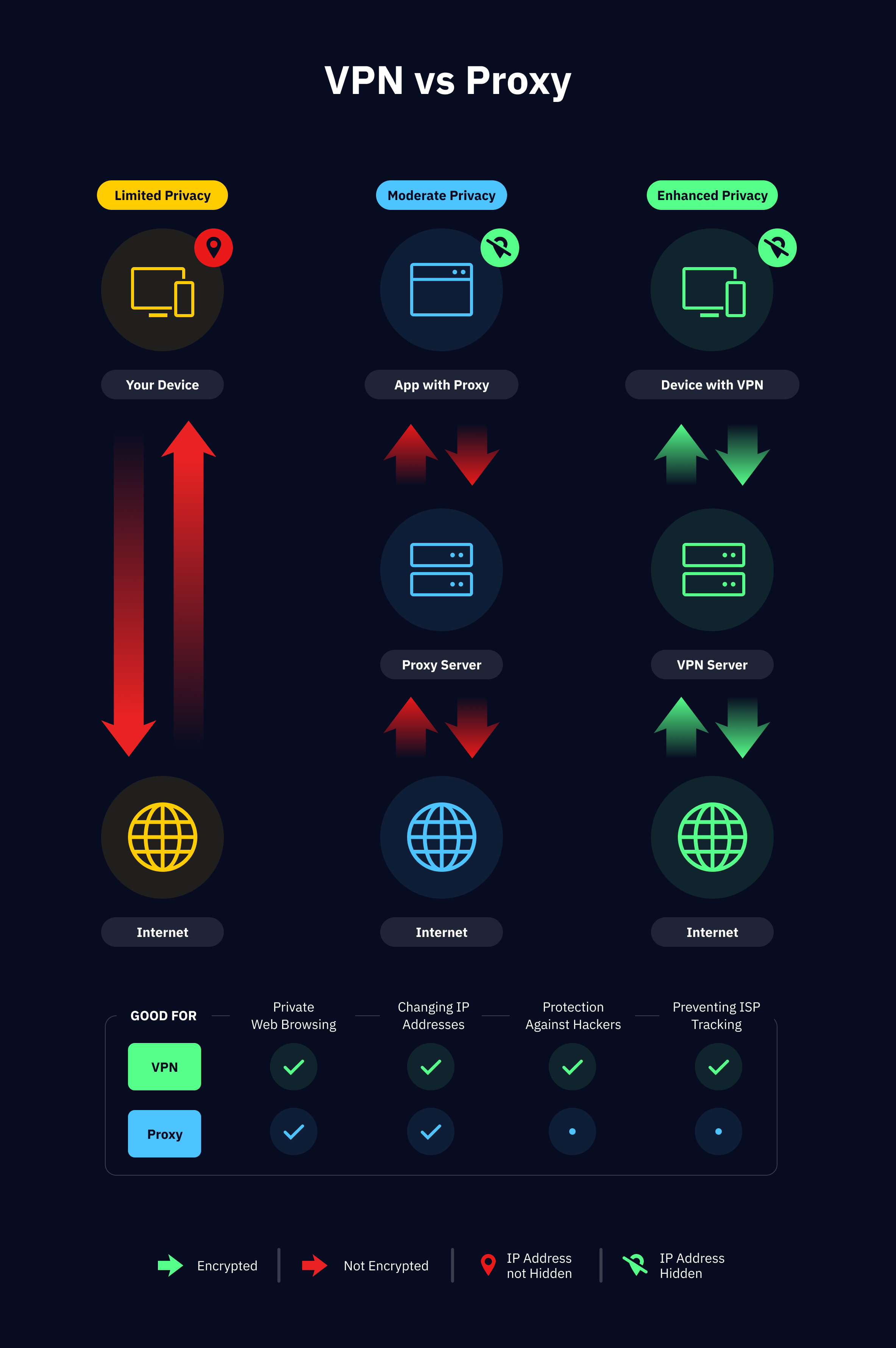
Yup, you can… but it doesn’t mean you should. Or that you really need it. In most setups, stacking a separate proxy on top of a VPN just adds latency without giving you much extra security. For the average person, it’s unnecessary. A good VPN already encrypts your traffic, hides your IP, and protects your DNS. Adding a random proxy on top usually just makes the route messier.
That said, there are a couple of cases where using both actually makes sense, and this is where Windscribe’s setup is genuinely useful.
The first solution is Proxy Gateway. Windscribe’s desktop app can host a local HTTP or SOCKS5 proxy on your network, and other devices on your LAN can connect to it. Those devices aren’t just using a plain proxy; they’re routing through a proxy that sits on top of the VPN tunnel. That means a smart TV, console, or other device that doesn’t support VPN apps can still benefit from the encrypted VPN connection.
The second is using the desktop app with the browser extension. The desktop app handles full-device encryption, while the browser extension adds browser-level protections like ad blocking, anti-fingerprinting, and WebRTC leak blocking. That’s a layered setup that actually gives you something useful, instead of just extra complexity.
And if you want even more obscurity, Windscribe also offers Double Hop, which lets you route through two VPN locations instead of piling a separate proxy into the mix.
VPN vs Proxy: Frequently Asked Questions
Is a proxy the same as a VPN?
No. While both mask your IP address, the similarities stop there. A VPN creates an encrypted tunnel for your entire device, protecting every app you use. A proxy only reroutes traffic for a single application (like your browser) and generally doesn't encrypt your data, leaving you exposed to snooping.
Do I need a proxy if I have a VPN?
For 99% of people, the answer is no. A VPN already handles IP masking and data encryption across your whole system. The only real exception is for developers doing massive web scraping who need specific residential IP rotation. For privacy, security, and streaming, a VPN is all you need. If you're still weighing that up, we cover why a VPN matters day to day, including the claims that do not survive scrutiny.
Is it better to use a proxy or a VPN?
A VPN is almost always the better choice. It provides full encryption, protects all your apps at once, and stops DNS and WebRTC leaks that proxies ignore. Proxies can only be a slightly better choice if you need a very lightweight IP change for a single browser tab and don't care about security. But still.
Can I use a VPN and a proxy together?
You can, but it’s usually overkill and will likely tank your connection speeds. A better move is using a VPN with a built-in Proxy Gateway. This allows you to share your encrypted VPN connection with devices that don’t support VPNs natively, like certain smart TVs or game consoles.
Which is faster, a VPN or a proxy?
The old "proxies are faster" claim is no longer valid. With modern protocols like WireGuard, a high-quality VPN only adds about 5-10% overhead. Most free proxies are hosted on ancient hardware and are so overcrowded that they end up being much slower than a premium VPN connection.
Are free proxies safe?
Rarely. Since you aren’t paying with money, you’re paying with your data. Free proxies often log your browsing history, inject ads into your web pages, and can even harvest your login credentials. If you aren't using a tool from a reputable, audited provider, you are the product. Working out which providers actually qualify is the whole point of our guide to picking a VPN you can trust.
Why are VPN providers removing SOCKS5 proxy support?
Standalone SOCKS5 proxies are a security liability because they lack encryption and are frequently abused by botnets. Windscribe dropped SOCKS5 support in 2022, and other major providers followed in 2025. The industry is moving toward encrypted tunnels because naked proxies just don't cut it in 2026. If torrenting is the whole reason you're comparing them, start with what makes a VPN P2P-friendly instead, since server policy matters more than the proxy-versus-VPN question.


