




Imagine you’re planning a trip to London next month. You’d love to have a few dates lined up before you even step off the plane, but your dating app of choice has a strict 50-mile radius that currently only shows you people in your hometown. To get around this, you decide to trick your phone into believing you’re already strolling through Soho instead of sitting on your couch in your pajamas.
That’s GPS spoofing. It's a clever way to tell your device, "I am not where you think I am," usually so you can access better content, cheaper flights, or a legendary carnitas bowl.
However, there’s a much darker version of this same term. It involves sophisticated radio hardware being used to trick the navigation systems of cargo ships or airplanes, making them think they’re miles off course.
Because the tech world loves to keep things confusing, both the GPS spoofing software you’d use to find matches in London before touching the Heathrow airport and the high-level electronic warfare that’ll confuse a plane go by the exact same name.
If you’re here, you’re probably trying to figure out which one is happening to you (or which one you can do yourself). To get a straight answer, we have to split these two worlds apart.
The Two Things People Call “GPS Spoofing”
If you feel confused about what GPS spoofing actually is, it’s not your fault. Most articles on the subject are a mess because they try to treat two completely different things as a single topic. In reality, “GPS spoofing” is a name shared by two different worlds that almost never touch.
Attack-style GPS spoofing
This is a hostile cybersecurity attack. It involves a third party using specialized radio hardware to broadcast fake satellite signals. These fake signals drown out the real ones, tricking a receiver into thinking it is somewhere else.
This is the high-stakes version that makes headlines when cargo ships, military drones, or commercial aircraft suddenly lose their way. If you’re a regular person walking down the street, this is not what is happening to your phone.
Consumer location spoofing
This is a privacy or utility tactic that you perform on your own device. It doesn’t use radio waves or hardware. Instead, you install software, often called a "fake GPS app" or a "mock location" provider, that tells your phone’s operating system to ignore the actual GPS sensor and use a set of fake coordinates instead. This is what people use to bypass regional blackouts on streaming apps or to find more matches on dating platforms.
These two things have almost nothing in common. They use different tools, serve different goals, and exist in different legal categories. One is an external assault on a navigation system, and the other is a deliberate choice to lie to your own apps for the sake of privacy or convenience.

How Attack-Style GPS Spoofing Works
To understand the hostile version of spoofing, you have to realize that GPS is surprisingly fragile. Your phone or car navigation system calculates your position by timing the radio signals sent by at least four different satellites.
The problem is that these satellites are orbiting roughly 12,000 miles away. By the time those signals reach the ground, they’re incredibly weak, often arriving at around -130 dBm. To put that in perspective, it’s like trying to hear a whisper from someone standing in the middle of a heavy metal concert.
Because the real signals are so faint, a nearby radio transmitter can easily shout over them. If an attacker broadcasts a stronger imitation signal on the same frequency, your receiver will naturally lock onto the louder, fake signal and ignore the real ones coming from space. Once the receiver is captured, the attacker can feed it fake timing data to make it calculate a completely different position. It’s basically gaslighting for electronics.
Meaconing, Synthesis, and $300 Radios
There are two main ways this happens in the technical world. The first is called meaconing, which is essentially the "record and replay" approach. An attacker captures real GPS signals and rebroadcasts them with a slight delay. It’s a relatively simple way to confuse a receiver without needing to build a complex fake signal from scratch.
The second, more sophisticated method is signal synthesis. This is where an attacker uses a software-defined radio (SDR) to generate entirely fake signals for GNSS systems like GPS, GLONASS, or Galileo from scratch.
While this used to require military-grade gear, entry-level SDR hardware now costs under $300 and runs on open-source software. This has moved the tech out of the shadows and into the hands of anyone with a laptop, and quite a concerning hobby.
Ships in Deserts and Planes in the Wrong Country
While this might sound like a plot point from a spy movie, it has become a daily headache for global logistics. We’re well past the era of stale research experiments from ten years ago.
In early 2024, United Airlines flight UA84 was diverted due to false signals, and throughout that year, over 15,000 flights found themselves spoofed toward Beirut Airport while actually flying elsewhere. In the Baltic region alone, more than 46,000 interference events were recorded in a six-month window between 2023 and 2024.
It’s just as chaotic at sea. Ships near major ports or politically sensitive coastlines frequently find themselves GPS-displaced miles inland, a tactic often used as an invisible force field against drones. Even the trucking industry is feeling the heat, with cargo thieves using localized spoofers to trick GPS-locked container locks or fleet trackers.
How Consumer Location Spoofing Works
Consumer location spoofing is entirely software-based. There are no radio transmitters or $300 gadgets here. It’s just you, your phone settings, and a healthy dose of digital deception.
On Android, this is made possible by a feature called the Mock Location Provider. By diving into the Developer Options menu, you can tell the operating system to ignore the actual GPS sensor and instead listen to a specific app that feeds it whatever coordinates you want. It’s effectively a middleman attack on your own device. The phone doesn’t know it’s being lied to because the operating system itself is the one handing over the fake notes.
If you’re an iPhone user, you have likely noticed that finding a Fake GPS app in the App Store is a fool’s errand. This is because Apple’s location framework is built like a fortress. They don’t expose a mock-provider API to third-party apps, meaning there’s no official way to spoof your location on iOS without jailbreaking your device and voiding your warranty. While you can trick a mobile browser into reporting a different HTML5 geolocation, native apps like Uber or Pokémon GO are locked down tight.
Why Fake GPS Apps Often Fail (the Wi-Fi and Cell Layer)
You might download a spoofing app, set your location to Honolulu, and then open a map only to find that the blue dot is still hovering over your neighborhood in snowy Chicago. This happens because modern smartphones are snitches. They use something called a fused location provider, which cross-references data from multiple sources to make sure you aren't lying.
Even if you feed the phone fake GPS satellite data, the device is still seeing known Wi-Fi BSSIDs (the unique IDs of nearby routers), cellular tower signals, and even Bluetooth beacons from the Starbucks across the street. It checks these against Google or Apple’s massive databases and realizes that the GPS coordinates for Hawaii don't match the Wi-Fi signals from a router in the Midwest.
To actually stand a chance at a successful spoof, you have to go into your device's location settings and manually disable Wi-Fi scanning and cellular location scanning. If you don't kill these secondary leak channels, the fused location provider will see right through your disguise.
Why Some Apps Catch Mock Locations Anyway
Even if you’re a pro who disabled Wi-Fi scanning, some apps are just smarter than others. Android actually includes a built-in "isFromMockProvider" flag on every location reading. High-security apps (think banking, ride-hailing, or the big location-based games) specifically check for this flag. If they see it’s set to "true," they will often refuse to work or, worse, ban your account on the spot.
This is where the integration of privacy tools comes in. A small number of VPN providers have built GPS Spoofing on Android directly into their apps.
By acting as the mock location provider themselves, these VPNs can automatically align your GPS coordinates with your chosen VPN server location. It’s a cleaner way to spoof your timezone and location at once, though the same iOS limitations still apply: if you’re on an iPhone, the Apple architecture simply won’t allow it.
GPS Spoofing vs GPS Jamming
If you follow cybersecurity news, you will often see jamming and spoofing mentioned in the same breath, like they are two sides of the same coin.
They’re both forms of interference, but their methods are polar opposites: jamming overpowers GPS signals so the receiver gets nothing, while spoofing replaces GPS signals so the receiver gets something fake. Big difference.
| Dimension | Jamming | Spoofing |
|---|---|---|
| Effect on the receiver | Loss of position | False position |
| Detectable by the victim? | Obvious (GPS stops working) | Hidden (GPS appears normal) |
| Equipment needed | RF noise generator | Signal-mimicking transmitter or SDR |
| Sophistication | Low | Medium to high |
| Legal status (US) | Illegal under FCC rules | Illegal in most contexts |
| Common targets | Personal trackers, surveillance avoidance | Ships, aircraft, fleets, drones |
The reason security experts lose more sleep over spoofing is that it is fundamentally more dangerous. When a signal is jammed, you know it immediately because your map goes blank or your navigation system starts screaming for help. When you’re spoofed, everything looks perfectly normal, but you’re being led into a trap. Decisions made on bad data are almost always more catastrophic than decisions made with no data at all.
Both of these activities are illegal in most contexts, which brings us to the next big question: what exactly does the law have to say about faking your location?
Is GPS Spoofing Illegal?
The legality of faking your location is not a simple yes or no question. Because GPS spoofing covers everything from a teenager playing a video game to state-sponsored electronic warfare, the legal consequences range from absolutely nothing to several years in federal prison.
Attack-Style Spoofing of Public Infrastructure
This category is illegal in essentially every jurisdiction on Earth. In the United States, broadcasting on the GPS L1 frequency without explicit authorization is a direct violation of FCC regulations regarding radio frequency interference.
If that spoofing causes actual harm, such as maritime accidents, flight diversions, or cargo theft, it escalates into serious federal criminal territory. Using radio hardware to mess with public signals is treated as an attack on critical infrastructure, and the authorities don’t have a sense of humor about it.
Spoofing Your Own Device's Location
This is a legal gray zone that depends almost entirely on what you do with the fake data. Faking your location to evade a court order, defraud an insurance company, commit financial fraud, or manipulate a workplace tracking app to get paid for hours you didn't work is clearly illegal.
However, using a mock location provider to play a region-restricted game or to keep a social media app from logging your real-time coordinates is usually not illegal in itself. In these cases, you aren't breaking the law; you’re simply violating the app's Terms of Service. The worst-case scenario is usually a banned account, not a pair of handcuffs.
Country-Specific Exceptions
Some jurisdictions have much stricter rules around any kind of location manipulation, regardless of your intent. Countries with high levels of digital censorship or strict surveillance laws often view location obfuscation as a threat to national security. If you’re uncertain about the local situation where you live or travel, you should check your local laws before turning on a mock location provider.
Can a VPN Spoof Your GPS?
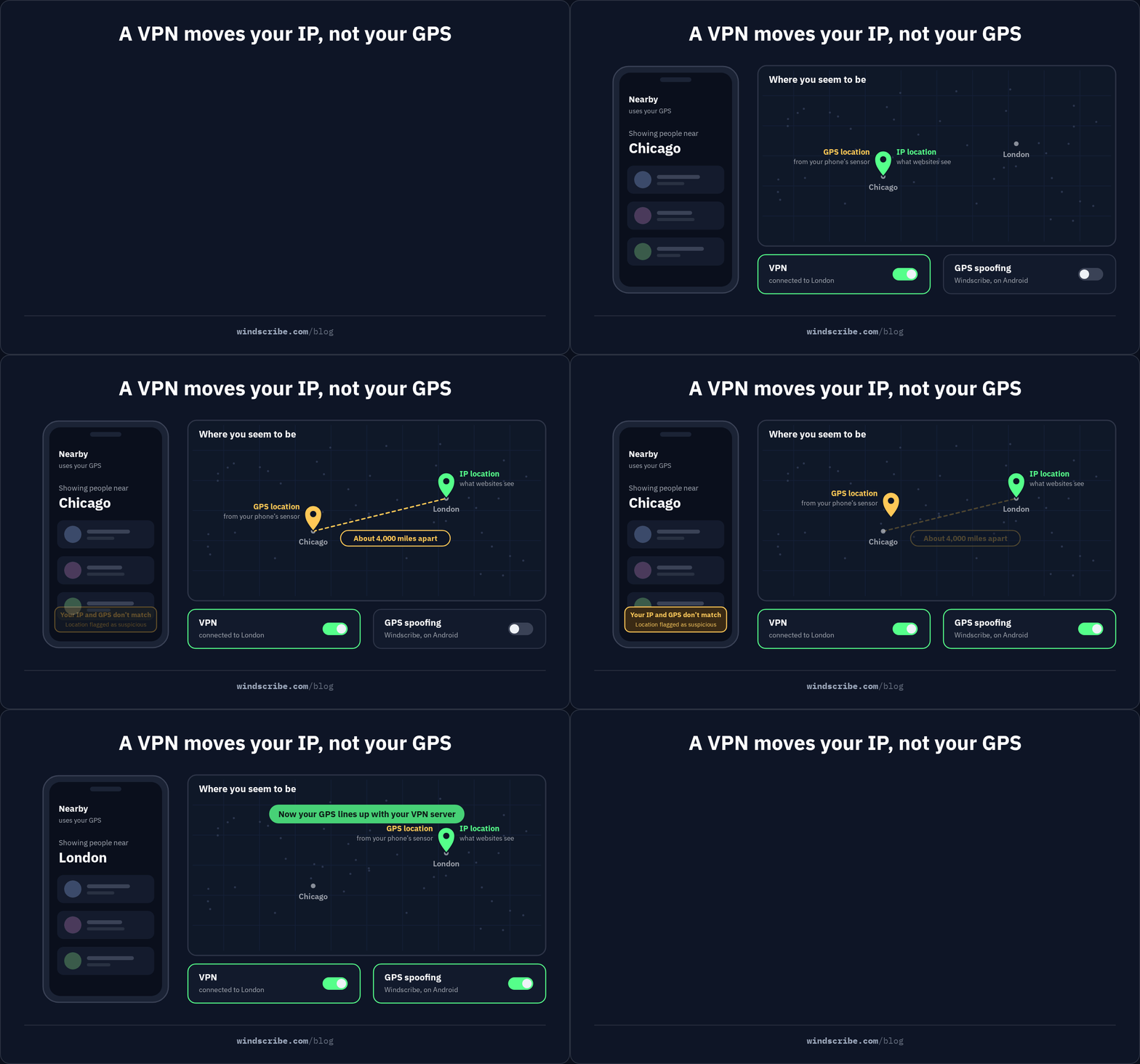
Not really, no. Most VPNs can’t spoof your GPS location. They’re excellent at changing your IP-based location, but they usually leave your GPS coordinates completely untouched.

That’s the part where most VPN providers get a bit awkward. They’ll tell you to "use a VPN to protect your location" and then quickly change the subject, hoping you won't notice that your phone is still broadcasting your exact physical coordinates to every app you open. To understand why, you have to look at the two different ways the internet tries to find you:
- IP-based location: A VPN routes your internet traffic through a server in another city or country. Apps and websites that look at your IP address will see the VPN server's location instead of yours. This is great for streaming, accessing regional websites, and general privacy.
- GPS-based location: This comes directly from your phone's hardware. An app that asks for your GPS coordinates is talking to your phone’s internal sensors, not the internet. A standard VPN does not interfere with this conversation, so the app gets your real coordinates regardless of whether your VPN is on or off.
Because this gap is so frustrating for privacy-conscious users, a small number of VPN apps have started including a built-in mock location provider on Android. It works by integrating with the Android mock location API, which gives you two major advantages over using a random third-party Fake GPS app.
First, it’s much more convenient. You don't need to manage separate apps or juggle different permissions; you just toggle a setting in your VPN. Second, and more importantly, it automatically aligns your GPS coordinates with your VPN server. This prevents location mismatch leaks, where an app sees a German IP address but Chicago GPS coordinates and immediately flags you as a faker.
Windscribe is one of the few VPN apps that offer GPS Spoofing on Android. It handles the heavy lifting of syncing your coordinates to your server, though you still have to enable the right settings in your phone's developer menu on your own. Just remember the limitations: this is an Android-only feature, and you still need to disable Wi-Fi and cellular scanning for it to be fully effective.
For users on a computer, the situation is a bit different. If you’re trying to trick a website that uses your browser's location services rather than a physical GPS sensor, our browser extension has a feature called Location Warp that handles that override for you without touching your operating system settings.
How to Detect and Defend Against GPS Spoofing
Whether you’re worried about being led off course by a radio hacker or you’re trying to stop users from cheating in your app, detection is the name of the game. Because there are two universes of spoofing, there are two very different ways to catch it.
Detecting Attack-Style Spoofing
For a typical person, hostile radio spoofing is a rare event, but it’s not impossible to spot. If someone is broadcasting fake signals near you, your device will likely show some glitch-in-the-matrix symptoms that are hard to ignore.
The most common red flag is a sudden, impossible jump in location. If you’re in a café in Seattle and your map suddenly insists you’re at an airport in Cairo, something’s wrong.
You might also see your time and date jump unexpectedly, as GPS satellites are used to sync global clocks, and a spoofer’s fake timing can corrupt your device’s internal calendar. If your GPS-derived speed shows you're moving at 60 mph while you’re standing perfectly still, or if everyone else’s phone in the same room is showing a wildly different city, you’re likely in a spoofing zone.
For professional operators in aviation or maritime, the defense is much more robust. They use professional anti-spoofing receivers that are multi-constellation and multi-frequency, meaning they check signals from GPS, GLONASS, and Galileo simultaneously and use anomaly detection to throw out any signal that is too loud or too perfect.
Defending Against Consumer-Side Spoofing of Your Apps
If you’re on the other side of the fence, perhaps an app developer or someone in fraud prevention, you’re likely more worried about users spoofing their own location to bypass your rules. This is a blind spot for most basic security setups, but you can build a solid defense by looking for the digital fingerprints a spoofing app leaves behind.
On Android, the easiest check is the OS-level isFromMockProvider flag (now often called isMock in newer versions). Every location reading includes this bit of metadata, and if it’s set to true, the user is almost certainly using a spoofing app.
You can also cross-reference GPS coordinates with other data sources; if the GPS says Honolulu but the Wi-Fi BSSIDs and cell towers are all screaming downtown Boston, you’ve found a liar. Watching for impossible movement velocities, like a user walking 500 miles in ten seconds, is another foolproof way to flag a spoofer.
Finally, requiring additional authentication or a verified IP address for location-sensitive transactions can help ensure that the person on the other end is actually where they claim to be.

Frequently Asked Questions
Can someone spoof my phone’s GPS without my knowledge?
For the average person, a hostile spoofing attack is highly unlikely. It requires an attacker to be physically near you with specialized radio hardware to overpower the actual satellite signals. In most cases, if your location data is being manipulated, it’s happening through an app you already granted permissions to, rather than a radio-based hack.
Does GPS spoofing work on iPhone?
Not really. Apple’s architecture does not allow third-party apps to set a mock location provider. Unless you jailbreak your iPhone, you cannot spoof your location for native apps like Pokémon GO or Uber. The closest workaround is using a VPN browser extension with a feature like Location Warp, which only works for websites you visit within that browser.
Can a VPN protect me against GPS spoofing attacks?
No. A VPN protects your network identity by hiding your IP address, but it cannot stop a radio transmitter from sending fake satellite signals to your device’s physical GPS sensor. These are two different layers of the "where are you" puzzle. A VPN is for digital privacy. Anti-spoofing hardware is for physical signal integrity.
How is GPS spoofing different from fake GPS apps?
They’re essentially the same thing in different contexts. GPS spoofing is the technical name for the act of faking coordinates, while a fake GPS app is simply the tool a consumer uses to achieve that on their own device. The confusion arises because the same term is used for both a software privacy trick and a hostile radio attack.
Why does my VPN's location not match the location my phone's GPS shows?
This happens because your phone uses two different systems to find you. Your VPN changes your IP-based location (what websites see), but your phone’s GPS sensor still sees your actual coordinates. To make them match on Android, you need to use a VPN with a built-in mock location feature.


