




So, you’ve hit the classic tech forum crossroads: one commenter insists that exposing SSH ports is a disaster, while another swears an SSH tunnel is just a free, DIY VPN.
They’re arguing about two completely different things, and most guides don’t bother to clear up the confusion.
The privacy crowd wants to know if an SSH tunnel can replace a paid VPN service. The self-hosters want to know whether they should expose SSH to the open internet or run a VPN gateway into their home lab instead.
The short answer? SSH gives you surgical control over a single remote server, while a VPN secures your device's entire network connection. Here's what that difference actually costs you in practice, performance, and privacy.
What SSH Actually Is (and the One Trick That Makes It VPN-Like)
Think of SSH (Secure Shell) as a private, encrypted hotline directly between your device and one remote server. Its whole job is letting you log in, run commands, and shuttle files back and forth securely. It’s a laser-focused remote management tool, not a house-wide privacy shield for your whole device.
So why does it keep showing up in VPN debates?

Because of a neat trick called dynamic port forwarding, unlocked with the simple ssh -D command. By running that command, SSH opens a makeshift proxy right on your machine. Point your web browser at that proxy, and suddenly your browser traffic gets encrypted, travels down the SSH line, and pops out into the world from that remote server instead of your home Wi-Fi.
It’s the "poor man's VPN". On the surface, it checks the basic boxes:
- Your IP address changes to match the server.
- Your browser traffic is scrambled while traveling over the wire.
It feels like you just tricked the internet into giving you a free VPN. But there is a massive difference between rerouting one app and actually protecting a device.
VPN vs SSH: The Differences That Matter
If you look at the specs, both tools use top-tier encryption to scramble your data. But line them up side by side, and you'll quickly see they were built for totally different jobs.
Here's how they actually stack up when you put them head-to-head:
| Feature | VPN | SSH Tunnel |
|---|---|---|
| What It Protects | Your whole device (every app, tab, and background task) | Only the single app you manually configure |
| Where It Runs | Deep in your operating system | Surface-level, per individual connection |
| Encryption Strength | Military-grade | Equally strong |
| IP Protection | Blends you into a crowd of thousands of users | Uses your server's unique IP, tied solely to you |
| Safety Net | Built-in Kill Switch / Firewall blocks leaks if it drops | None. If it disconnects, your app is exposed |
| Traffic Handling | Handles all traffic smoothly (TCP & UDP) | Clunky TCP-only traffic (bad for gaming/calls) |
| Ease of Use | One click in a sleek app | Cryptic terminal commands for every single app |
| Best Used For | Total privacy for everything you do online | Controlling a single remote server |
Scope: The Whole House vs. One Room
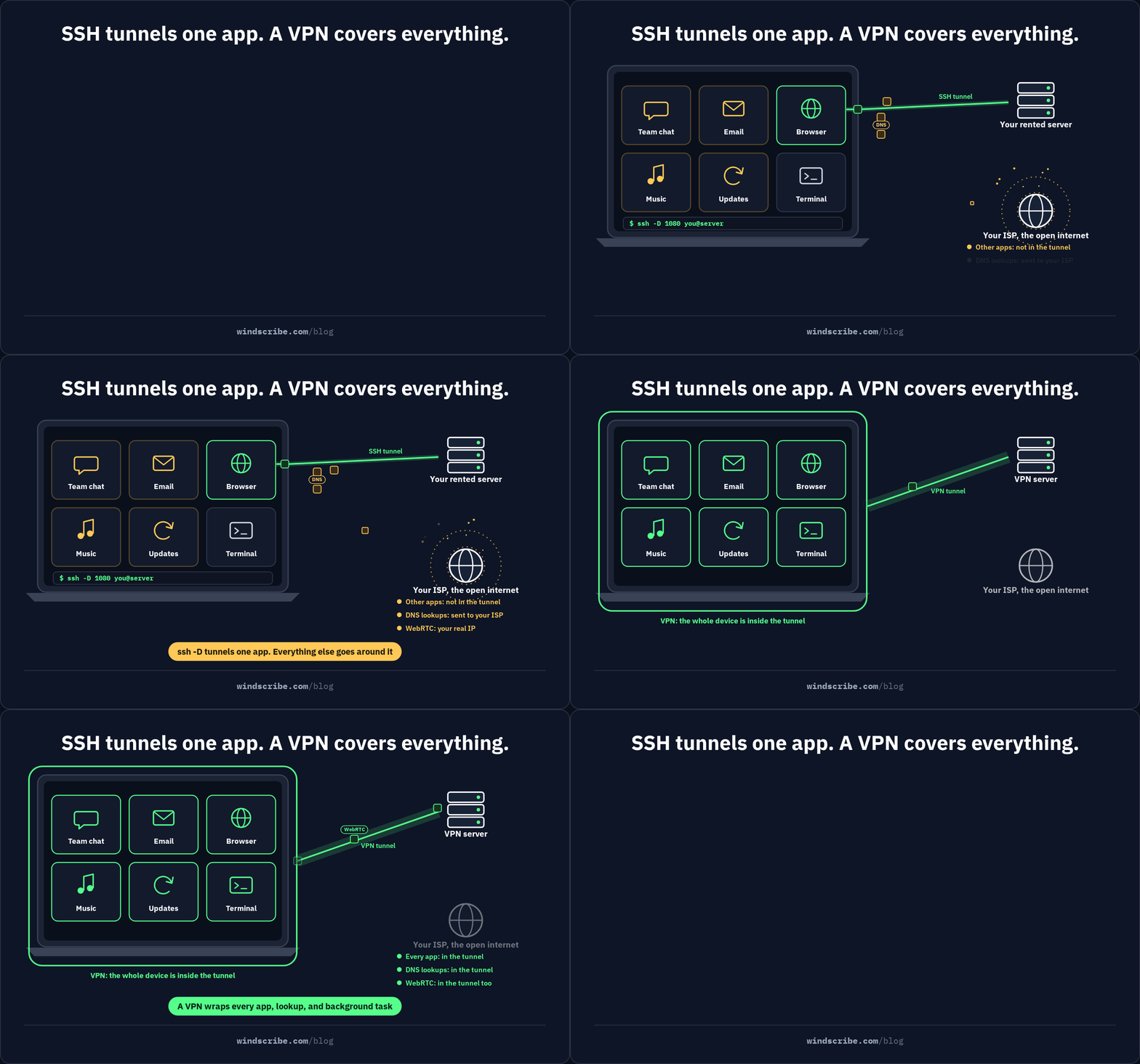
A VPN is like an encrypted dome over your entire device. The moment you turn it on, every browser tab, Spotify stream, and background system update gets routed safely.
An SSH tunnel is more like a single private phone line. You have to manually plug one specific app into it. If you forget to configure your email client, it broadcasts your business out in the open, even while you think you're protected.
Encryption: A Tie That Doesn't Matter
People love to debate cipher strength, but both tools use essentially unbreakable, modern encryption. Arguing over which lock is "stronger" misses the point. They both lock the door. The real question is whether you're locking the whole house or just a single drawer.
Leak Protection: Your Safety Net
This is where DIY setups usually fall apart. If a VPN connection hiccups, features like Windscribe’s Firewall instantly cut your internet to make sure raw data doesn't leak out. An SSH tunnel has no safety net. If the connection stumbles, your app might quietly fall back to your normal internet, exposing your real IP without warning.
Speed & Smoothness: Built for Traffic vs. Built for Commands
SSH was designed to send text commands to servers, not stream 4K video or run online games. Because it forces all traffic into a single, strict queue (TCP-only), one slow packet can choke your whole connection.
On paper, a VPN easily takes the crown for everyday privacy. But because the SSH trick costs almost nothing, people keep trying to make it work.
Can an SSH Tunnel Replace a VPN? Here's Where It Leaks
So, you fired up your terminal, typed in the magic command, pointed your browser to the local port, and called it a day. Your browser traffic is scrambled, and you feel like a hacker who just bypassed paying for a VPN.
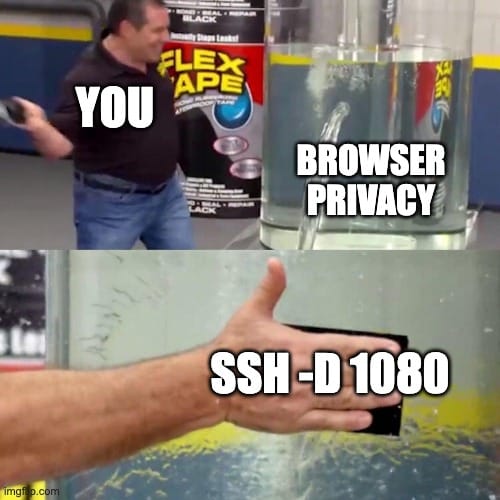
Not so fast. You’ve encrypted one app's connection, but beneath the surface, your data is leaking like a rusty bucket.
- DNS Leaks (The Address Book Slip): Even if your browser traffic travels down the tunnel, its DNS requests (aka, the lookup process that converts website names into IP addresses) might still use your local internet provider. Your browser sends the traffic through your server, but asks your ISP for directions on how to get there.
- WebRTC Leaks (The Backdoor Peek): Modern browsers use WebRTC for browser-based video calls and real-time chat. The catch? WebRTC loves to bypass browser proxy settings entirely, casually revealing your real IP address in the background.
- The "Forgot About That App" Leak: Only the exact application you manually configured is using the tunnel. Your Slack client, email app, Spotify, and background operating system updates are all still chatting away over your normal, unprotected home internet.
- The Connection Drop Danger Zone: When your Wi-Fi blips or your laptop goes to sleep, the SSH connection dies. Unlike a proper VPN, which uses a Kill Switch to cut your internet instantly, an SSH setup has zero fail-safes. Your browser will either throw an error or quietly fall back to your open, unencrypted internet connection.
Even if you spent hours meticulously tweaking settings to plug every single one of these leaks, you still hit a massive privacy wall that no amount of code can fix.
The Privacy Inversion: Why Your Own Server Can’t Hide You
Here is the big plot twist that DIY guides usually leave out: renting your own server to run an SSH tunnel actually makes tracking you easier.
When you set up a cloud server (a VPS), it comes with a unique IP address registered to your name, email, and credit card. Since you’re the only person on earth using that server, every website you visit sees the exact same IP coming from the exact same single user. You haven't hidden your identity; you've just given yourself a static digital name tag.
A commercial VPN works in reverse using crowd blending:
- Your Own Server (SSH): 1 user on 1 IP address. Everything you do points directly back to you.
- Commercial VPN: 10,000 users sharing 1 IP address. Your traffic gets tossed into a stadium full of noise, making it nearly impossible to single out your network activity.
It also comes down to who you trust. With an SSH tunnel, you're shifting your trust to a cloud hosting company, one that probably doesn't have strict no-logs policies or privacy-focused infrastructure. Against a shady coffee shop Wi-Fi, your own server works fine. But for true online anonymity, you aren't hiding, you're just standing in an empty room by yourself.
Which brings us to the real elephant in the room: most people debating this aren't actually looking for general privacy. They're trying to get into their home networks. Enter the self-hosters.
Remote Access to Your Own Network: Exposed SSH vs. a VPN Gateway
If you have a home server or a NAS, should you open an SSH port to the internet or run a self-hosted VPN gateway into your network?
Exposed SSH acts like a guarded door. It works fine if you harden it with SSH keys and rate-limiting tools, but the port remains wide open. Automated bots and internet scanners will knock on it 24/7, meaning a single configuration slip leaves you vulnerable.
A self-hosted VPN gateway (like WireGuard) acts like a hidden door. Unauthenticated probes get total silence, making your network invisible to outside scanners. Once you authenticate through the tunnel, you get seamless access to every service inside your home network without exposing individual ports to the internet.
When SSH Is Actually the Right Tool (and When to Use Both)
SSH isn't bad. It was just built for surgical precision rather than whole-device protection. It remains the absolute best choice for running terminal commands, moving files over SFTP, or mapping a single local port to a remote database.
In practice, sysadmins don't pick one over the other. They stack them. You launch a VPN connection to create an invisible tunnel into your home network, then run SSH inside that tunnel to administer specific servers.
Why We Killed Proxy-Style Connections
Windscribe discontinued SOCKS5 proxy access back in 2022 because unencrypted, per-app proxies create a false sense of security.
Using SSH as a makeshift VPN has the exact same structural flaw: it acts as a per-app proxy that only protects what you manually configure, leaving everything else exposed without a fail-closed firewall if the connection drops.
Instead of patchworking proxies, modern VPNs use system-wide tunnels paired with strict firewalls that cut all traffic if the connection hiccups.

Frequently Asked Questions
Is SSH obsolete?
Not even close. It remains the absolute gold standard for server administration, automated scripting, and securely managing remote infrastructure. The mistake isn't using SSH. It's trying to force it to act like a full-device VPN on the side.
Why do people use SSH?
People use SSH to directly log into remote servers, execute command-line instructions, and securely shuttle files back and forth over SFTP. It provides a lightweight, highly encrypted, and precise connection straight to a specific target machine.
Is there anything better than SSH?
For its specific job (remote terminal access and single-host management) nothing beats SSH. While modern tools like VPN gateways or zero-trust access platforms (ZTNA) handle network-wide routing better, SSH remains the undisputed king of direct server administration.
Is SSH better than a VPN?
Neither is better because they solve completely different problems. SSH secures your connection to a single remote server, while a VPN encrypts all internet-bound traffic across your entire device. Which one you need depends on whether you're managing one box or protecting your whole online footprint.
Can SSH be tracked?
While external eavesdroppers can't read the contents of your encrypted SSH session, network operators and ISPs can still see that you're connected to a specific IP address. Additionally, if you route browser traffic through your own rented server, that IP is tied directly to your billing identity, making your online activity easy to attribute back to you.
Can you use SSH as a VPN?
You can use dynamic port forwarding to create a makeshift SOCKS proxy, but it isn't a real VPN. It only covers the specific app you configure, lacks fail-closed firewall protection if the connection drops, and can easily leak DNS or WebRTC data.
Does SSH encrypt traffic like a VPN?
Yes, both tools rely on modern, highly secure cryptography to scramble your data while it travels across the network. The real difference isn't the strength of the encryption, but the scope: SSH protects a single app or terminal session, whereas a VPN wraps your entire device.
Is an SSH tunnel faster than a VPN?
Usually not for general internet use. SSH tunnels force all traffic through TCP, which can create slowdowns when multiple data streams get backed up behind a single dropped packet. Modern VPN protocols like WireGuard run over UDP and handle everyday, real-time traffic much more efficiently.
Do I need both an SSH client and a VPN?
If you manage remote servers, using both is standard practice. System admins frequently fire up a VPN first to securely enter a private network, and then launch an SSH session inside that tunnel to manage individual machines safely.


