




Most comparisons give you the same tired line: SOCKS5 is faster than a VPN but less secure. That’s a massive understatement. It’s a lot like saying a screen door is "breezier but less waterproof" during a hurricane.
While SOCKS5 technically swaps your IP, it’s a shallow fix that ignores the massive trail of digital breadcrumbs you leave behind. It doesn’t encrypt your data, it doesn’t hide your intent, and it certainly doesn’t protect you from an ISP that makes money by paying attention to your browsing habits.
The real danger lies in what SOCKS5 quietly fails to do. It leaves your DNS queries, your IPv6 connections, and every single byte of unencrypted data completely exposed to anyone sitting between you and the proxy server.
While a VPN wraps your entire system in high-grade encryption and funnels it through a secure tunnel, SOCKS5 only handles specific apps. This leaves the rest of your OS to leak like a sieve. If you’re looking for actual anonymity rather than just a cosmetic IP change, you need to look past the speed marketing and understand how SOCKS5 effectively leaves the lights on while you’re trying to hide.
This guide breaks down why those technical gaps matter and why "good enough" usually isn't.
What Is a SOCKS5 Proxy?
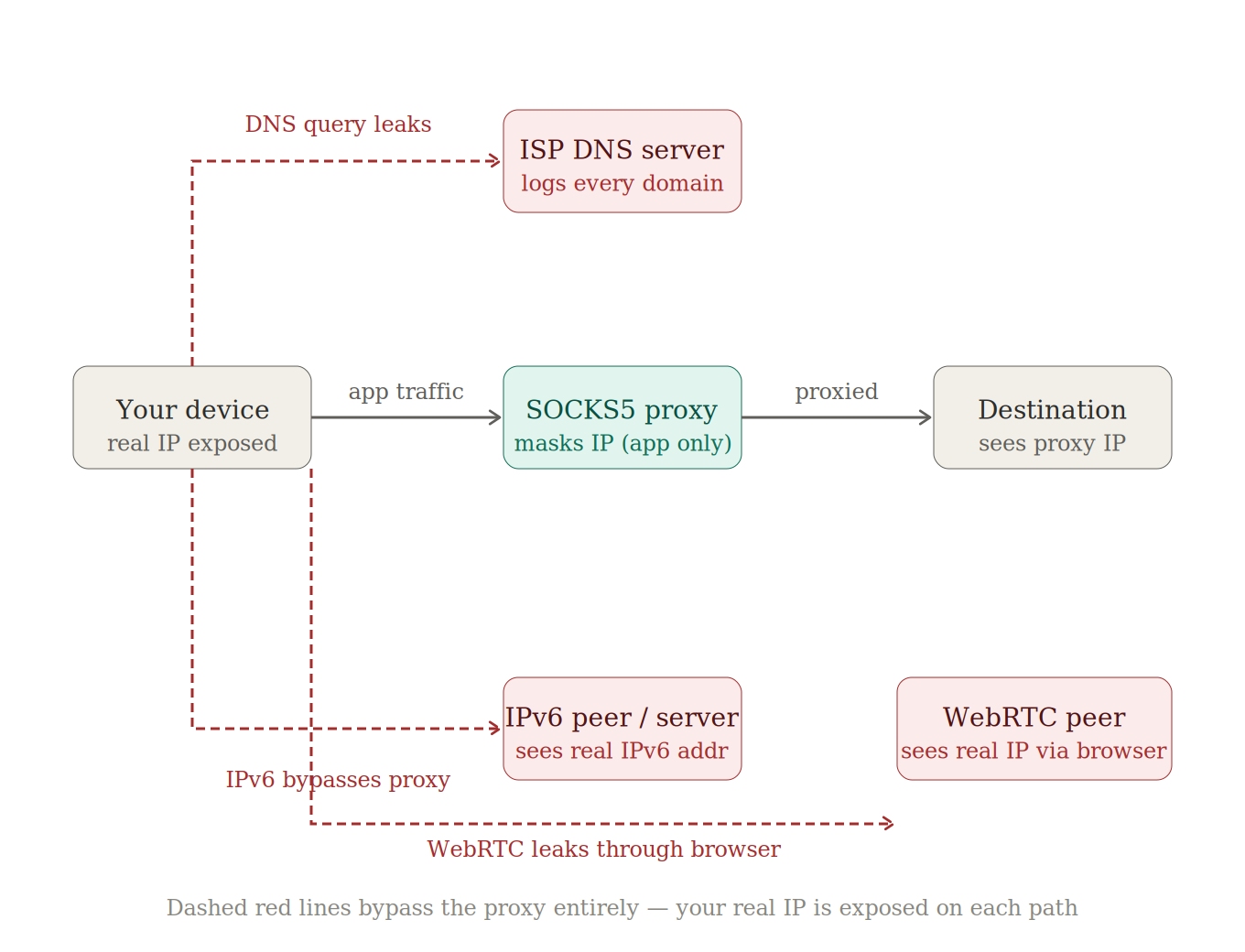
SOCKS5 (Socket Secure version 5) is a proxy protocol designed to route traffic from a specific application through an intermediary server. In the process, it replaces your IP address with the proxy's IP. If you're weighing the whole category rather than this one protocol, start with proxy vs VPN.
It operates at the session layer, sitting just below the application level. It typically communicates over port 1080. This position in the stack gives it the flexibility to handle a wide variety of traffic types like HTTP, FTP, P2P, and gaming.
Unlike the older SOCKS4 protocol, which only handled TCP connections, SOCKS5 added UDP support. This was a meaningful upgrade for anything that benefits from lower latency, such as VoIP or online gaming. It also supports basic authentication via username and password, providing a thin layer of access control. On paper, SOCKS5 masks your IP and supports diverse traffic, which is often enough for very narrow, non-critical use cases.
The list of what SOCKS5 doesn't do is much longer and more dangerous. It doesn’t encrypt your data, meaning everything travels in plaintext. It doesn’t protect against IPv6 leaks, and it has no awareness of anything happening outside the single application you configured. Every other process on your machine, like browser tabs, system services, and background apps, carries on using your real IP. You’re essentially hiding one finger while the rest of your body is standing in a spotlight.
SOCKS5 technically supports remote DNS resolution through a variant called SOCKS5h. In this mode, the proxy resolves hostnames on your behalf to prevent DNS leaks. The problem is that most applications, including popular torrent clients, default to local DNS resolution. This means your queries go straight to your ISP even when your traffic flows through the proxy.
Unless you have explicitly confirmed your application is using SOCKS5h, you should assume it’s leaking your activity to your ISP.
VPN vs SOCKS5: Key Differences
Forget "one is faster." Here's what's different under the hood:
| Dimension | VPN | SOCKS5 Proxy |
|---|---|---|
| Encryption | Yes (AES‑256 / ChaCha20) | No (data sent in plaintext) |
| Scope | System‑wide (all apps, all traffic) | Per‑application only |
| DNS Handling | Routed through an encrypted tunnel | Leaks to the ISP by default |
| IPv6 Protection | Yes (blocked or tunneled) | No (bypasses proxy entirely) |
| Speed Overhead | ~5‑10% with WireGuard | Minimal (no encryption) |
| IP Masking | Yes (all traffic) | Yes (configured app only) |
| Authentication | Credentials + protocol‑level | Username/password or GSS‑API |
| Use Case Fit | Privacy, security, remote access | Scraping, per‑app routing, P2P speed |
| Cost | Subscription ($2‑12/mo) | Free (risky) or bundled with VPN |
The claim that "SOCKS5 is faster" is a relic from the days when VPNs relied on OpenVPN, a CPU-hungry protocol that could actually throttle your throughput. That era is over. Modern protocols like WireGuard run at the kernel level with hardware-accelerated encryption, trimming overhead down to a measly 5% or 10%, on speed and on the data a VPN uses alike.
For most users on most connections, the speed gap between a VPN and a SOCKS5 proxy ranges from “barely noticeable" to "completely irrelevant." SOCKS5 might still win on raw latency for specialized tasks like high-volume scraping, but it’s no longer a valid excuse to avoid a VPN.
Also, SOCKS5 only covers the specific application you configured. If you set up a proxy in your torrent client and call it a day, every other process on your machine is still broadcasting your real IP to the world.
Any tool that only covers one app has the same ceiling. Apple's version is Private Relay, which covers Safari and nothing else, and is Private Relay the same as a VPN walks through what that leaves exposed.
Your OS updates, background apps, WebRTC calls, and every browser tab outside that one app continue to use your normal, exposed connection. A VPN covers your entire system by default with no per-app configuration required.

What SOCKS5 Doesn't Protect (The Leak Problem)
So, you’ve set up a SOCKS5 proxy in your torrent client, and you’re feeling like a regular digital Houdini. Your peers see the proxy IP, and you think you’re invisible. Spoiler alert: You aren’t.
Using SOCKS5 for privacy is like wearing a high-tech mask but leaving your GPS-tracked phone in your pocket and your name tag on your shirt. It’s a leaky solution that offers a false sense of security while your ISP effectively watches the entire show from the front row.
The fundamental problem is that SOCKS5 is a specialized tool being asked to do a generalist’s job, and it fails in four distinct, embarrassing ways:
- DNS leaks: By default, SOCKS5 doesn't handle DNS. When you connect to a torrent tracker or website through a SOCKS5 proxy, the domain name resolution still goes through your ISP's DNS servers. Your ISP has a log of every domain you accessed. SOCKS5h is the technical fix, but most applications do not use it by default.
- IPv6 leaks: SOCKS5 was designed for IPv4. If your device has IPv6 connectivity, those connections bypass the proxy entirely. Your real IPv6 address is exposed to any peer or server that supports it.
- WebRTC leaks: WebRTC, used for real-time communication in browsers, can bypass proxy settings and reveal your real IP. This affects browser-based SOCKS5 configurations specifically.
- Connection drop exposure: If the SOCKS5 proxy disconnects, most applications silently revert to a direct connection. Your real IP is immediately exposed. There is no kill switch equivalent for a standalone SOCKS5 proxy.
Windscribe addresses all four of these vulnerabilities. Our built-in Firewall blocks all non-VPN traffic to prevent leak scenarios, and R.O.B.E.R.T. handles DNS resolution at the server level. The bottom line is simple: don’t bring a proxy to a privacy fight. Use a VPN that actually gives a damn.
When SOCKS5 Actually Makes Sense
Most VPN-authored articles dismiss SOCKS5 entirely, which is a major credibility problem. SOCKS5 has genuine strengths for specific workflows, and pretending otherwise just makes it look like we’re trying to sell you something. SOCKS5 absolutely has its place in a technical toolkit. That place just happens to be everywhere except general privacy protection.
Web scraping and data collection are perfect examples. Scrapers need to rotate IPs rapidly across thousands of requests to avoid being blocked. Residential SOCKS5 proxies are purpose-built for this: a VPN’s fixed IP would get rate-limited almost immediately.
Besides, professionals managing multi-accounting or anti-detect workflows rely on SOCKS5. Tools like Dolphin Anty or AdsPower use these proxies to assign a unique IP to every individual browser profile. A VPN is far too coarse-grained for this kind of work because you need per-session isolation, not a system-wide blanket.
There’s also the case for non-sensitive geo-spoofing. If you just need a different IP to check localized search results or access region-locked content, and you don’t care about encryption, SOCKS5 is lighter and faster. When there is no sensitive data in transit, and you’re not worried about ISP visibility, the overhead of a VPN can feel like overkill.
To be fair, SOCKS5 is useful for per-app routing in restricted environments. In corporate networks that block VPN traffic or on embedded systems where a full VPN client isn’t practical, a proxy provides basic IP masking for a single application without requiring system-level access.
Why We Stopped Offering SOCKS5 (and What Replaced It)
In April 2022, we officially sent our SOCKS5 proxy servers to the digital afterlife. The reason was simple: SOCKS5 is an insecure, ancient protocol with zero encryption. Using it for anything sensitive is like using a screen door for privacy. You might feel covered, but everyone can still see exactly what you're doing.
We’re a VPN provider, not a proxy museum. Beyond the security flaws, SOCKS5 IPs were a constant magnet for abuse and bad actors. It’s an inherent risk with any unencrypted relay, and we’re tired of babysitting it.
Offering a leaky proxy alongside a high-grade encrypted VPN made as much sense as selling cigarettes at a lung clinic. We’ve replaced the old system with two features that actually do the job without leaving your data exposed to the world.
The first is Split Tunneling. The main appeal of SOCKS5 was per-app routing. Our Split Tunneling feature does exactly that, allowing you to route specific apps through the VPN while others use your normal connection. The massive difference here is that the traffic going through the tunnel is actually encrypted. This is available right now on Windows, macOS, and Android.
The second is Proxy Gateway. Some devices genuinely need a SOCKS5 or HTTP proxy endpoint, such as smart TVs, gaming consoles, or legacy apps that do not support VPN clients. Our Proxy Gateway creates a local proxy server on your LAN that routes all traffic through the VPN tunnel. You get the SOCKS5 compatibility you need at the application layer, backed by full VPN encryption underneath. It is the SOCKS5 pattern, just done securely.
The math is straightforward. If you need per-app routing, Split Tunneling gives you that with encryption. If you need a SOCKS5 endpoint for a specific device, Proxy Gateway handles it through the VPN. This makes the insecure, standalone SOCKS5 proxy completely unnecessary.
For those who want the full story, you can find more context in our knowledge base article on why SOCKS5 was discontinued.
VPN vs SOCKS5 Frequently Asked Questions
Is SOCKS5 the same as a VPN?
No. SOCKS5 is a proxy protocol that routes traffic on a per-app basis without encryption. A VPN encrypts all system-level traffic through a secure tunnel. While they share IP masking as a feature, they differ fundamentally in scope, security, and DNS handling. SOCKS5 is like a mask you wear at a party; a VPN is a private, armored limousine that takes you to the party and back. Using one is not a substitute for the other.
Does SOCKS5 encrypt your data?
No. SOCKS5 relays data exactly as it finds it. There’s no modification, no encryption, and no protection. Your traffic remains visible to anyone in a position to intercept it, including your ISP, a network administrator, or a malicious actor running a man-in-the-middle attack. If you want your data to be unreadable to prying eyes, you need a VPN or an SSH tunnel wrapping that SOCKS5 connection.
Is SOCKS5 faster than a VPN?
Historically, yes, because SOCKS5 skips the heavy lifting of encryption entirely. However, the gap has closed significantly. Modern VPN protocols like WireGuard have reduced encryption overhead to a measly 5% to 10%. For the average user, the speed difference is now negligible in practice. SOCKS5 still maintains a slight edge in raw latency for hyper-specific tasks like professional gaming or high-volume web scraping, where every millisecond counts and encryption is an unnecessary cost.
Should I use SOCKS5 or a VPN for torrenting?
A VPN is the only safe choice here. SOCKS5 might mask your IP within the torrent swarm, but it is a sieve for leaks. It exposes your DNS queries to your ISP, ignores IPv6 traffic, and lacks a kill switch to stop traffic if the proxy fails. A VPN with a kill switch, or better yet, Windscribe’s Firewall, shuts down all these vulnerabilities. If your goal is actual privacy while torrenting, SOCKS5 provides the appearance of protection without actually delivering it. Our P2P VPN guide covers what to look for in one.
Can you use a VPN and SOCKS5 together?
Yes, and it is a common power-user move. You connect to your VPN first, then route a specific application through a SOCKS5 proxy. This setup gives you encrypted system traffic via the VPN plus a second layer of IP masking for that specific app. It’s incredibly useful for multi-accounting or bypassing bans on known VPN IP ranges. Windscribe’s Proxy Gateway takes this a step further by handling it locally, automatically routing your proxied traffic through the VPN tunnel for maximum security.


