




If you’ve spent more than five minutes looking into online privacy, you’ve probably run into some well-meaning tech bro telling you to "just switch your DNS to 1.1.1.1" to secure your connection. Or maybe you're already running something like NextDNS or Pi-hole and wondering: Is this basically a free VPN? Or am I paying for a VPN that makes my DNS setup completely redundant?
It’s incredibly easy to get these two confused. Both sit between your device and the wild, tracking-heavy web, both are marketed as privacy shields, and the industry absolutely loves to blur the lines between them.
Before we tear them apart, a quick conflict-of-interest disclosure: we make a VPN, but our team also runs Control D, a dedicated DNS service. We literally build and sell both sides of this equation, which means we have zero reason to lie to you about how they work. So, in this guide, we’ll tell you everything you must about VPN vs. DNS, and the differences between the two.
The Three Things People Mean by "DNS"
To actually understand what DNS is and what it does, we first have to untangle what people actually mean when they say "DNS," because there are three very different versions of it.
1. Custom DNS Resolvers
By default, your Internet Service Provider (ISP) runs its own DNS resolver, which automatically looks up the IP addresses for every website you try to visit. Swapping to a custom DNS resolver (like NextDNS, Cloudflare's 1.1.1.1, or Control D) simply means you’re bypassing your ISP's lookup machine and asking a different company's server to do that directory work for you.
2. Encrypted DNS (DoH & DoT)
This is the exact same directory lookup, but wrapped in a layer of security using protocols like DNS over HTTPS (DoH) or DNS over TLS (DoT). It stops your ISP or a local network admin from intercepting, reading, or tampering with your requests.
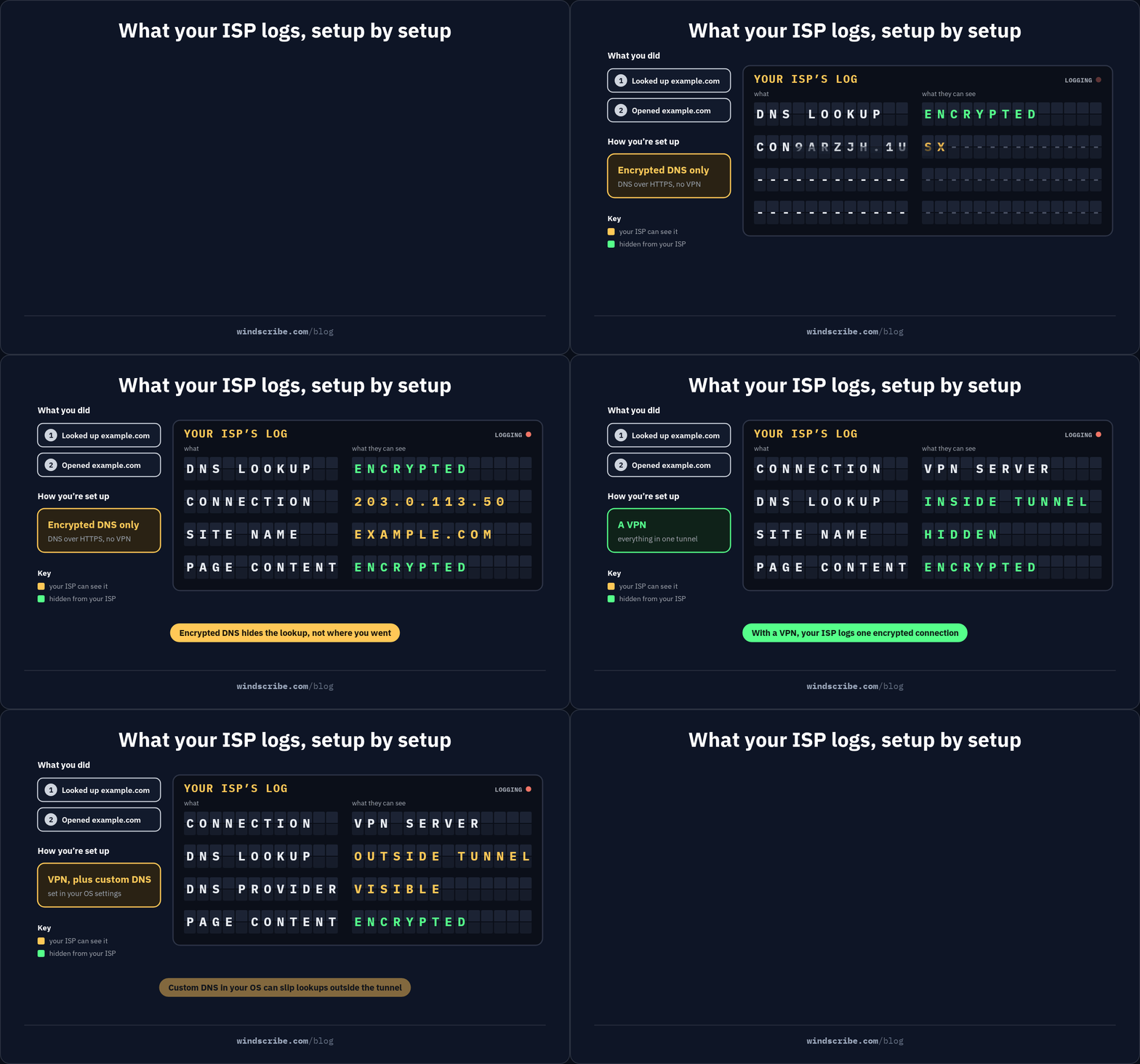
But encrypted DNS only hides the question you asked, not where you actually ended up going. And because encrypted DNS doesn’t hide your actual web traffic, your ISP still sees the destination IP address of every server you connect to. You secured the whisper, but your physical footsteps are still completely visible.
3. Smart DNS
This is a completely different beast: a geo-unblocking workaround that intercepts and reroutes specific location-check queries to make you look like you’re browsing from somewhere else. It doesn’t encrypt your traffic, change your IP address, or offer any real security.
What a VPN Does That No DNS Service Can
If a DNS resolver is just a phone directory, a VPN is an armored transport vehicle. No matter how private, custom, or heavily encrypted your DNS settings are, a DNS service is structurally incapable of securing your actual web browsing.
Here are the three massive boundaries a DNS service simply cannot cross.
1. Full-Traffic Encryption
When you use an encrypted DNS service, only your initial lookups are secured. The actual data you send and receive afterward, like your messages, files, banking info, and browsing activity, is left completely untouched.
Sure, most of your web traffic is covered by HTTPS these days, but HTTPS isn’t exactly a magic shield. It only encrypts the content of your conversation with a specific website. Your ISP and local network admin can still see the destination IP address you’re connecting to. On top of that, during the initial handshake with a website, your browser broadcasts the domain name in plaintext (a technical vulnerability called Server Name Indication, or SNI).
So even with encrypted DNS and HTTPS, your ISP still knows exactly where you’re going. But with a VPN, it cannot, because a VPN wraps every single bit of data leaving your device in an encrypted tunnel. Whether you’re downloading a file, playing a game, or checking your balance, everything is scrambled before it even touches the local network. It protects all traffic from every single app, not just the website addresses you type into a browser.
2. IP Masking
Your IP address is your digital home address. It tells servers exactly who you are and where you are. And with a DNS, it’s completely visible to every single website, app, and server you connect to.
A VPN, on the other hand, uses IP masking to swap your real IP address with the IP address of the VPN server. To the rest of the web, you look like a completely different user browsing from a completely different location.
3. Network-Level Trust Shift
When you connect to a sketchy public Wi-Fi network at a local coffee shop, the router you’re connecting to is inherently untrusted. Even if you use encrypted DNS to hide your website requests, the local network administrator (or an online thief sitting next to you) can still monitor your unencrypted traffic or block specific connections.
A VPN completely shifts your trust away from the local network and onto your VPN provider. By routing your connection through a modern protocol like WireGuard, the local network only sees one single, unbreakable stream of encrypted data going to the VPN server. In other words, they can see that you’re doing something on the internet, but they cannot see exactly what it is.
What Each Setup Hides, and From Whom
To make a smart choice, you have to stop looking at arbitrary feature lists and start looking at who’s actually watching you. Depending on your setup, your ISP, local network administrators, and the websites you visit can see wildly different slices of your digital footprint.
| Setup | Your ISP Sees | Local Network / Admin Sees | Websites See | Lookups Filtered or Protected? |
|---|---|---|---|---|
| ISP Default DNS | Every domain you visit, in plaintext, often logged | Same as ISP (completely unencrypted) | Your real IP address | No |
| Custom DNS (Plaintext) | Every domain you visit, in plaintext | Same as ISP | Your real IP address | Yes (if configured to filter) |
| Encrypted DNS (DoH/DoT) | Destination IPs & the domains you visit (via SNI handshake) | Destination IPs & domains (via SNI handshake) | Your real IP address | Yes (safely encrypted in transit) |
| Smart DNS | Every domain you visit, in plaintext | Same as ISP | Your real IP address | No (only redirects location checks) |
| VPN (e.g., WireGuard®) | One encrypted connection to a VPN server | One encrypted connection to a VPN server | The VPN server's IP address | Yes (safely inside the tunnel) |
The Encrypted DNS Asterisk
Let's talk about the catch with encrypted DNS. You turn on DoH, your lookups are hidden, and you assume your ISP is now completely blind. The reality? Your ISP still knows exactly what websites you’re visiting.
First, because DNS only resolves the address, your device still has to connect to the destination IP of the server, which is visible to your ISP by definition. Second, during the TLS handshake that establishes a secure web connection, your browser broadcasts the website's name in plaintext using a field called SNI.
While a new standard called Encrypted Client Hello (ECH) aims to fix this, its adoption across the web is still incredibly limited. Ultimately, encrypted DNS hides the question you asked, not the answer.
When Traffic Skips DNS Entirely
Another major blind spot of DNS-based privacy tools is that plenty of internet traffic bypasses DNS lookup servers completely. For example, torrent clients frequently connect directly to other peers using hardcoded IPs. Similarly, many apps rely on hardcoded endpoints built right into their software instead of looking up a domain name.
If you’re using a private DNS while torrenting, your real IP is still completely exposed to the entire P2P swarm because those direct IP connections slip right past your DNS settings. A VPN, on the other hand, catches and encrypts all of that traffic regardless.
The Unchanging Identifier
Finally, no flavor of DNS replaces your IP address. Your IP address acts as a stable identifier that websites and tracking networks use to build a profile on you across the web. Even if you swap your DNS resolver, every single server you communicate with still logs your real, physical location and network identity.
All of this makes it sound like a VPN is the undisputed winner. But there is one major dimension where DNS-based tools genuinely beat a VPN, and it is the one everyone asks about first: speed.
The Speed Question, Answered Honestly
Yes, a DNS service is faster than a VPN.
There’s no point in dancing around it: a DNS service only touches your lookups, adding effectively zero overhead to your actual browsing. But the folklore that running a VPN will immediately cut your internet speeds in half is a relic of the ancient, clunky OpenVPN era.
Modern VPNs running the WireGuard protocol have completely changed the game. In our own testing across the global Windscribe server network, using WireGuard typically keeps performance within a tight 5% to 15% range of your raw connection speed. Unless you’re running speed tests 24/7, a single-digit drop is something you’ll literally never feel during everyday browsing, gaming, or streaming.
If all you want is to clean up some lookups, speed is a moot point. DNS wins by default because it isn't doing any heavy lifting. But the moment you actually want to protect your traffic, choosing your privacy tool based on speed is the wrong axis to decide on.
The more practical question isn’t which one is faster, but whether you can run both at the same time. You can, but it’s also exactly where people quietly break their own privacy.
Using Both: The Trap Nobody Warns You About
Many privacy-conscious users try to combine both tools. You configure a third-party encrypted DNS at the operating system level, turn on your VPN, and assume you have built an impenetrable double-shield.
But in reality, if that’s what you did, you have actually probably just broken your own privacy. Depending on your device and its settings, this combination often triggers a silent security failure: a self-inflicted DNS leak.
When a VPN connects, it wants to capture all of your traffic and perform in-tunnel resolution. This means your DNS queries are securely resolved inside the encrypted tunnel by the VPN server itself. However, an OS-level private DNS setting is incredibly stubborn. Because your operating system handles network plumbing, its hardcoded encrypted DNS settings can fight the VPN app, and win.
Instead of routing your DNS requests through the secure tunnel, your OS may quietly send those queries outside the VPN tunnel directly to your third-party resolver. While those queries are still encrypted, you’re now broadcasting your web requests over your local, unencrypted network connection. Your ISP cannot read the requests, but they can see exactly which third-party DNS provider you’re querying, entirely separating your lookup footprint from your VPN traffic.
While behavior varies depending on your platform and how your VPN handles network adapters, you should never rely on your OS to negotiate this truce.
The Fix: Move the DNS Inside the Tunnel
The correct way to run a custom DNS alongside a VPN is to keep the OS settings completely vanilla and configure your custom DNS upstream directly inside your VPN app. This forces your queries to travel through the secure tunnel first before reaching your resolver of choice.
But let’s be honest: if the only reason you wanted a custom DNS service in the first place was to block annoying ads, malicious trackers, and scam sites, there’s a major shortcut that lets you skip this entire configuration nightmare altogether.
Why You Might Not Have to Choose
The whole debate around choosing between a VPN and a DNS service misses a major architectural reality: a properly built VPN already contains the DNS layer. It’s not actually an either/or choice.
Here’s how Windscribe handles this combination under the hood without breaking your privacy.

1. In-Tunnel Recursive DNS
When you connect to Windscribe, the VPN server you’re connected to actually acts as your DNS server. It performs full recursive DNS resolution right inside the encrypted tunnel. This means your DNS queries never exit the tunnel to be handled by a third-party resolver where they could be logged or intercepted.
Even better, the system is designed to "fail closed" thanks to our Firewall. If your VPN connection drops unexpectedly, your DNS queries instantly stop resolving altogether rather than silently falling back to your ISP’s default, unencrypted servers.
2. DNS-Level Filtering With R.O.B.E.R.T.
The main reason people reach for a custom DNS service in the first place, which is filtering out junk, already exists inside Windscribe. We built a server-side tool called R.O.B.E.R.T. that blocks ads, trackers, malware, and phishing domains before they can ever load on your device.
Because this blocking happens directly on our VPN servers, it saves you bandwidth and speeds up your load times without requiring you to configure any external DNS settings. You can customize exactly what gets blocked, from social media trackers to gambling sites, with a few toggles.
3. A Quick Disclosure
We’re not just making educated guesses about the DNS side of this comparison. We actually build it. Windscribe's sister company is Control D, a dedicated DNS service, and our VPN apps use Control D's open-source ctrld engine under the hood to manage local network requests. We live and breathe both protocols every day.
None of this means that everyone actually needs a VPN, though. There are very specific situations where a standalone DNS service is more than enough to cover you.
When a DNS Service Alone Is Enough
Look, we sell VPN subscriptions, but we’re not going to pretend you always need one. A standalone DNS service is a highly practical, lightweight option under the right circumstances.
You should probably save your money and just use a DNS service if:
- You only care about blocking junk: If your main goal is filtering out malware, trackers, and annoying ads at the router level, a custom DNS resolver is the easiest way to clean up your home network.
- Your devices cannot run apps: Some smart TVs, game consoles, and certain IoT devices usually don’t support native VPN clients, making DNS configuration your only real option. Although with Windscribe, we have the router option that will secure all the devices connected to your Wi-Fi.
- You trust your network: If you’re on a trusted home connection and simply want a cleaner, faster web browsing experience, you don’t need the encryption overhead of a VPN.
- You’re on a strict budget: High-quality DNS services are significantly cheaper than VPNs, and many excellent options have incredibly generous free tiers. If you decide to take this route, Control D is an incredibly solid option we can personally vouch for. We’d know. We built it.
But here’s the flip side: the moment your threat model shifts to worrying about your ISP, a public Wi-Fi network you don’t trust, or anything that exposes your real IP address (like torrenting or highly sensitive research), DNS alone simply cannot protect you.
So, let's keep it simple:
- If you have a filtering problem: Use a DNS service.
- If you have a visibility problem: Use a VPN.
- If you have both problems: Use a VPN with server-side DNS blocking built right in.
If you fall into that last camp, you don’t have to spend hours trying to bridge these two technologies together. You can try Windscribe for free and get full, uncompromised encryption alongside R.O.B.E.R.T., our built-in DNS-level blocklist. Give it a go!

Frequently Asked Questions
Is a DNS service better than a VPN?
Neither is inherently better because they protect entirely different layers of your connection. If you want to block ads and malware with zero speed impact, use a DNS service. If you need to hide your real IP address and encrypt your actual traffic from prying eyes, use a VPN.
Does a VPN override my DNS settings?
Yes, by design. To prevent accidental data leaks, a VPN automatically routes your DNS queries through its secure, encrypted tunnel. If you want to use your own custom resolver instead of the VPN's default, you must configure those custom settings directly inside the VPN app.
Does encrypted DNS hide my browsing from my ISP?
Only the initial lookups. While encrypted DNS stops your ISP from reading your raw query, your ISP can still see the destination IP address of every server you connect to. Furthermore, your browser still broadcasts the website name in plaintext during the initial TLS handshake.
Do I still need a DNS filtering service if I use Windscribe?
Usually, no. Windscribe's built-in R.O.B.E.R.T. feature already handles DNS-level filtering of ads, trackers, and malware while you are connected. A standalone DNS service is only necessary if you want always-on filtering on devices that do not support the Windscribe app.
Can I use Control D and Windscribe together?
Yes, you can easily use them together. Instead of setting up Control D on your operating system (which causes leaks), you should input your Control D resolver endpoints directly into the Windscribe app.


