




Lemme guess… You’re likely staring at a toggle in your VPN settings, wondering if flipping from UDP to TCP will actually fix your buffering or if it’s just a fun little placebo button. Most "ultimate guides" on this topic are stuck in 2015, reciting the same tired script: "UDP for speed, TCP for reliability." While technically true, that advice ignores how modern networks actually behave in 2026.
Choosing between these two isn't just about a marginal speed boost, but about how your data survives the journey across a crowded coffee shop Wi-Fi or a restrictive corporate network.
In this guide, we’ll get into the actual packet-level physics of why one protocol flies while the other can occasionally suffer a total nervous breakdown, when you should go for OpenVPN UDP vs. TCP, and when you should skip it altogether and just use WireGuard (best option, btw).
OpenVPN TCP vs. UDP: Which Should You Choose?
So, which one is better? UDP or TCP? The answer comes down to whether you need your connection to be fast or whether you need to slip through a firewall without getting noticed.
OpenVPN UDP is faster and the better default for streaming, gaming, and general browsing. OpenVPN TCP is more reliable on unstable connections and easier to sneak past firewalls because TCP port 443 looks like normal HTTPS traffic. Most users should start with UDP and only switch to TCP when UDP fails.
| Dimension | OpenVPN UDP | OpenVPN TCP |
|---|---|---|
| Speed | Faster (lighter headers, no acknowledgements) | Slower (acknowledgement overhead) |
| Stable Network Reliability | Excellent | Excellent |
| Lossy Network Reliability | Good | Better (but prone to "meltdowns") |
| Latency | Lower | Higher |
| Firewall Evasion | Easier to block | Harder to block (especially on port 443) |
| App Default | Yes | No (manual switch) |
How TCP and UDP Actually Work?
To understand why your connection sometimes crawls, you have to look at how these two protocols handle your data at the hardware level. Think of it as the difference between sending a certified letter and a postcard.
TCP (Transmission Control Protocol) is connection-oriented. It's the "did you get it?" protocol. Before any data moves, it performs a three-way handshake. Think of this as a digital "Hello, are you there?" "Yes, I am," "Great, I’m about to send some data" conversation to establish a formal connection.
Every single packet sent requires an acknowledgement (ACK) from the receiver. If a packet goes missing, TCP stops everything and performs a retransmission until the data is confirmed. This obsession with reliability comes with a speed tax: a minimum header (the "address and instructions" metadata attached to the front of your data packet) size of 20 bytes.
UDP (User Datagram Protocol) is connectionless, or "fire and forget." There is no handshake and zero acknowledgements. It just pours data into the tunnel and hopes for the best. Because it does not care about retransmitting lost packets or keeping them in order, it is much leaner, with a tiny header of only 8 bytes.
That 12-byte difference, combined with the lack of constant "I got it!" chatter, is the fundamental reason UDP is faster. These two foundations create a massive divergence when you wrap them inside a VPN tunnel, leading to some very real differences in how you experience the internet.

The Six Real Differences for OpenVPN
The choice between UDP and TCP changes how OpenVPN actually feels while you use it. It’s the difference between a smooth highway drive and a stop-and-go commute. Here are the six dimensions where the transport protocol changes the game.
1. UDP is faster
UDP is the undisputed heavyweight champion of speed. Because it doesn't require a constant back-and-forth dialogue to confirm that every piece of data arrived, your bandwidth is dedicated almost entirely to the actual content you’re downloading.
TCP, by contrast, suffers from acknowledgement overhead. For every chunk of data sent, a confirmation packet has to come back. This extra traffic, combined with headers that are more than double the size of UDP headers, means that on the same connection, TCP will almost always deliver lower effective throughput.
2. TCP is more reliable (but maybe too much)
TCP guarantees that your data arrives in the exact order it was sent. If a packet goes missing, the line stops until it’s recovered. While that sounds like a win for reliability, it’s often overkill. Most modern applications, like your web browser or Spotify, are smart enough to handle a little bit of packet disorder on their own.
In fact, the unreliability of UDP is its greatest strength: if a single frame of a 4K video drops, UDP just skips it and keeps going, while TCP would pause the whole show to go back and find it.
3. UDP has less lag
Latency is the lag you feel in real-time apps. To see the difference, imagine you’re on a video call, and your connection drops two packets. Under UDP, you might hear a tiny, half-syllable audio glitch, but the conversation stays in real-time.
Under TCP, the entire call freezes for 500ms while the protocol frantically re-requests those two missing packets. By the time they arrive, the conversation has moved on, but you are still stuck in the past. This makes UDP the only logical choice for gaming or VoIP.
4. UDP saves you mobile data
If you’re on a limited mobile data plan, TCP is essentially a hidden tax. Because TCP requires larger headers (20 bytes vs. UDP’s 8 bytes) and a constant stream of "I got it!" acknowledgement packets, it consumes more total data to move the same file.
Over a month of heavy browsing, this overhead can add up to hundreds of megabytes of wasted data that did nothing but confirm what your phone already knew. On a metered connection, UDP isn't just faster; it’s literally cheaper. If you want the actual numbers, we measured how much data a VPN uses per hour across every protocol and activity.
5. TCP stays connected better on mobile
UDP can be quite forgetful. Many routers use a system called NAT (Network Address Translation) that essentially forgets your VPN connection exists if it stays quiet for too long. To prevent this, UDP tunnels have to send periodic “hey, I’m alive!” packets to stay on the router's radar.
TCP, being connection-oriented, is naturally more persistent. On mobile networks with aggressive timeouts, you might find that a TCP tunnel feels more stable and sticky even though it’s technically slower than a UDP one.
6. TCP is harder to block (usually)
The most common reason people switch to TCP is to hide. Most firewalls, like the ones at your office or school, are configured to let traffic through port 443 because that’s what normal HTTPS web traffic uses. By running OpenVPN over TCP on port 443, you can often mimic a regular secure website and slip through basic blocks.
However, there’s a catch: sophisticated systems used by national firewalls use Deep Packet Inspection (DPI) to look past the port number and fingerprint the OpenVPN handshake itself. TCP 443 is a great camouflage for a school library, but it's often a paper tiger against state-level censorship.
The TCP-over-TCP Meltdown Nobody Talks About
Most people assume that choosing TCP for your VPN is like wearing a belt and suspenders: it might be a bit restrictive, but at least your pants aren't falling down. On a clean, fiber-optic home connection, that’s mostly true.
But if you’re on a lossy network, like a cellular signal at the edge of a dead zone or a congested public Wi-Fi, the reliable choice can actually cause your connection to suffer a total nervous breakdown. This is a phenomenon known as a TCP meltdown.
When you run OpenVPN in TCP mode, you’re performing TCP encapsulation. You take the TCP traffic from your apps (like your browser or Slack) and wrap it inside another layer of TCP from the VPN. Now you have two layers of TCP running on top of each other, and they don't talk to each other.
On an unstable network, here’s how the collapse happens:
- A packet is lost due to a poor signal.
- The inner TCP (your browser) notices the loss and tries to retransmit the data. At the same time, the outer TCP (your VPN) also notices the loss and tries to retransmit the same data.
- Both layers begin a timer to wait for a response. Because they’re both fighting for the same limited bandwidth to resend the same data, they create more congestion.
- The timers on both layers conflict. The congestion control algorithms in both layers misread the situation, assuming the network is even more broken than it actually is. They both back off and slow down your speed to a crawl.
In these specific conditions, your throughput can collapse to a fraction of what UDP would deliver. Because UDP doesn't try to manage retransmissions at the VPN level, it lets your browser's inner TCP handle the recovery on its own, avoiding the conflict entirely.

But Which Is More Secure? (Both, Equally)
Let’s settle the most common concern once and for all: OpenVPN UDP and TCP are identical when it comes to security. Neither one is safer than the other because the encryption happens in the OpenVPN layer, not the transport layer.
Whether you choose UDP or TCP, your data is wrapped in the exact same OpenSSL/TLS encryption. They use the same ciphers, the same secure key exchanges, and the same authentication methods. The protocol you pick only changes how those encrypted envelopes are delivered, not what is inside them or how well they are sealed.
Some tech-savvy users assume TCP is more secure because its ordered delivery makes it harder for a hacker to inject out-of-order packets. While technically true for unencrypted traffic, it’s irrelevant here. The encryption itself prevents packet injection or tampering regardless of the protocol.
When to Use OpenVPN UDP
UDP is the default for almost everything you do online. Because it prioritizes speed over perfect data accounting, it’s the only logical choice for high-bandwidth or real-time activities.
You should use UDP for streaming video in 4K or HD, where you need raw throughput to avoid the dreaded buffering wheel. It is essential for online gaming, where a low ping is the difference between a win and a rage-quit. It is also the standard for voice and video calls (VoIP), ensuring your audio stays in sync even if the network hiccups.
For general web browsing on a stable home or office connection, UDP provides the snappiest experience with the least amount of technical drag.
However, if your VPN provider offers WireGuard, that’s now the objectively faster choice for all these scenarios in 2026. OpenVPN UDP remains your best bet only when WireGuard is blocked by your network, unavailable on your specific device, or when you need the battle-tested compatibility that only OpenVPN provides.
When to Use OpenVPN TCP (and the Censorship Reality)
While UDP is the speed king, TCP is the utility player you call off the bench when things get difficult. It’s the protocol of necessity rather than preference, because you should only switch to TCP in three specific situations.
First, on unstable connections, such as cellular data at the edge of a coverage zone or weak public Wi-Fi, where TCP's persistent nature outweighs the risk of a meltdown. Second, on restrictive networks like schools or offices where UDP traffic is flat-out blocked to prevent gaming or streaming. Finally, use it when you need to blend in on port 443, making your VPN traffic look like a standard secure website.
There’s a common myth that TCP 443 is a silver bullet for censorship. The truth is more nuanced. On a typical school or office firewall, TCP 443 works because the system is performing port-based blocking: it sees traffic on port 443, assumes it is a normal HTTPS website, and lets it through.

However, national-scale firewalls use Deep Packet Inspection (DPI). These systems don’t just look at the door (the port) you’re walking through; they look at your data, too. DPI can easily fingerprint the unique TLS handshake of OpenVPN regardless of the port you use. In these hostile environments, TCP 443 won’t save you. It’s the right answer for moderate restrictions, but the wrong tool for sophisticated blocks.
If your network blocks UDP entirely, TCP becomes mandatory. If standard VPN ports are also blocked, switching to TCP 443 is your next logical move. But if you find that even TCP 443 is failing to connect, you have officially hit the ceiling of what standard OpenVPN can do.
Beyond TCP vs UDP: The Modern Protocol Stack
The debate between OpenVPN TCP and UDP has remained largely unchanged since 2010. The protocols themselves are static, but the landscape around them has shifted radically. In 2026, framing your connection choice as a binary coin toss between two versions of OpenVPN is like choosing between two different types of fax machines while everyone else is using Slack.
OpenVPN UDP is no longer the default speed champion: WireGuard is. IKEv2 sits between them on most networks, and IKEv2 vs WireGuard covers where each one actually wins.
WireGuard runs exclusively on UDP, uses significantly smaller headers, uses modern cryptography (ChaCha20 and Poly1305), and operates on a much leaner codebase. For the vast majority of users, WireGuard replaces the OpenVPN UDP use case entirely by being faster and more battery-efficient on mobile devices.
OpenVPN’s remaining strength is what it has always been: a reliable fallback for restrictive networks and a universal standard for broad device compatibility. But it isn’t as reliable anymore in heavily censored countries or very restrictive networks. In those cases, you need stronger, stealthier obfuscation protocols.
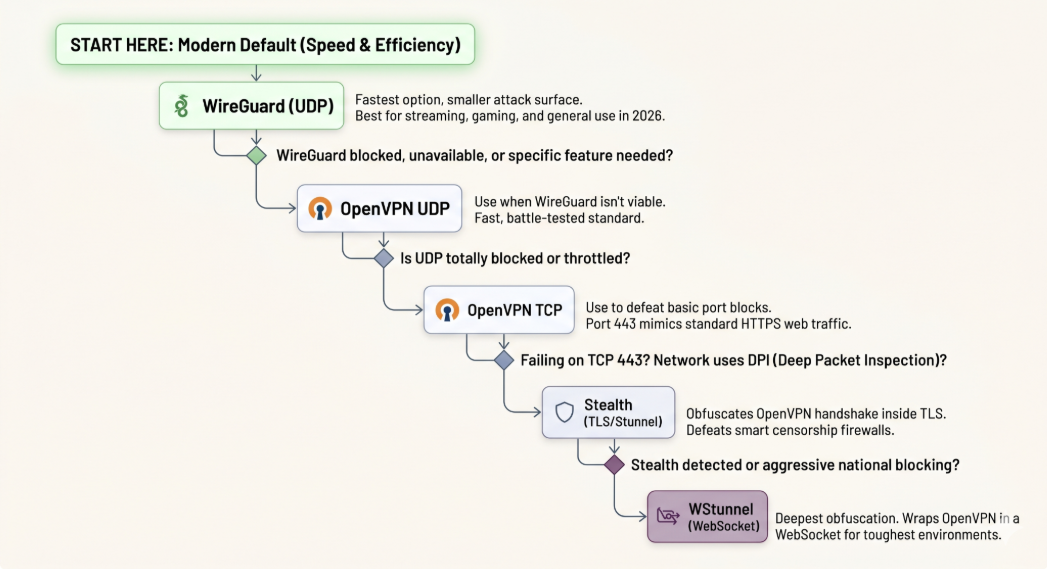
The Obfuscation Ladder
You should view protocol choice as a decision tree based on your specific network conditions. If you’re struggling with a connection, you shouldn't just toggle between TCP and UDP. You should move up the ladder until you find what works. Here are the steps to climb if you’re using Windscribe:
- WireGuard: The modern default. Use this first for the best balance of speed and security. It is faster than any OpenVPN configuration and has a smaller attack surface.
- OpenVPN UDP: Use this if WireGuard is unavailable on your specific platform, if WireGuard’s port is being throttled, or if you require specific OpenVPN features.
- OpenVPN TCP: Your first line of defense against restrictive firewalls. Use this when UDP is blocked entirely. Port 443 is the go-to fallback because it mimics the port used by standard HTTPS traffic.
- Stealth: This encapsulates OpenVPN in a TLS tunnel via Stunnel. It’s designed to defeat DPI systems that can see the OpenVPN handshake even on port 443. Use this on networks that recognize and block standard VPN signatures.
- WStunnel: This wraps OpenVPN inside a WebSocket. This is the deepest fallback, designed for the most aggressive censorship environments where even Stealth might be detected.
The TCP vs. UDP question is an important piece of the puzzle, but it’s a small one. If you’re choosing for speed, WireGuard has already ended the conversation. If you’re choosing for censorship resistance, you’re likely better served by moving past plain TCP and into Stealth or WStunnel territory.
How to Switch Between OpenVPN UDP and TCP in Windscribe
If you’re currently looking at the Windscribe interface and need to swap protocols to fix a slow connection or bypass a block, here’s exactly where those buttons are hidden.
Desktop (Windows, Mac, Linux):
- Open Windscribe and click the Menu icon (three horizontal lines), then select Preferences.
- Select the Connection tab and set Connection Mode to Manual.
- Under the Protocol dropdown, select OpenVPN, then choose UDP or TCP and your preferred port (like 443).
- Open the Windscribe app and tap the Menu icon.
- Tap Preferences and then select Connection.
- Set the Connection Mode to Manual, tap Protocol, and select OpenVPN UDP or OpenVPN TCP.
Routers and Manual Configs:
If you are using a manual setup, you will need to edit your .ovpn configuration file. Look for the line starting with proto and change it to either proto udp or proto tcp.
OpenVPN TCP vs UDP Frequently Asked Questions
Is OpenVPN UDP secure?
Yes. OpenVPN UDP is just as secure as TCP. The encryption is handled by the OpenSSL/TLS layer, which remains the same regardless of which transport protocol you choose. The only difference is how the encrypted packets are delivered, not the strength of the security protecting them.
What is the default port for OpenVPN UDP?
The standard default port for OpenVPN UDP is 1194. However, many VPN providers offer alternative UDP ports, such as 443 or 80, to help the traffic blend in or bypass basic network filters that might be targeting the default port.
Why does OpenVPN use UDP by default?
UDP is the default because it offers significantly lower overhead and latency. By skipping the constant acknowledgment chatter required by TCP, it provides a much faster experience for streaming and gaming. It also avoids the TCP-over-TCP performance collapse that can happen on unstable networks.
Should I use OpenVPN TCP for torrenting?
Generally, no. UDP is better for torrenting because its higher throughput and lower overhead allow for faster download speeds. You should only switch to TCP for P2P activities if your network is so restrictive that UDP traffic is being throttled or blocked entirely. Protocol is only half of it; choosing a VPN for P2P also depends on whether the server allows the traffic at all.
Is WireGuard better than OpenVPN UDP?
For most users in 2026, yes. WireGuard is faster, uses more modern cryptography, and is much easier on your mobile battery. While OpenVPN UDP is still a great, battle-tested protocol, WireGuard has effectively replaced it as the industry standard for raw performance.
Can I use OpenVPN TCP in China or other heavily restricted networks?
TCP 443 can help you bypass simple, port-based firewalls found in schools or offices. However, in heavily censored regions, sophisticated Deep Packet Inspection (DPI) can still identify and block the OpenVPN signature. In those cases, you should use more advanced obfuscation protocols like Stealth or WStunnel.


