



You installed an ad blocker months ago. The little icon is sitting right there in your toolbar, looking smug. And yet, here you are, staring at an autoplaying video ad, a "Congratulations, you've won!" pop-up, and a cookie banner the size of a billboard.
So is it broken? Probably not. It's just doing exactly what it was built to do, which is a much smaller job than most people assume.
Most articles about ad blockers are written by companies that sell ad blockers, or by review sites that earn a commission when you buy one. We make one too (two, actually), so take this with the appropriate grain of salt. But the truth is pretty simple: ad blocking isn't one thing. It's two very different tools working at two very different layers, and once you understand which is which, most of the "why is this ad still here?" mystery goes away.

What an Ad Blocker Actually Does
Every web page you load looks like one thing. It isn't.
Behind the scenes, your browser is making dozens of separate requests: the article text, the images, the fonts, and a small army of ad scripts, tracking pixels, and analytics tools phoning home to companies you've never heard of. Busy pages can make 100+ network requests before you've finished reading the headline.
An ad blocker is a bouncer with a list. Every time your device tries to reach something, the blocker checks it against rules for known ad, tracker, and malware sources. If it's on the list, it gets turned away. If it's not, it walks right in. (How much the bouncer can see depends on where it's standing. More on that in a second.)
That's it. That's the whole trick. Which means an ad blocker is only ever as good as two things:
- Its list: what it knows to look for.
- Its position: where it's standing when the request goes by.
The list part gets most of the attention. The position part is where things actually go wrong.
The Two Layers of Ad Blocking
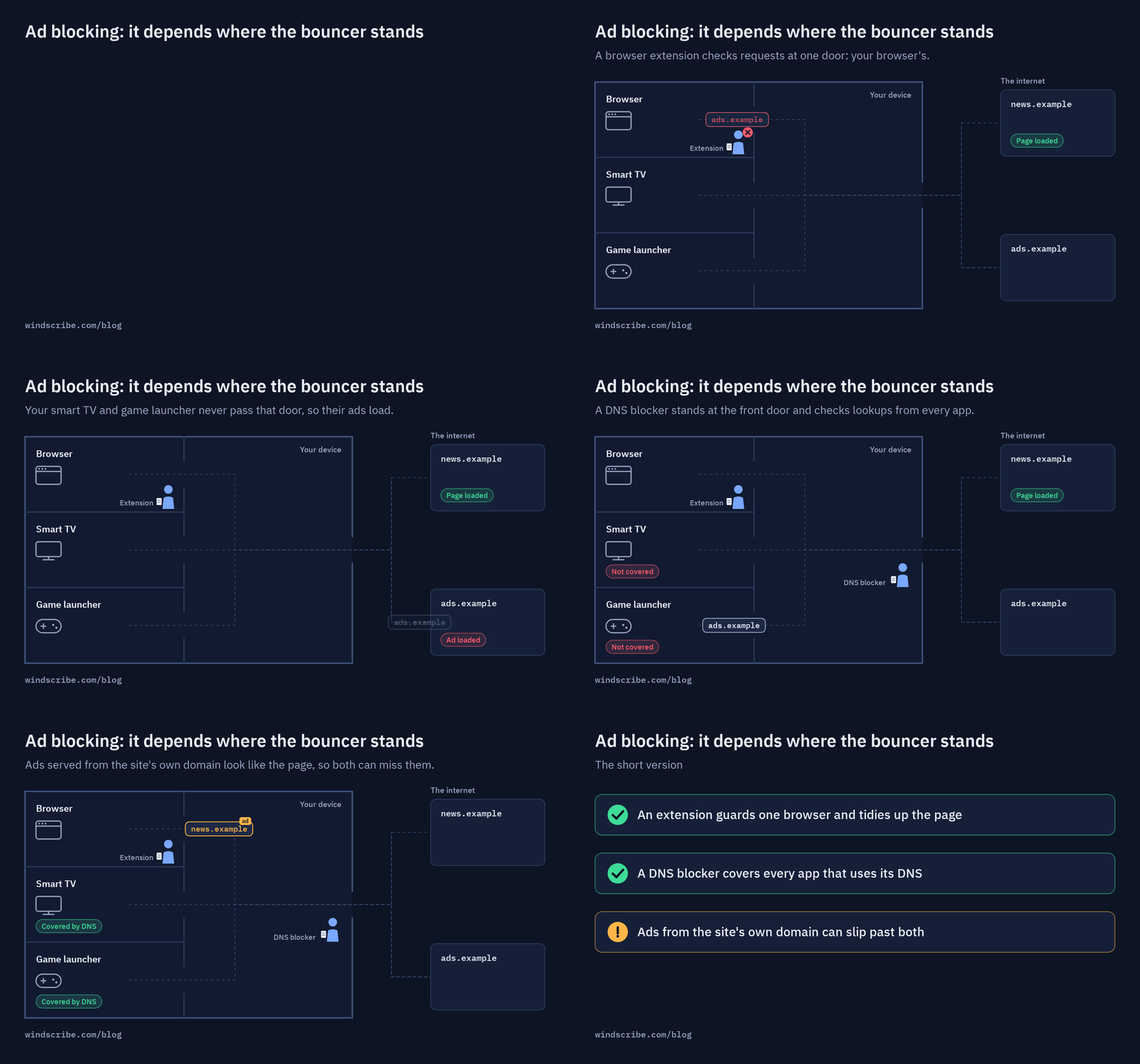
Think of ad blocking as a two-stage security system. One part stands at your device's front door to screen incoming network connections, while the other sits inside your browser to polish up what actually reaches your screen.
Most people rely on just one layer, which is why ads still slip through. To understand why, you need to look at where each layer operates.
Layer 1: Browser-Level Blocking
This is the ad blocker most people picture: an extension like uBlock Origin, AdGuard, or the blocker built into the Windscribe browser extension.
It lives inside your browser and checks every request a page tries to make against filter lists, which are huge, community-maintained sets of rules matching known ad and tracker domains and URL patterns. If a request matches, your browser never sends it.
Browser blockers have one trick nothing else can pull off: cosmetic filtering. Because they can see the page itself, they can hide many of the empty boxes, "Sponsored" tiles, and cookie notices that get left behind after the ad is blocked. That's why a good extension makes a page look clean, not just load faster.
The catch? It only protects that one browser. Your phone's apps, your smart TV, the game launcher on your PC, and that second browser you forgot you installed are all on their own.
Layer 2: DNS-Level Blocking
DNS is the internet's address book. Before your device can load anything, it has to ask a DNS server where that thing lives. Your browser doesn't know where "ads.sketchy-network.com" is until it asks.
A DNS blocker checks each domain lookup against its blocklists and simply refuses to answer for known ad, tracker, and malware domains. No address, no connection, no ad. And because most apps look up addresses the same way, DNS blocking covers every app that uses that DNS path, not just your browser. (The exception: some browsers and apps bring their own resolver, like a browser's "Secure DNS" setting, Android's Private DNS, or hardcoded IP addresses, and those can skip a DNS blocker entirely.)
The catch? DNS blocking only sees domain names. It has no idea what's on the page. If a site serves its ads from its own domain, DNS blocking can't separate the ad from the article without blocking the whole site. It also can't clean up the empty space a blocked ad leaves behind.
Browser vs. DNS Blocking, Side by Side
| What it does | Browser extension | DNS blocker |
|---|---|---|
| Where it works | One browser | Every app using that VPN/DNS path |
| Blocks third-party ads and trackers | Yes | Yes |
| Blocks trackers inside other apps | No | Yes |
| Cleans up leftover ad boxes and many cookie notices | Yes | No |
| Blocks ads served from the site's own domain | Sometimes | No |
| Blocks known malware and phishing domains | If its lists include them | If its lists include them |
| Affected by Chrome's extension rules | Yes | No |
| Needs a VPN or DNS setting turned on | No | Yes |
Why Your Ad Blocker Isn't Catching Everything
If ads are still getting through, it's almost always one of these. Ranked from "easy fix" to "sorry, nothing to be done."
1. It's Paused, or the Site Is Allowlisted
It happens to everyone. A site broke, you paused your blocker "just for a minute," and that was three months ago. Or a site begged you to turn it off, and you clicked yes.
Click the extension icon, make sure it's on for the site you're looking at, and clear out any allowlist entries you don't remember adding.
2. Your Filter Lists Are Stale (or Set to "Acceptable Ads")
Ad networks rotate domains constantly. Old lists miss new ones. Some popular blockers also ship with an "acceptable ads" program turned on by default, which lets certain advertisers through on purpose.
Update your lists and switch off any "acceptable ads" option. But don't go wild enabling every list you can find. Stack too many and you'll start breaking sites and slowing your browser down.
3. Chrome Changed the Rules
This one caught a lot of people off guard. Chrome moved to a new extension system called Manifest V3, which limits how much control extensions have over network requests, and the Manifest V2 phaseout hit older request-blocking extensions hard. Chrome 138 was the last Chrome version that could support Manifest V2 under enterprise policy, Chrome 139 removed that escape hatch, and on August 31, 2026, Google removed the remaining Manifest V2 extensions from the Chrome Web Store.
uBlock Origin Lite still exists for Chrome, but it's the Manifest V3-friendly version, which means fewer deep controls than the full uBlock Origin. Firefox still supports full uBlock Origin. Brave says it will keep best-effort support for some privacy-relevant Manifest V2 extensions, including uBlock Origin.
If your ad blocking got noticeably worse after a Chrome update, this could be why. And it's a great argument for adding a DNS layer, because Chrome's extension rules don't touch DNS filtering at all.
4. Your VPN or DNS Blocker Isn't Actually On
DNS blocking through a VPN only works while you're connected. Disconnect to troubleshoot something, forget to reconnect, and your network-level protection quietly disappears.
Same goes for custom DNS settings. A browser's Secure DNS (DNS-over-HTTPS) setting can bypass the VPN's DNS path, which may stop DNS-level filtering from applying at all.
5. The Ad Comes From the Site Itself
This is the big one, and it's getting bigger. More sites now serve ads from their own domain, or stitch them directly into the content. When the ad and the article come from the same place, a blocker has a much harder time telling them apart.
YouTube is the best-known example. In 2024, it was spotted testing server-side ad insertion, which merges the ad into the video stream itself. When that happens, there's no separate ad request to block. The ad is the video, at least for 30 seconds.
What Actually Blocks Each Kind of Ad
There's no single "block everything" switch. It's about matching the right layer to the specific thing you're trying to stop:
| Ad Type | What You See | What Works | What Doesn't |
|---|---|---|---|
| Banner and display ads | Boxes around and inside articles | Browser extension, DNS blocker | Nothing extra needed; most blockers catch these |
| Pop-ups and notification prompts | New tabs, "Allow notifications?" | Browser extension (for many pop-ups), your browser's notification settings (for permission prompts) | DNS blocking alone, if served from the site's own domain |
| Trackers inside apps | Nothing, which is the problem | DNS blocker (like R.O.B.E.R.T. while connected through the Windscribe app or a custom config) | Browser extensions |
| Cookie banners | "We value your privacy" walls | Browser extension with cookie banner filtering | DNS blocking |
| Malware and phishing domains | Fake login pages, sketchy redirects | DNS blocker with malware lists, browser extension | Ad blockers without security lists |
| In-stream and same-domain ads | Ads inside the video or page itself | Sometimes a browser extension, often nothing | DNS blocking, VPN tunneling alone |
The pattern is pretty clear. Browser extensions are best at cleaning up the page you're looking at. DNS blocking is best at everything happening behind your back.
Does a VPN Block Ads?
On its own, no.
A VPN encrypts your traffic and changes where it appears to come from. That's genuinely useful, but it does nothing to stop a page from loading an ad. Browsing from Toronto instead of Chicago might change which ads you see. It won't stop them from loading.
What some VPNs do is add DNS filtering on their servers. Since your DNS lookups already go through the VPN, the provider can refuse to resolve known ad and tracker domains along the way. That's the part doing the blocking, not the tunnel. At Windscribe, that part is R.O.B.E.R.T.
So if a VPN advertises "built-in ad blocking," what it usually means is "we run a DNS blocker for you." Which is great! Just know that it comes with all the same strengths and blind spots as any other DNS blocker.
What No Ad Blocker Can Fix
An ad blocker controls which requests leave your device. It doesn't control what a website decides to put inside the content you asked for.
There are a few hard limits where every blocker on the market, including ours, runs out of road:
- Ads stitched into the stream: If the ad arrives as part of the same video or audio stream as the show, there's nothing separate to block.
- Sponsored posts in apps you're signed into: Promoted posts in a social feed come from the same servers as your friends' posts. Block the domain and you've blocked the whole app.
- Ad blocker walls: Some sites detect blockers and refuse to load until you switch yours off. Your options are allowlisting them, paying for an ad-free tier, or leaving.
- Creator reads and sponsored articles: If a YouTuber reads an ad in their own voice, or a site publishes a "sponsored" story, that's content. No traditional network or DNS blocker can reliably filter out a sentence baked into the content itself.
A blocker is a great answer to third-party ads and trackers. It's a terrible answer to ads that are part of the content itself. Knowing the difference saves you a lot of time installing extensions that were never going to fix the problem.
How Ad Blocking Works at Windscribe
We run both layers, and we built them to cover each other's blind spots.
R.O.B.E.R.T. (the DNS layer)
R.O.B.E.R.T. blocks ad, tracker, malware, and other filtered domains at the DNS level on our servers. It works while you're connected through the Windscribe desktop or mobile app, or a Windscribe custom configuration, for any app that uses that DNS path.
Blocked domains resolve to 0.0.0.0, which is a polite way of saying "nowhere." Changes made in My Account sync to your connected devices automatically. If you toggle blocklists from the desktop app instead, reconnect so they take effect.
The browser extension (the page layer)
The Windscribe extension for Chrome, Firefox, and Edge is built on the uBlock engine and filter lists, plus Windscribe's own custom lists, and includes browser-level blocking features like Ad Crusher, Tracker Eradicator, Malware Evader, Social Distancing, and Cookie Go Away (for those endless consent banners).
Depending on browser and extension version, some appear as separate controls and some are grouped under Ad Crusher. It works even when you're not connected to a VPN server. If you run the app and the extension together, the extension handles blocking inside your browser and R.O.B.E.R.T. filters matching domains for app traffic that uses Windscribe's DNS path.
Here's what you get on each plan:
| Feature | Free | Build A Plan | Pro |
|---|---|---|---|
| R.O.B.E.R.T. blocklists | Malware & Ads | All lists | All lists |
| Custom allow/block rules | Three | 10 | 1,000 |
| Browser extension ad blocking | Yes | Yes | Yes |
The paid lists go beyond ads, covering things like social networks, gambling, clickbait, and cryptominers, for when you want to block a whole category instead of hunting domains one by one.
Our Own Catch
Fair's fair. Here's where our setup has limits too:
- R.O.B.E.R.T. only works while you're connected. Disconnect the VPN and the DNS layer goes with it. The extension keeps blocking, but your other apps are back on their own.
- The free plan is lean. Free users get the Malware and Ads lists and three custom rules. That covers the basics, but not the extra categories.
- DNS blocking can break things. Every blocklist occasionally catches something it shouldn't, like a login page or a checkout flow. That's what custom rules are for, but it's still an extra step.
- We can't beat in-stream ads either. Nobody reliably can. See above.
Be Smart
Before you install three more extensions or pay for anything (including us), take 30 seconds to figure out which layer you're actually missing.
- Trackers in apps getting through? You need DNS blocking.
- Pop-ups and cookie banners getting through? You need a better browser extension.
- Ads inside a video getting through? No traditional blocker is going to reliably fix that, and it's not your fault.
Ads aren't going anywhere. But you get a real say in how many of them follow you around the internet, and checking takes less time than sitting through one unskippable ad. Turn on R.O.B.E.R.T., pick your blocklists, and while you're at it, run our DNS Leak Test and WebRTC Leak Test.

Frequently Asked Questions
How do ad blockers work?
Ad blockers check what your device is trying to load against lists of known ad, tracker, and malware sources, and block anything that matches. Browser blockers check browser requests against filter rules and can hide leftover page elements. DNS blockers check domain lookups against blocklists before a connection is made, which covers every app that uses that DNS path.
How do I know if my ad blocker is working?
Run an ad blocker test. A good one loads common ad, tracker, and malware requests and shows which ones got blocked. If most come back blocked, you're in good shape. If some slip through, check which layer is missing.
Does a VPN block ads?
Not by itself. A VPN encrypts your traffic and changes your IP address, but it doesn't stop ads from loading. Some VPNs, including Windscribe, add DNS filtering on their servers, and that filtering is what blocks the ads.
Is a DNS ad blocker better than a browser extension?
Neither is better; they do different jobs. A DNS blocker covers every app using it but can't hide what's left on the page. A browser extension cleans up the page but only protects one browser. Running both catches the most.
Why doesn't my ad blocker block YouTube ads?
YouTube actively fights ad blockers and changes how it serves ads often. It has also tested inserting ads directly into the video stream, which makes them very hard for any blocker to separate from the video. Results tend to vary week to week.
Is it legal to use an ad blocker?
In most countries, yes. Using an ad blocker is generally treated as your choice about what your own device loads. Some websites restrict access for blocker users in their terms of service, but that's a site rule, not a law.
Does Windscribe block ads on the free plan?
Yes. The free plan includes R.O.B.E.R.T.'s Malware and Ads blocklists while you're connected, and the browser extension's ad blocking is on by default.


