




VPN homepages love to sell you on the "military-grade encrypted tunnel," but almost none of them tell you what it actually is. The technical term sells better than the mechanics, and frankly, it leaves you assuming your traffic is riding through some magical sci-fi pipe.
But there is no pipe.
A VPN tunnel is simply the encrypted connection between your device and a VPN server. Your app takes your traffic, encrypts it, wraps it inside ordinary internet packets, and routes them over the exact same Wi-Fi and undersea cables you always use. Intermediaries like your ISP can see data moving, but they can't see what it is or where it's going.
Understanding the real mechanics is the only way to figure out what your VPN actually protects, why your data can still leak through DNS or IPv6 while your app says "Connected," and what happens to your real IP address when the connection drops.
So, here's how it all actually works.
If There's No Tunnel... What Is a VPN Tunnel, Actually?
Your data isn't traveling through a special glowing pipe. It rides the exact same Wi-Fi, ISP, and undersea cables it always has. The "tunnel" isn't a physical place.

It's a clever software trick your VPN app plays on your device using three simple steps:
- The virtual adapter: When you tap connect, the app creates a fake software network card (a TUN interface). Your operating system falls for it, treating it like a normal Wi-Fi adapter and handing it your traffic. But instead of sending data straight out to the web, this virtual card funnels it into the VPN app.
- The encapsulation trick: This is the core mechanism. Your browser builds a normal request. The VPN app grabs that entire request (destination address included) encrypts it into scrambled code (ciphertext), and hides it inside a brand new outer packet. That new outer packet is stamped with a single visible address: that of the VPN server.
- The hand-off: Your ISP carries this outer packet like any other web traffic. When it hits the VPN server, the server strips off the outer wrapper, decrypts your original request, and sends it to the actual website. The reply makes the exact same trip in reverse.
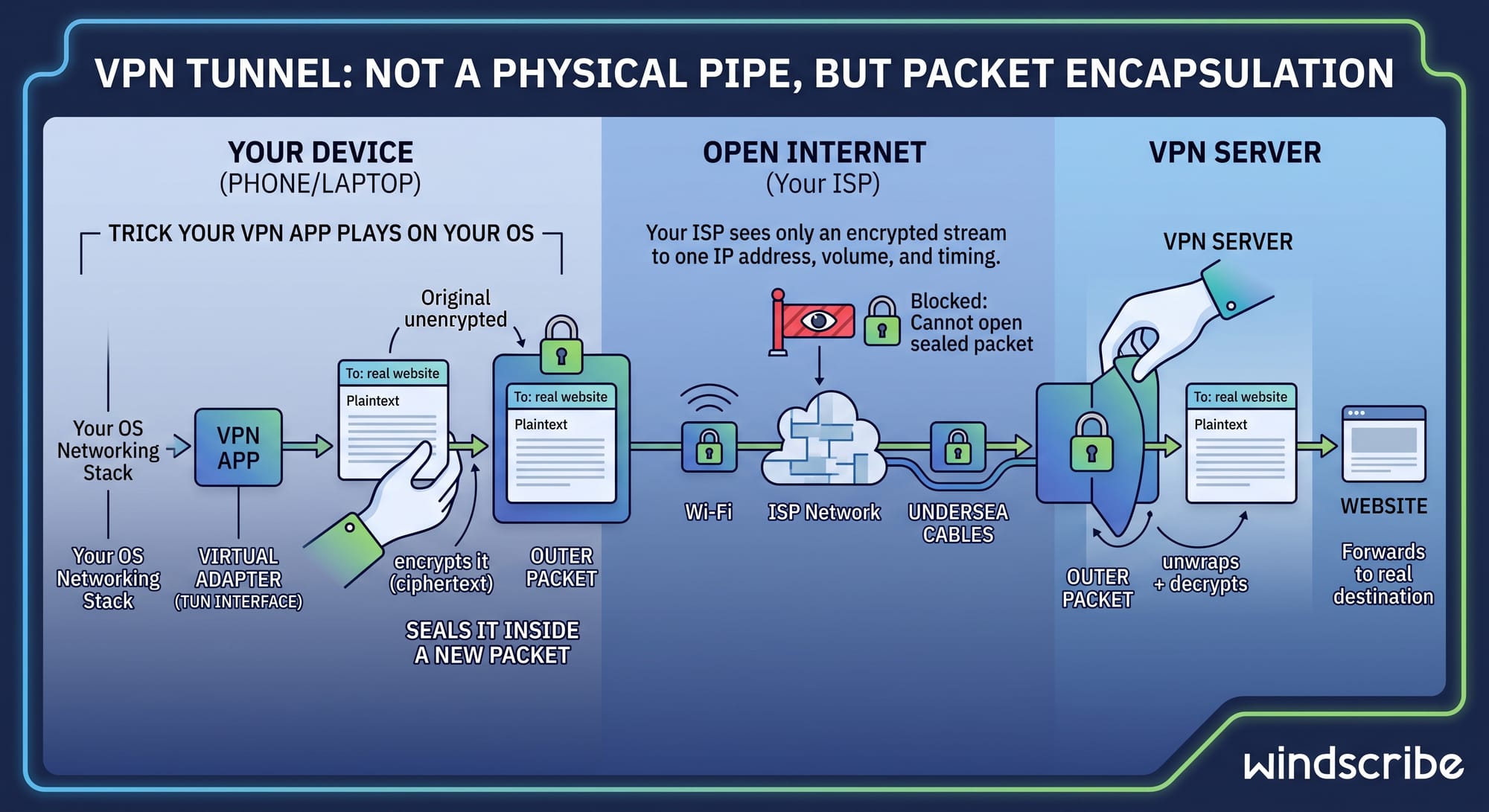
Through all of this, your ISP only sees an encrypted stream moving to a single IP address, plus how much data you're sending and when. They can't see the site you're visiting, the pages you're loading, or the content of your traffic. They can still throttle or block the connection, but they can't peek inside.
All that wrapping and unwrapping gets negotiated in a few milliseconds by a protocol handshake. Which raises an obvious question: how do your device and a server that just met agree on secret keys while your ISP watches every packet go by?
How a VPN Tunnel Gets Built, Step by Step
While exact mechanics vary depending on the VPN protocol you use (WireGuard, for instance, speeds things up by combining the first two steps), nearly every VPN builds its connection in five distinct moves:
- Access check: The app proves who you are using account credentials, digital certificates, or cryptographic keys. If the server doesn't recognize you, it drops the connection instantly.
- The handshake: The app and server establish temporary session keys to lock down the session. Modern protocols constantly rotate these keys through ephemeral key exchange, giving you perfect forward secrecy: even if a key is somehow compromised later, your past sessions remain completely unreadable.
- Flipping the switch: The app spins up the virtual network adapter, and your operating system starts routing network traffic into it. From here on out, your device's apps have no idea a VPN even exists; they just send data normally.
- Outbound protection: Your data gets encrypted, stuffed inside outer packets, and sent across the web to the VPN server, where it is unwrapped and forwarded to its final destination.
- The return journey: The destination website responds to the VPN server's exit IP instead of your real home address. The server encrypts that reply, wraps it back up, and routes it back down the tunnel to your device.
Your traffic is secured in both directions, not just on the way out. How fast this entire sequence feels and how well it stands up to strict network blocks depends entirely on the protocol building it.
VPN Tunneling Protocols: What Builds the Tunnel
A tunneling protocol is the engine under the hood: it handles the handshake, encrypts and wraps your packets, and keeps the connection alive when your network hiccups. Despite what bloated vendor glossaries claim, you only need to know a few in 2026.
| Protocol | Speed | Best For | Main Drawback |
|---|---|---|---|
| WireGuard | Fastest | Everyday default | UDP-only; easier to block on restrictive networks |
| OpenVPN UDP | Fast | Older devices and router setups | Larger, legacy codebase; slower than WireGuard |
| OpenVPN TCP | Slower | Bypassing networks that block UDP | TCP-over-TCP overhead drags performance down |
| IKEv2/IPsec | Fast | Switching between Wi-Fi and cellular | Easy for firewalls to block; limited port flexibility |
| Stealth | Slower | Networks actively blocking VPNs | Trades raw speed for total camouflage |
| WStunnel | Slower | Firewalls that only allow WebSocket traffic | Same trade: disguise over speed |
Choosing the right protocol is straightforward:
- Use WireGuard by default. It has a lean, easy-to-audit codebase and delivers the fastest speeds on modern hardware.
- Switch to OpenVPN TCP or Stealth when a network fights back. Both can run over TCP port 443 to blend in with standard, encrypted web traffic.
- Use IKEv2 on mobile. Its MOBIKE feature seamlessly hands off connections when hopping between Wi-Fi and cellular networks.
All of these options, including Stealth and WStunnel, can be selected directly in Windscribe's app settings.
The Dead Protocols You Should Ignore
Competitor glossaries still list ancient protocols like PPTP and L2TP/IPsec as viable choices. PPTP's authentication was cracked on stage at DEF CON in 2012 and never recovered. Offering it today is like selling gas station sushi.
L2TP is equally obsolete: clumsy, slow, and completely lacking any modern advantage. If a provider pushes either one, close the tab. You're looking at a museum exhibit, not a security tool.
Full Tunnel vs. Split Tunnel
Full tunnel routes 100% of your device's traffic through the encrypted VPN. Split tunnel lets you choose: specific apps or websites go through the VPN, while everything else uses your normal, unencrypted connection.

Full tunnel is the right default for privacy. Split tunneling isn't a feature upgrade, but a convenience trade. Every app you exclude is traffic handed straight back to your ISP, completely exposed and tied to your real IP address. Use it deliberately, not casually. Split tunneling makes sense when:
- Sensitive or stubborn apps: Your bank flags VPN IP addresses as suspicious activity and threatens to lock your account.
- Local network access: Connecting to a VPN breaks access to your home printer or local storage (NAS).
- Selective bandwidth: You want maximum speeds for local streaming while keeping your torrent client locked inside the tunnel at all times.
Windscribe handles Split Tunneling in both directions: Inclusive mode (only chosen apps use the tunnel) and Exclusive mode (everything uses the tunnel except chosen apps), alongside granular IP and hostname rules. Availability spans Windows, Mac, Linux, and Android (with macOS options varying slightly by client version).
But even in full-tunnel mode with zero apps excluded, data can still leak out.
What Escapes the Tunnel (Even When You're Connected)
Seeing a green "Connected" status doesn't automatically mean you're fully covered. A VPN tunnel only carries the traffic your operating system actually hands to it.
These four common escape routes occur most often with browser extensions, proxy setups, or misconfigured clients. A solid VPN client plugs them automatically:
DNS Leaks (Your History in Plaintext)
Before loading a site, your device looks up its IP address via a DNS resolver. If your VPN misses these lookups, your actual webpage traffic travels encrypted through the tunnel while your raw DNS queries slip out over your regular connection.
Your ISP can't see what you do on the site, but they get a clean, timestamped list of every domain you visit. Proper VPNs, like Windscribe, force all DNS requests through the tunnel to their own private resolvers (like R.O.B.E.R.T.).
WebRTC Leaks (Browsers Talking Too Much)
WebRTC powers real-time video and voice in your browser. If you rely solely on a browser extension or proxy rather than a full-system VPN, WebRTC can reveal your true IP address to any site that requests it by design, no hacking required.
IPv6 Leaks (The Industry Standard Shrug)
Most home connections run IPv4 and IPv6 side by side, but many VPNs only handle IPv4. If an app ignores IPv6, your device will happily route that traffic right around the VPN while claiming you're connected.
A good VPN must either block IPv6 completely to prevent leaks or support full IPv6 egress through the tunnel. Windscribe blocks IPv6 by default and offers full IPv6 egress on select WireGuard locations.
LAN Traffic & OS Bypasses
Devices on your local network (like printers or smart TVs) communicate outside the tunnel on purpose so local features keep working. Additionally, some operating systems occasionally allow their own background services to bypass third-party VPN apps. No VPN can completely override a system vendor that decides its own traffic gets a free pass.
While these leaks happen during normal operation, the two worst scenarios are when the tunnel drops entirely or when a hostile network tries to strangle it.
When the Tunnel Breaks (and When It Gets Blocked)
Live connections fail. What matters is what your traffic does the second things break, and whether a restrictive network lets your connection exist in the first place.
When the Tunnel Drops: Kill Switches vs. Failing Closed
Tunnels drop for simple reasons: a Wi-Fi hiccup, an app crash, or server maintenance. The standard industry fix is a kill switch, which watches the connection and cuts your internet when it detects a drop.
The keyword is detects. Most kill switches are reactive. In the milliseconds between the connection dying and the software noticing, sensitive packets carrying your real IP address can slip out. It only takes one stray packet to expose you.
Instead of relying on a reactive check, Windscribe uses a built-in Firewall. When enabled, it blocks all connectivity outside the tunnel directly at the operating system level. If the tunnel dies, there is no delay or detection gap, because no unencrypted route outside the tunnel ever existed. In safety engineering, this is called failing closed, when the connection breaks, it locks down into a safe state rather than falling open.

When the Tunnel Is Blocked: Disguising Your Traffic
Restrictive networks at hotels, universities, or in censored regions don't just block VPN sites; they inspect the connection itself. Deep Packet Inspection (DPI) flags the unique cryptographic signatures of WireGuard or OpenVPN and blocks them before the connection completes.
The fix is camouflage, aka wrapping the tunnel inside standard web traffic:
- Stealth Protocol: Wraps OpenVPN inside a TLS connection (usually over TCP port 443), making it look identical to standard HTTPS secure web traffic.
- WStunnel Protocol: Wraps the tunnel inside WebSocket traffic to pass through strict firewalls.
- Double Hop: Combines the Windscribe desktop app with the browser extension, running a proxy on top of the VPN so browser traffic travels through two distinct servers.
No disguise works everywhere 100% of the time, but a tunnel that can change its appearance is much harder to block.
The Bottom Line
A VPN tunnel isn't a magical pipe. It's packet encapsulation. By encrypting your data, wrapping it inside new packets, and routing it through a virtual adapter, a VPN keeps your activity private from ISPs, local network snoops, and restrictive firewalls.
Knowing how the mechanics work reveals why the details matter:
- Protocol choice dictates your experience: Use WireGuard for raw speed, and switch to Stealth or WStunnel when a network tries to block you.
- Leaks happen easily: Unhandled DNS queries, WebRTC, and IPv6 traffic can expose your identity even while your VPN app says "Connected".
- Architecture determines safety: A fail-closed firewall that blocks unencrypted traffic at the OS level is far safer than a reactive kill switch that takes milliseconds to notice a connection drop.
A tunnel is only as secure as the protocol building it and the software managing it. Pick a reliable provider, keep your DNS and IPv6 locked down, and don't let flashy marketing metaphors distract from real engineering.

Frequently Asked Questions
What does a VPN tunnel do?
A VPN tunnel encrypts your internet traffic, wraps it inside new packets, and routes it through a secure server before forwarding it to its destination. This hides your real IP address and browsing activity from local networks, hackers, and your ISP. It ensures your data remains secure and private on both the way out and the return trip.
Is a VPN tunnel legal?
Yes, using a VPN is legal in most countries. A few governments restrict or strictly regulate privacy tools, so it is always smart to check local rules when traveling. Keep in mind that a VPN protects your privacy, but it does not make illegal online activities legal.
Is tunnel VPN safe?
A VPN tunnel is safe as long as it uses modern encryption protocols like WireGuard, forces DNS queries inside, and uses a fail-closed firewall. Outdated protocols like PPTP or misconfigured apps that leak DNS, WebRTC, or IPv6 traffic can expose your real identity. Security ultimately depends on the protocol quality and provider setup.
What is the difference between a VPN and a VPN tunnel?
In casual conversation, the two terms are often used interchangeably. Technically, the VPN tunnel is the specific encrypted connection created between your device and the remote server. The VPN refers to the broader service, including the provider's server network, desktop apps, and management software.
Does a VPN tunnel slow down my internet?
Yes, a VPN tunnel usually causes a slight drop in speed due to the overhead of encrypting and routing your traffic. Modern protocols like WireGuard minimize this delay so it is barely noticeable on fast connections. Your physical distance to the chosen server typically impacts your speed far more than the encryption process.
Can my ISP see inside a VPN tunnel?
No, your ISP cannot see inside an active VPN tunnel. They can only see that you are connected to a VPN server's IP address, along with the timing and total volume of your traffic. The specific websites you visit, search queries, and transmitted data remain completely hidden, assuming your DNS is properly contained.


