



You asked. Then asked again. Then posted about it. Then probably muttered about it while looking at a leak test.

Good news: Windscribe now supports IPv6 (egress).
This is one of those long-awaited features that sound small if you are a normal person, and extremely overdue if you are the kind of person who knows what an AAAA record is. Either way, it matters. With IPv6 egress support enabled, Windscribe can now route IPv6 traffic through the VPN tunnel on supported Pro locations, while keeping IPv4 working like normal. That closes one of the older gaps in what a VPN hides about your connection.
In plain English: the internet is slowly moving beyond IPv4, and Windscribe is now better equipped for that future.
What changed?
Until now, Windscribe handled IPv6 by blocking it. That was the safe approach. A VPN that ignores IPv6 can create leaks, break websites, or send some traffic outside the tunnel, which is bad, dumb, and the opposite of why you installed a VPN in the first place.
Now, supported Windscribe Pro locations can provide IPv6 egress through the VPN tunnel. That means websites and apps may see a Windscribe IPv6 address instead of only a Windscribe IPv4 address.
The key word is “supported.” IPv6 support is being rolled out by location on WireGuard only. If the VPN location you connect to supports IPv6, Windscribe can use it. If it does not, Windscribe keeps using IPv4. No panic clicking required.
Things are moving fast here and the easiest way to check which locations support IPv6 is to chat with Garry (our support bot) on the Windscribe website. He can point you in the right direction!
Why IPv6 matters
Every device on the internet needs an address. IPv4 is the old address system, and it was built back when “the internet” meant universities, nerds, and maybe three printers. It gave the world about 4.3 billion addresses, which sounded like plenty until we connected every phone, laptop, thermostat, game console, camera, watch, fridge, and suspiciously chatty doorbell.
IPv6 is the newer address system designed to solve that problem. It has a comically large number of possible addresses, enough that we can stop rationing them like apocalypse beans.
More websites, networks, apps, and internet providers now support IPv6. Some services work better with it. A few are IPv6-only. And as IPv6 adoption grows, VPNs need to handle it properly instead of pretending the internet stopped evolving in 1998.
What this means for Windscribe users
You can reach IPv6-only websites and services
Some corners of the internet are only reachable over IPv6. With IPv6 support on Windscribe, those sites are now accessible through supported VPN locations instead of failing because your VPN connection is living in the IPv4 past. That’s right, you now have access to https://clintonwhitehouse1.archives.gov/ and https://ipv6is.life/.
Possibly fewer CAPTCHA roadblocks
No promises, because CAPTCHA systems are powered by mystery, spite, and whatever Google had for breakfast. But IPv6 may help reduce some annoying bot checks in certain cases by giving your traffic access to different address space and reputation patterns. Because there are so many more IPv6 addresses available to our users than IPv4 addresses, CAPTCHAs (which are designed to block "abusive" traffic) are more likely to be lenient with IPv6 traffic.

Translation: you may spend less time proving you are not a robot to a robot.
Better peer-to-peer reachability
Peer-to-peer apps work best when they can reach more peers. With IPv6 support, Windscribe users may be exposed to more peers that are also using IPv6, which can improve peer discovery and connectivity in some situations.
IPv6 matters most for direct peer connections, which is where P2P traffic behaves differently from ordinary browsing.
This does not magically make every torrent faster, cure bad seed ratios, or make your Linux ISO finish before dinner. But it does give peer-to-peer traffic a bigger pool of peers to work with when IPv6 is available.
Better future-proofing
The internet is not switching to IPv6 overnight, because nothing involving networking is allowed to be simple. But IPv6 usage keeps growing, and Windscribe now supports the modern dual-stack internet instead of only dealing with one half of it.
How to enable IPv6 in Windscribe
If your app supports it, setup is simple:
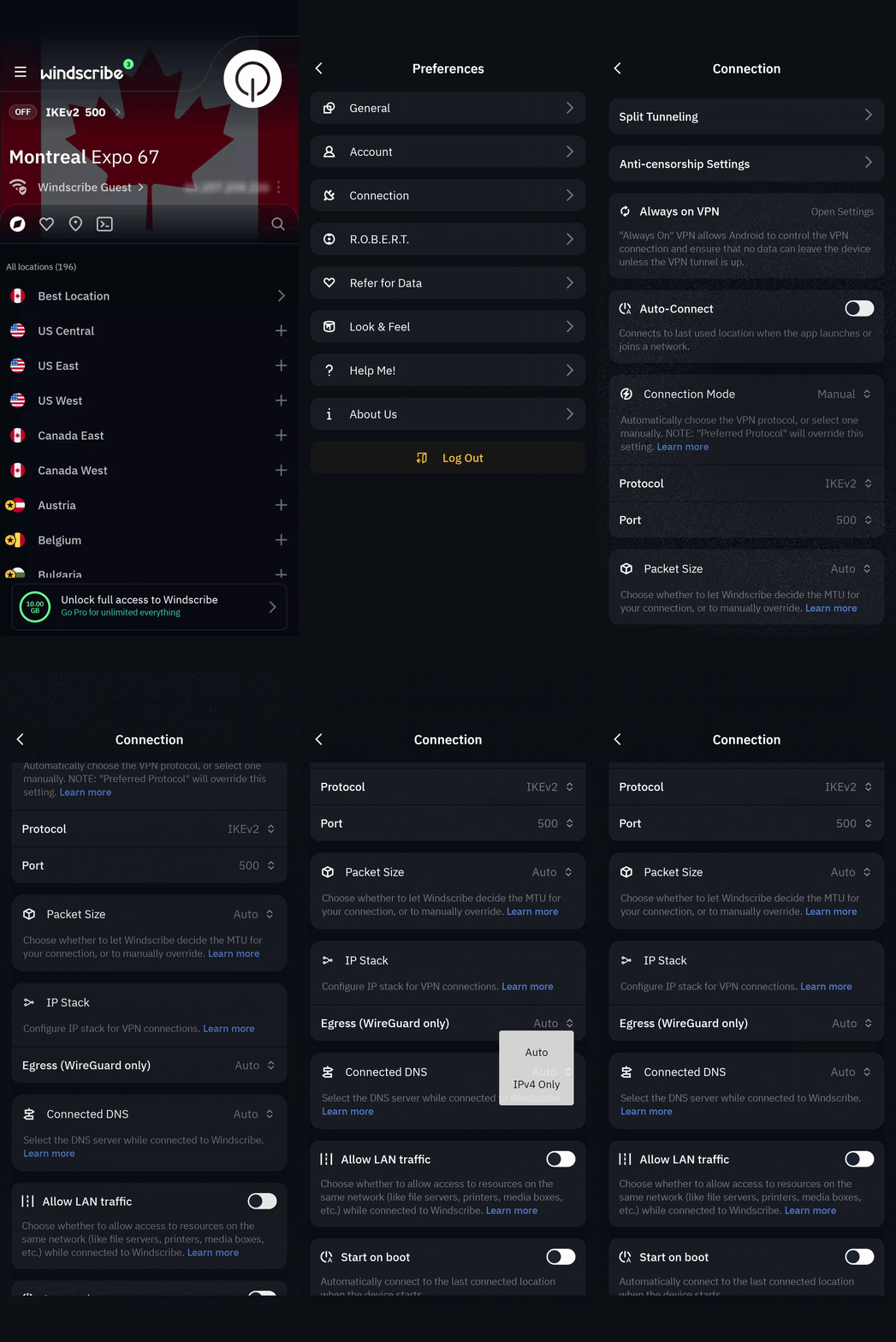
- Open the Windscribe app.
- Go to Preferences.
- Open Connection.
- Find IP Stack.
- Set Egress to Auto.
- Connect like normal.
Auto is the recommended setting and your app will default to this. It allows Windscribe to use IPv6 when your selected VPN location supports it, and IPv4 when it does not.
If you only want IPv4, choose IPv4 Only instead.
Minimum app versions for IPv6 support
You will need at least:
Windows, macOS, and Linux: Windscribe 2.23.4
Android: Windscribe 4.0
iOS: Windscribe 3.10.1
IPv6 support is not currently available in Windscribe browser extensions or custom configuration files for OpenVPN and IKEv2.
Manual Config Support (WireGuard)
WireGuard manual configs support IPv6 egress by default. You will notice an IPv6 LAN address in the Address section of every config you generate. However, IPv6 egress will only actually be used if the location supports it. Unsure if the location config you downloaded supports IPv6? Check with Garry, the chatbot on our website.
How to check if IPv6 is working
After connecting:
1. Make sure IP Stack Egress is set to Auto.
2. Connect to a supported Windscribe Pro location, such as Toronto - Comfort Zone or Amsterdam - Stroopwafel
3. Visit the Windscribe IP checker or another IPv6 test site.
4. Look for a Windscribe IPv6 address.
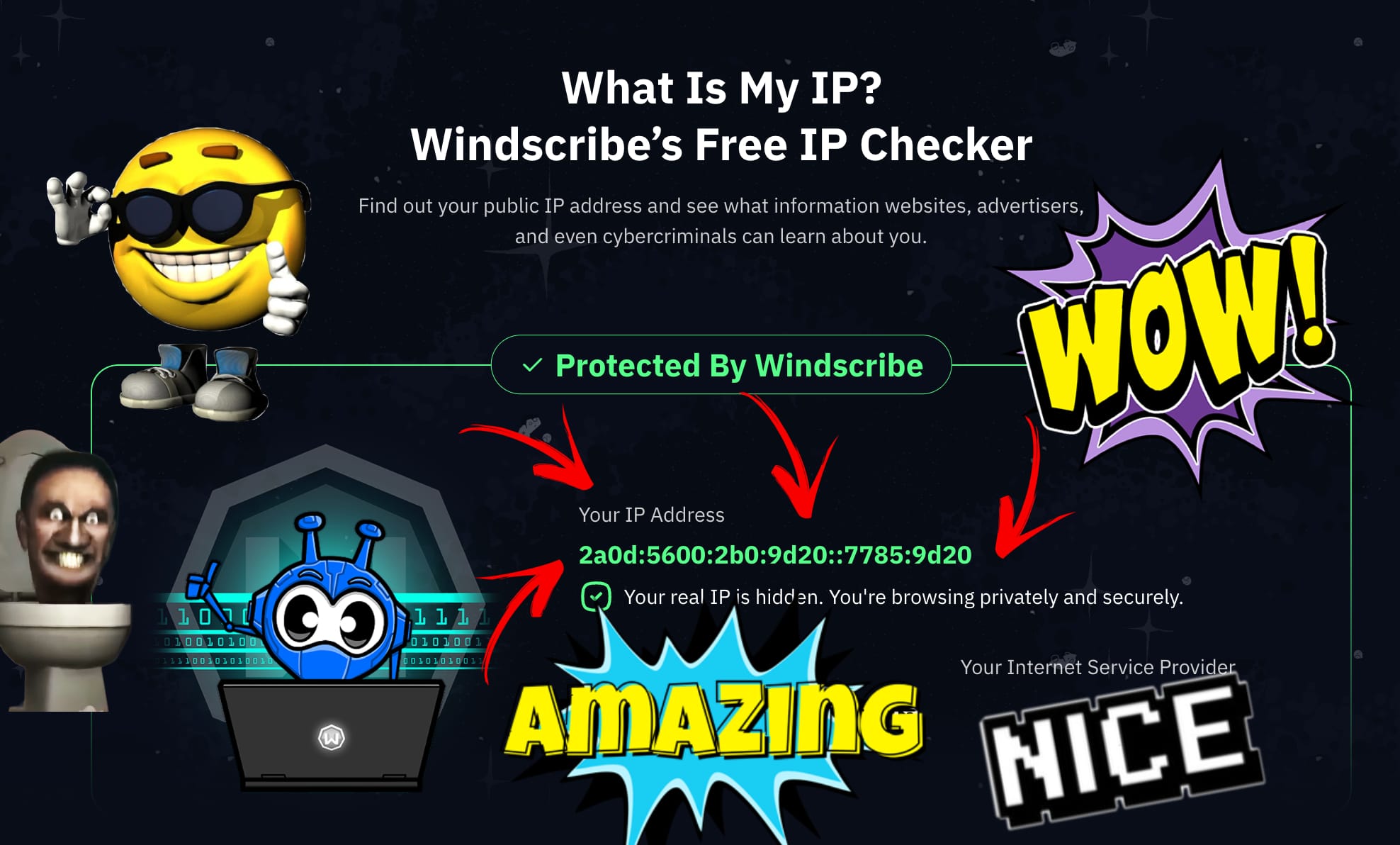
If you only see IPv4, that probably means the location you selected does not support IPv6 yet. Your connection is still protected. It is just using IPv4.
IPv6 support versus IPv6 leak protection
These are not the same thing.
IPv6 leak protection stops your real IPv6 address from escaping outside the VPN tunnel. Windscribe has handled that for years by blocking IPv6 where needed.
IPv6 support means Windscribe can now provide IPv6 traffic through the VPN tunnel on supported locations. Your real IP address stays hidden, but the destination site may see a Windscribe IPv6 address.
One prevents leaks. The other lets you actually use IPv6. Both matter.
The short version
Windscribe now supports IPv6 egress on supported Pro locations. It works through the app when IP Stack is set to Auto, falls back to IPv4 where IPv6 is not available, and helps Windscribe support the modern internet without making users babysit settings.
Long-awaited? Yes.
Useful? Also yes.
A tiny bit nerdy? Obviously. That is why we like it.
IPv6 VPN Frequently Asked Questions
Does Windscribe support IPv6 now?
Yes. Windscribe supports IPv6 egress on supported Pro locations when IP Stack is set to Auto and connection protocol is set to WireGuard.
Is IPv6 available on every Windscribe location?
No. IPv6 is rolling out by location. If a location does not support IPv6 yet, Windscribe will keep using IPv4. Check with Garry, our chatbot, on the Windscribe website for the most up-to-date list of supported locations.
Do I need an IPv6 connection from my internet provider?
No. If the Windscribe VPN location supports IPv6 egress, Windscribe can provide IPv6 through the VPN tunnel even if your regular connection is IPv4.
Will IPv6 reduce CAPTCHAs?
Possibly. Some users may see fewer CAPTCHA prompts depending on the site, address reputation, and how that site handles IPv6 traffic. It is not guaranteed.
Does IPv6 help with peer-to-peer traffic?
It can. IPv6 may let peer-to-peer apps reach more peers that are using IPv6, depending on the app, location, and network conditions.
Does the browser extension support IPv6?
No. Windscribe browser extensions do not currently support IPv6.
Do custom configs support IPv6?
Yes, IPv6 support is available through WireGuard config files only. It is not supported with OpenVPN or IKEv2.
What version of Windscribe do I need?
Desktop apps need version 2.23.4 or newer, Android needs 4.0 or newer, and iOS needs 3.10.1 or newer.


