




Sure, at a mechanical level, WARP certainly borrows the shape of a traditional VPN. Your data leaves your device through an encrypted tunnel, hits a nearby Cloudflare edge server, and exits onto the wider internet from there. To any website you visit, you appear to be browsing from a Cloudflare IP address rather than your home connection.
If you search the web for comparisons, half the articles ranking on the first page of Google will confidently tell you that WARP doesn’t hide your IP address. That was true years ago. Today, it’s flat-out wrong.
If you connect to WARP right now and check your connection status, you'll see a Cloudflare egress address where your real IP used to be. The fact that so many tech blogs still repeat the old claim is a dead giveaway that they copy-pasted their research from 2021. Plus, WARP has long since outgrown its mobile-only phase. It runs on Windows, macOS, Linux, iOS, and Android.
So, it encrypts your traffic, runs on every major platform, and masks your IP address. Sure, that sounds a lot like a VPN. But still, it’s not the same. So, what’s the difference? Let’s go over it.
Is Cloudflare WARP a VPN?
If it looks like a duck and quacks like a duck, it’s a duck… right? Not quite. Just because WARP uses the plumbing of a VPN doesn’t mean it behaves like one when you actually need it.

First, there’s the sneaky problem of WebRTC leaks. WebRTC is the browser technology that handles real-time voice and video communication. The trouble is, WebRTC is notoriously chatty. Depending on your browser’s mood and the specific app you’re running, WebRTC can completely bypass WARP’s encrypted tunnel and broadcast your real, home IP address to the website you’re visiting.
A standard, lazy IP-leak test won’t always catch this. If you’re relying on WARP for privacy, you need to run a dedicated WebRTC leak test. Otherwise, your browser might be whispering your real location behind Cloudflare’s back.
But the biggest differentiator isn't a leak. It’s a lack of control.
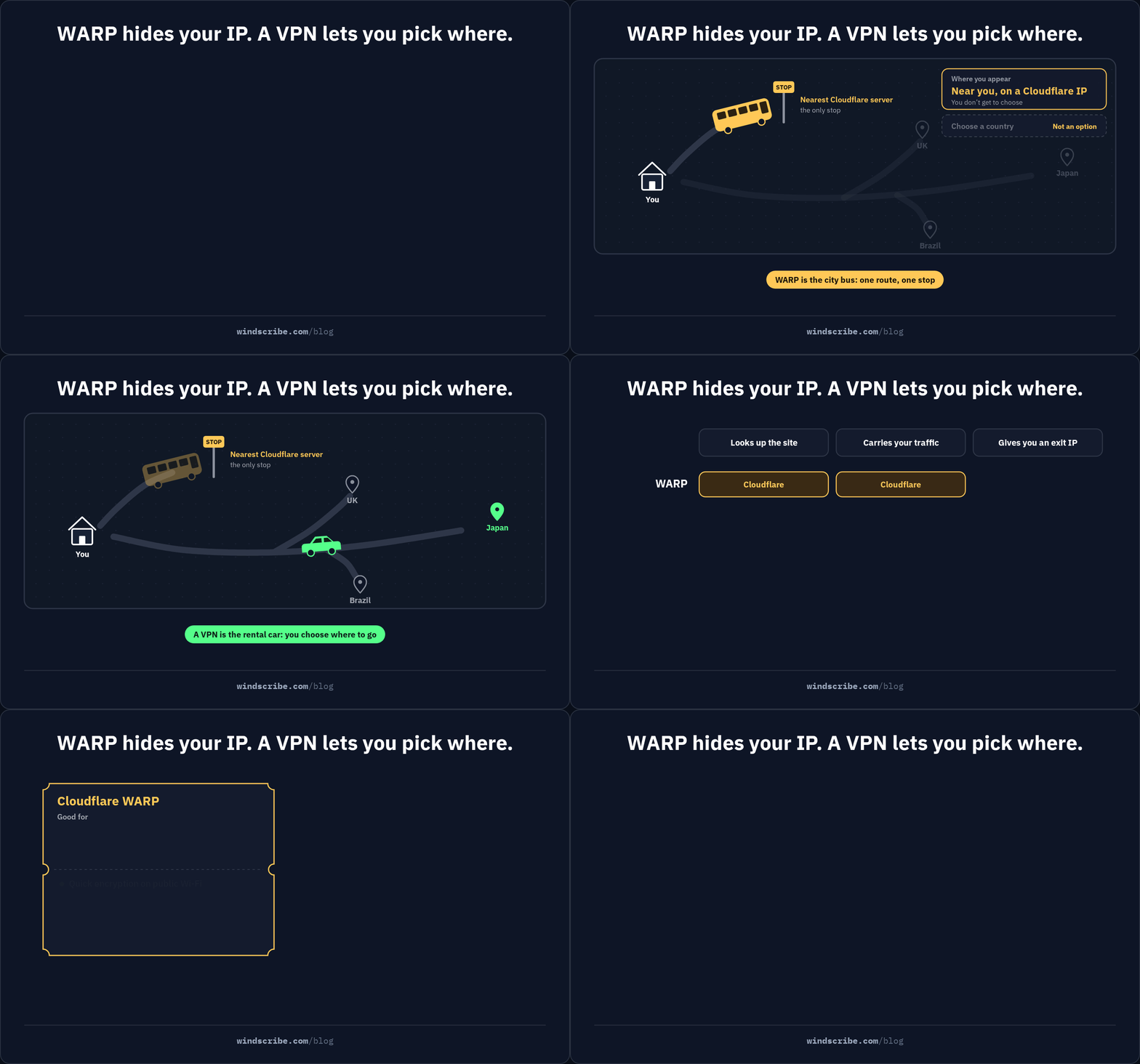
Yes, WARP hides your IP, but it hides it behind a Cloudflare edge server that they choose. You get absolutely zero say in where you pop up on the digital map. Everything downstream of that single, unyielding fact determines what the product can and cannot do.
Most people mask their IP for two very specific reasons: to appear in a country of their choosing or to control which company handles their data. Because WARP denies you both of those choices, comparing it to a true VPN is like comparing a city bus to a rental car. Sure, they both run on roads, but only one of them lets you turn left when you want to.
Cloudflare WARP vs VPN: The Real Differences
To understand why WARP is not a full-scale VPN replacement, you have to look at the practical trade-offs. While both tools encrypt your connection, they are built for entirely different purposes. Here's how their core capabilities actually stack up side-by-side.
| Capability | Cloudflare WARP | A VPN (e.g. Windscribe) |
|---|---|---|
| Hides your real IP | Yes, to a Cloudflare IP (WebRTC coverage varies; test separately) | Yes |
| Choose your country/server | No; routes to a Cloudflare-selected edge | Yes, pick from many locations |
| Unblock geo-restricted content | Not designed for this: no location control | Yes, core use case |
| Encryption | Yes (MASQUE/HTTP/3 by default; WireGuard optional) | Yes (WireGuard) |
| Who sees your traffic | Cloudflare: resolver + tunnel + exit (default mode) | The VPN provider operating the server you selected |
| Jurisdiction | United States (Five Eyes) | Varies by provider |
| P2P / torrenting | Not designed for it: no location control | Supported by many providers |
| Platforms | Windows, macOS, Linux, iOS, Android | Same major platforms |
| Cost | Free, unlimited data; WARP+ is a paid tier | Paid; many offer a limited free tier |
The defining difference is location control, or rather, WARP’s complete lack of it.
Hiding your IP is only useful if you can choose where you reappear. Because WARP automatically routes your connection to the nearest Cloudflare server, there is no server picker, no location list, and no country override. If you want to bypass regional blocks while traveling, WARP simply lacks the button to make it happen.
This absence of choice directly impacts peer-to-peer (P2P) traffic. Safe torrenting requires choosing a jurisdiction with strong digital privacy laws. With WARP, you’re stuck with whatever network rules and local policies apply to your nearest geographic Cloudflare node.
Even on a DNS level, WARP’s default configuration funnels both your web queries and your data packets straight to Cloudflare. While you can toggle a "Traffic Only" mode to leave DNS resolution to your operating system, you still lose the granularity of a standard VPN.
A true VPN lets you choose your DNS resolver or use custom DNS-level filters like our R.O.B.E.R.T. to block trackers and malware before they load.
The Privacy Catch: One Company Is in the Path
With WARP's default configuration, Cloudflare is your DNS resolver, your tunnel operator, and your exit IP, all at once. You haven't distributed trust across a few different parties. You've concentrated your DNS queries, tunnel metadata, and exit path with a single U.S.-based company that already handles a significant share of the web's infrastructure.
To be fair, per Cloudflare's own documentation, WARP collects limited data: DNS query information, traffic metadata (payload excluded), app ID, transferred data volume, average speed, and some aggregate usage statistics. Cloudflare has a real security track record.
Here's the structural problem, though. "Limited" is Cloudflare's characterization, and at the time of writing, no public independent audit could be found that specifically covers WARP's tunnel and connection logging practices, as distinct from Cloudflare's 1.1.1.1 resolver audits. Cloudflare's privacy policy leaves room for sharing data with law enforcement, affiliated entities, and for other described purposes. Without a third-party audit, the retention and use claims are unverifiable by design. You're trusting the policy, not a verification.
Compare that to a VPN that publishes an independently audited no-log policy and a transparency report, like us. The accountability structure looks different, not because Cloudflare is dishonest, but because the structure gives you a way to check.
There's another layer. If you use Cloudflare-powered websites, they're already in the path through CDN infrastructure. Add WARP, and one entity is handling your DNS queries, your tunneled traffic, and your exit IP. That's a significant surface area for a single trust decision.
For a lot of people, that trade is completely acceptable. WARP is genuinely good at a narrower job than replacing a VPN, and it's worth being honest about what that job is.
What Cloudflare WARP Is Actually Good For
If WARP isn't a full-scale VPN, what is it actually built to do? For specific, narrow tasks, it’s incredibly efficient.
Quick Encryption on Sketchy Public Wi-Fi
If you’re sitting at an airport or coffee shop and need immediate encryption on an untrusted public Wi-Fi network, WARP is perfect. You don't need to sign up, configure settings, or hand over an email address. You just open the app, hit the button, and secure your connection. For basic, local protection, it works.
Smoothing Out Bad ISP Peering
Because Cloudflare operates one of the largest networks on earth, they are incredibly well-peered with global internet service providers. If your local ISP has congested or poorly routed pathways to a specific website, routing your traffic through Cloudflare can bypass those digital bottlenecks. You won't notice this on a fast home network, but on a variable mobile connection or in a region with weak ISP infrastructure, the difference can be real.
Genuinely Free, Unlimited Data
If your only metric is volume, WARP wins. Its free tier is genuinely unlimited with no data caps or account requirements. By comparison, Windscribe's permanent free plan has a monthly data limit (10 GB if you give us your email, 2 GB if you don’t), but it gives you actual location choice and a privacy-focused company of your choosing.
It’s a clean trade-off: choose WARP if you want pure, unthrottled data volume, or choose Windscribe if you want control over where you appear on the map.
What Cloudflare WARP Isn’t Really Good For
While WARP handles basic security and routing well, there are two technical realities you need to keep in mind before installing it:
Streaming
Because WARP’s traffic originates from Cloudflare’s massive business infrastructure rather than a standard consumer VPN IP pool, streaming platforms sometimes fail to flag or block the connection. While this sounds useful, remember that you still cannot choose your egress country.
WARP might slip past a streaming platform’s detection systems, but it’s ultimately useless for accessing regional content catalogs because you cannot choose to "reappear" in another country. It might bypass a block, but it cannot take you anywhere you aren’t already.
Double-Tunneling
It’s pretty tempting to think that running WARP and a standard VPN at the same time gives you double the security. In reality, it just gives you a broken internet connection. Both programs will immediately fight over your system’s routing tables and DNS control.
To make them play nice, you would have to disable DNS control in one of them, which defeats the purpose entirely. Stacking two tunnels on top of each other only adds severe processing overhead with zero meaningful security benefits. Use one or the other, never both.
The Speed Story Nobody Tells You: We Ran WARP's Original Engine
WARP’s headline pitch is speed: "as fast as a VPN, for free." It sounds great, but we know exactly where that engine hits its limit. We ran it for years.
WARP is built on BoringTun, a user-space implementation of the WireGuard protocol. Windscribe adopted this exact same engine back in 2020. In a quiet lab, it tests beautifully.
The trouble starts when millions of users crowd the servers. Because user-space engines have to constantly pass data back and forth to your operating system, they pin the CPU under heavy loads. For you, this means jitter: web pages loading in fits and starts, and video streams stuttering.
To fix this, our FreshScribe infrastructure overhaul replaced BoringTun with native kernel-space WireGuard. By processing data directly in the OS core, we cut out the performance middleman, eliminated server choke, and dropped latency.
BoringTun is decent code, and it works at Cloudflare's scale. But when a network gets busy, kernel-space code is what keeps your connection steady. We know where WARP's speed ceiling is because we hit it, broke it, and built past it.
The Bottom Line
When you strip away the marketing, the choice between Cloudflare WARP and a true VPN comes down to what you’re actually trying to accomplish:
- Use Cloudflare WARP if: You want quick, one-tap encryption on sketchy public Wi-Fi with zero cost, zero setup, and no account creation. For securing local traffic at an airport or coffee shop, it handles the job without complaint.
- Use a Real VPN if: You want to choose a specific country, unblock regional streaming libraries, torrent safely, control exactly whose infrastructure resolves your DNS, or browse under a verified, independently audited no-logs policy.
If you need a true VPN, you should use a provider that lets you choose exactly where your traffic exits, ideally one running a modern kernel-space WireGuard implementation with a real location picker. Like us. Just sayin’.

Frequently Asked Questions
Is Cloudflare WARP safe to use?
The encryption is sound. The trust question is structural: in WARP's default mode, one U.S.-based company handles your DNS, your tunnel, and your exit IP simultaneously, and at the time of writing, no public independent audit could be found that specifically covers WARP's tunnel and connection logging practices, as distinct from Cloudflare's 1.1.1.1 resolver audits. Whether that's acceptable depends on what you're trying to protect against. The longer version is in the privacy section above.
Is WARP free? Is it actually unlimited?
Basic WARP is free with no data cap. WARP+ is a paid tier that Cloudflare says offers access to a larger network, which can reduce latency. The 1.1.1.1 app in DNS-only mode is also free. No account is required for the basic product.
Does WARP hide my IP address?
Yes, in most contexts. Connect and visit cloudflare.com/cdn-cgi/trace: you'll see a Cloudflare egress address instead of your real IP. Two caveats: WebRTC behavior varies by app and browser, and your real IP can surface in some contexts, so test for it directly if this matters to you. And it's a Cloudflare address you can't choose, so WARP won't let you appear to be in a specific country.
Can WARP unblock Netflix or other regional libraries?
It isn't designed for it. Unblocking a specific region means appearing to be there, which requires choosing a server in that region. WARP routes to a Cloudflare-selected edge location and gives you no control over that destination. Even if a service doesn't flag the connection as a VPN, there's no mechanism to select a country's library.
What's the difference between 1.1.1.1 and WARP?
1.1.1.1 is Cloudflare's DNS resolver: it encrypts your DNS lookups but leaves the rest of your traffic untouched. WARP adds a full encrypted tunnel on top, routing your entire device traffic through Cloudflare's network. One secures a narrow layer; the other covers the whole connection.
Can I use WARP and a VPN at the same time?
Generally, no. They conflict over routing tables and DNS control. In practice, you'd need to disable DNS control in one to avoid the conflict, and stacking two tunnels adds overhead with no meaningful security benefit. Pick one.


