



Connected to a VPN, and now you think you’re invisible online? We’re sorry to say, but that’s not quite how VPNs work.
A VPN isn’t some kind of invisibility cloak that makes you disappear into the internet’s void. It does hide some things about your connection (like your IP address, real location, and what you’re doing online), but it doesn’t hide everything. Your ISP still sees some things, like that you’re using a VPN, for starters.
Does that mean using a VPN is ultimately useless? Absolutely not. VPNs are privacy tools that keep you safe from the vast world of online threats. They can also help you slip past network restrictions and geo-blocks. Except, it’s just not as simple as it seems.
Knowing what a VPN hides and what it doesn’t can help you use those tools to their fullest potential. So, in this article, that’s what we’ll help you understand.
What a VPN Actually Hides
Even though a VPN doesn’t make you entirely invisible and anonymous online, it does hide some important things about your online activity and behind-the-screen identity. So, what does a VPN hide?
Your IP Address
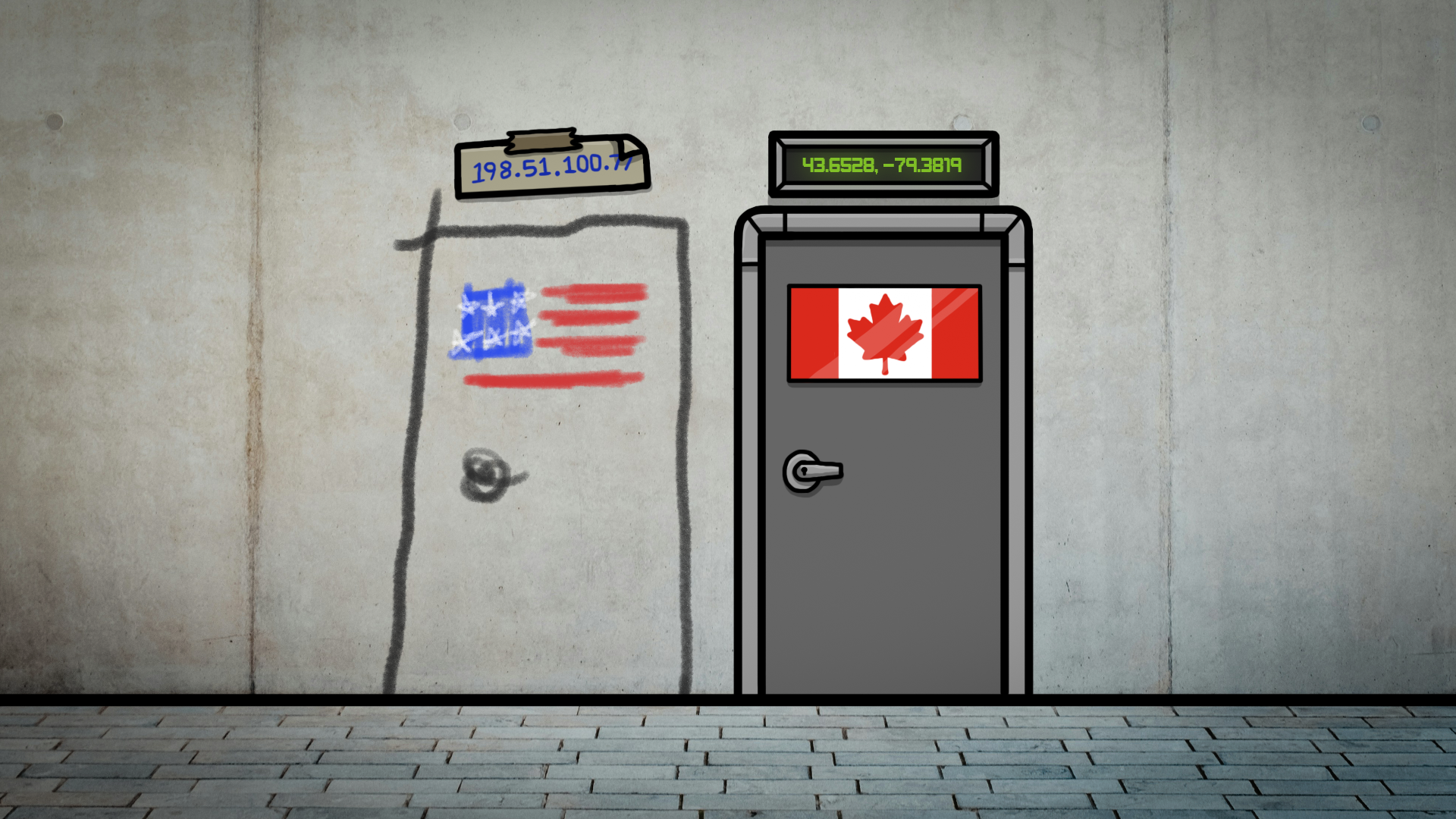
A VPN masks your IP address. Think of your IP as your rough location online.
Without a VPN, websites can see it and make a pretty good guess where you’re connecting from, like New York City or Paris.
When you connect to a VPN, your traffic goes through a VPN server instead, so websites see the server’s IP, not yours. With Windscribe, you can pick from servers in 69+ countries and 115+ cities. So, if you’re sitting on your couch in London but want the entire internet to think you’re in Tokyo, just pick one of our Tokyo servers and voilá!
Your Browsing Activity from Your ISP
Without a VPN, your ISP can see the services you connect to and when you connect to them. They can tell you visited IMDb, and later connected to Apple’s servers when you opened the Apple TV app. They can also see how long those connections stayed active and how much data you used.
What they usually can’t see is the exact pages you read on IMDb or the specific show you streamed, because those details are protected by HTTPS. With a VPN on top of that, your traffic is encrypted and routed through the VPN server.
This means that your ISP can still see that you’re using a VPN (and when), plus how much data you’re moving, but it usually can’t see which services you’re accessing behind it. To them, it’s just encrypted traffic going to a VPN server.
Your General Location
Most websites that restrict content based on location do so using your IP address.
Streaming sites use it to decide what shows you can watch, and some stores use it to show you different prices or offers depending on where you’re browsing from.
When you use a VPN, it swaps out your real IP for the one of the server you connect to, so you can make it look like you’re browsing from a different city or country.
But that doesn’t mean a VPN is a magic “change your identity” button. It’s more like putting a mask on your connection to hide your location.
A VPN masks your IP-based location, and that’s often enough to bypass geo-blocks, but your account will still be tied to the region you signed up for and where your payment method is from.
Your Traffic Type
Even with HTTPS, ISPs can often identify broad categories of traffic based on destination networks, traffic patterns, and protocols. They can usually tell if you’re streaming video, gaming online, or using P2P. And because they can classify what you’re doing, they can choose to slow certain traffic types during peak hours (a.k.a. throttling or traffic shaping).
With a VPN, your traffic is wrapped in an encrypted tunnel to one VPN server.
Your ISP can still see that you’re using a VPN (and how much data you’re moving), but it has a much harder time labeling what you’re actually doing inside the tunnel. And if they can’t see what you’re doing, they can’t throttle anything.
What a VPN Doesn't Hide
VPNs are great privacy tools that protect you from threats like hackers, surveillance, and geo-restrictions. They encrypt your connection, mask your IP address, and give you more control over your digital footprint. But they’re not magic, and they don’t make you invisible. There are still some things a VPN cannot hide.
Your Connection to a VPN
When you browse, stream, or do anything online with a VPN, your ISP and the websites you visit can tell that you’re using a VPN. They can also see when you connected, how long you stayed connected, and how much data passed through the connection.
The fact that you’re using a VPN is visible, which is why platforms like Netflix or Steam sometimes flag VPN traffic with error messages like, “It appears you’re using a VPN or proxy.”
Obfuscation can help with that by disguising the VPN traffic to look more like normal HTTPS traffic.
But still, you’re not invisible. Your data is encrypted, so it’s unreadable to your ISP and the sites you visit, but the fact that you’re using a VPN? Yeah, they can still tell.
Your GPS Location
A VPN does a great job masking your IP and changing your IP-based location, but it doesn't change your GPS coordinates. Many mobile apps, especially the ones that ask for your location permission, can bypass the VPN altogether.
On top of that, HTML5 geolocation prompts can expose your real location if you accept them. And don’t forget about cell tower and Wi-Fi triangulation. These can figure out where you are, even if you’re hiding behind a VPN.
This is why some apps and platforms, like TikTok, aren’t that easy to manipulate with a VPN. For example, if you’re in Thailand but connected to a London server, TikTok might still show you content for Thai users, not Brits, because your GPS doesn’t match your VPN location.
Account Activity When Logged In
This one’s pretty obvious, but if you’re logged into Google, Facebook, Netflix, or any other platform, they can always tell it’s you, VPN or not. Once you're signed in, they know who you are because they track your activity by your account, not your IP.
So, if you're just trying to hide your IP to get around Netflix’s regional restrictions, a VPN will work. But if you’re hoping to stay fully anonymous while logged in, well… that’s practically impossible, and the VPN won’t help. If you want more privacy, simply log out. Or, just accept the tradeoff that some things are easier to access when you're authenticated.
Cookies, Trackers & Browser Fingerprinting
Cookies are great if they’re the chocolate chip kind, but not if they’re the digital kind.
VPN or not, accepting cookies means you’re basically leaving a breadcrumb trail to your real identity. But cookies aren’t the only thing tracking you. Invisible trackers and browser fingerprinting are also keeping tabs on you while you browse.
Fingerprinting uses details like your screen resolution, fonts, and browser extensions to create a unique identifier. In fact, a study by the EFF shows that 83% of browsers have unique fingerprints, making it easy to track you across sites.
A VPN encrypts your traffic, but it doesn’t block cookies and trackers, and it doesn’t prevent browser fingerprinting on its own. Unless you use Windscribe.
This is why we created R.O.B.E.R.T., our ad and tracker blocker, along with our browser extensions that block cookies, prevent trackers, and help reduce fingerprinting.
Technical Leaks That Can Expose You
Yes, VPNs protect your real identity and keep you safe from cyberthreats. Yes, they mask your IP and encrypt your connection. But even good VPNs can leak through browser vulnerabilities and unintentionally expose your data to malicious agents.
DNS Leaks
Domain Name System (DNS) requests are a fundamental part of how the internet works. They translate the website names you type (like google.com) into IP addresses (like 172.217.5.78), which computers and servers use to locate each other on the network.
A DNS leak occurs when DNS requests bypass your VPN and go directly to your ISP. Since DNS requests are often sent in plaintext, anyone monitoring your connection (including your ISP) can see which websites you access, even if your VPN is on.
You can easily check for DNS leaks using our free DNS leak test. These sites will show you which DNS server is handling your requests, helping you identify if your VPN is leaking DNS queries.
WebRTC Leaks
WebRTC sounds like something from a hacker movie, but it’s actually a pretty fancy technology that enables real-time communication over the internet, such as video calls. It uses your IP to establish direct connections between devices to allow for instant communication.
When WebRTC bypasses the VPN tunnel and communicates directly with your network, it can expose your IP address and other network details in the process, even if you're connected to a VPN. Most users don’t realize this because WebRTC operates in the background, and it’s not something you see or interact with directly.
To check for WebRTC leaks, visit a site like BrowserLeaks.com or simply perform an IP address check while connected to your VPN. If your real IP is visible, you have a WebRTC leak.
IPv6 Leaks
When you connect to the internet, you're typically assigned two types of IP addresses: IPv4 and IPv6. Why two? Well, the internet was running out of IPv4 addresses because there were too many devices to handle, so IPv6 was introduced to provide many more addresses for future growth. As a result, many websites now operate under both.
The problem is that most VPNs only protect your IPv4 address by routing it through the VPN tunnel, while IPv6 traffic often bypasses the tunnel entirely. This means that if you’re using a VPN, your IPv4 address is hidden, but your IPv6 address could still be exposed, revealing your real location. And as more networks switch to IPv6, the IPv6 leak is becoming more common.
Who Can (and Can't) See What
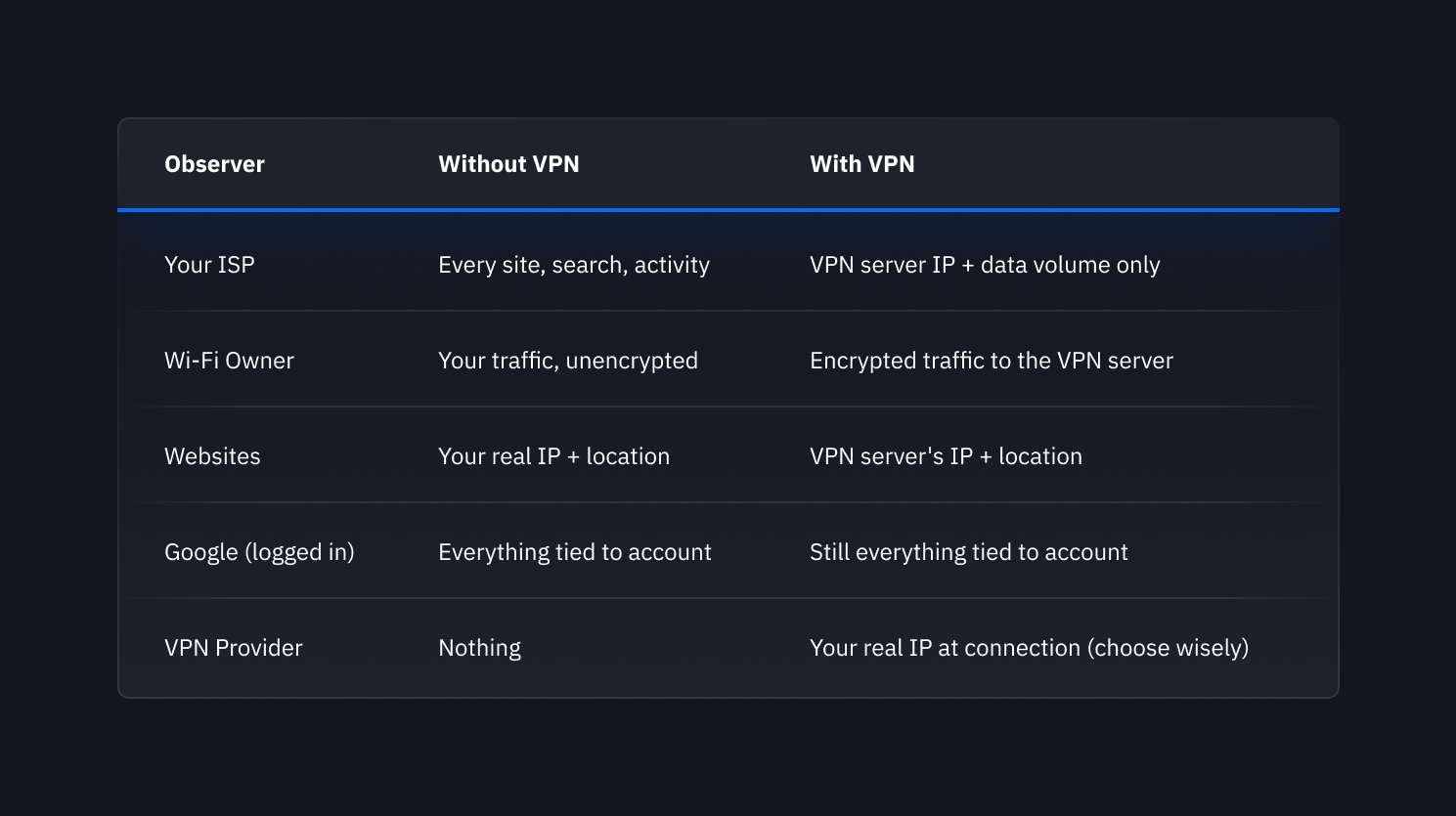
Without a VPN, your ISP can see every website you visit, the apps you use, and how long you’re connected. Websites can track your real IP address, your location, and your browsing activity, depending on cookies and trackers. Network admins, like those managing the Wi-Fi or your workplace network, can also monitor your internet usage.
When you're connected to a VPN, your ISP can still see that you’re connected to a VPN, but they can't see what websites or services you're using. Websites only see the IP address of the VPN server you're connected to, not your real one, and they can't track your exact location. And network admins can see that you're connected to a VPN, too, but they can't monitor what you're doing online.
Aside from that, even if your VPN is on, there are still factors like cookies, DNS leaks, and logged-in accounts that can expose certain information. So, yes, VPN hides a lot of your online activity, but no, it doesn't make you invisible.
Still, use a VPN. In fact, use Windscribe.
FAQs
Does a VPN hide my browsing history from my ISP?
No, a VPN doesn’t hide your browser history from your ISP, that’s not how it works. Your ISP can’t access the websites you’ve visited in the past, VPN or no VPN, as that’s stored locally in your browser. However, a VPN does prevent your ISP from seeing your real-time browsing activity, meaning they can’t see which websites you’re currently visiting or the pages you’re browsing while you’re connected to the VPN. They’ll only know that you’re using a VPN, but not what you’re doing inside that encrypted tunnel.
Does a VPN hide me from Google?
Not if you’re logged in. Google doesn’t track you by IP address, but by your Google account. So, even if you’re using a VPN to change your IP, as soon as you're logged into your Google account, they’ll still know who you are. If privacy is your main concern, consider logging out of your Google account while browsing.
Can my employer see my activity with a personal VPN?
On your personal device, no. On a company device, potentially yes. If they’ve installed monitoring software or have a Mobile Device Management (MDM) system, they could track your activity, even with a VPN. It’s best to keep work and personal use separate, especially when using company devices.
Does a VPN hide my location completely?
A VPN can hide your IP-based location, meaning it can make it look like you’re browsing from another city or country. However, it doesn’t hide your GPS location, and apps and websites that have access to your location can still see that. And if you’re logged into an account (like Google or Netflix), your account region might still give your location away, regardless of the VPN.
Can I be tracked with a VPN?
While a VPN makes it harder to track you, it doesn’t make you invisible. Websites can still use cookies to track you across sessions, fingerprinting can give you away based on your device and browser settings, and if you’re logged into an account, that can tie your activity to you. So, yes, a VPN adds privacy, but it’s not a complete shield.
What's the best VPN for privacy?
Obviously, we're going to say it's Windscribe – and it's not just because we've got great standard privacy features and extra ones like our browser extensions that help with fingerprinting, our ad and tracker blocker, and leak protection. Sure, we've got those. But most of all, we've got a strict no-identifying-logs policy, which isn't common. Even VPN providers who say they don't log anything, do log something. "No-logs" is great, but it means different things to different providers, so you should look for court-tested proof. We've got one. In 2025, we went to court in Greece. The case got dismissed because we literally had nothing to hand over.


