




You’ve surely seen the little padlock icon in your browser address bar next to almost every site you visit. That’s HTTPS, and it means your traffic is encrypted. But is that really enough? And if so, are VPN companies just selling you digital snake oil? Or do they actually protect things that the padlock cannot touch on its own? These are perfectly reasonable questions, especially when tech skeptics on Reddit tell you that VPNs are a complete waste of money.
And yes, we’re a VPN company. But we’re not going to pretend that VPNs are some magical shield just because we want your subscription. We’d rather be transparent about when a VPN actually helps and when you don’t really need it.
If you still want to give us your money after reading this, we won’t complain, but let's get the facts straight first.
What HTTPS Actually Does
HTTPS is that little browser padlock you see next to the site address. It stands for Hypertext Transfer Protocol Secure, and it relies on a security protocol called TLS (Transport Layer Security), which is just the modern, much-improved successor to the now-deprecated SSL (Secure Sockets Layer).
When you connect to a secure site, TLS establishes encryption in transit. This means all the specific content traveling between your browser and the site’s server is scrambled. If you’re typing a credit card number, entering your password, or sending a search query, that data is encrypted so that anyone snooping on your local network sees nothing but unreadable gibberish.
But encryption is only half the battle. You also need to know who you’re talking to. That’s where certificates and site authentication come in. Before your browser lets you view an HTTPS page, the website must present a valid cryptographic certificate issued by a trusted third party.
This certificate officially proves that the server you’re talking to actually owns the domain name in your address bar. By authenticating the server, HTTPS stops classic man-in-the-middle attacks. An attacker on a public network cannot simply intercept your connection and pretend to be your bank, because their fake server will lack a valid certificate, triggering a massive red warning in your browser.
But it’s not all unicorns and rainbows: HTTPS is entirely a browser-to-server technology, and it’s controlled by the website owner, not you. This means that if a site administrator forgets to renew their TLS certificate or chooses to run their site on old-school, unencrypted HTTP, you cannot force HTTPS on them. You’re entirely at the mercy of their setup.
VPN vs HTTPS: The Key Differences
Both HTTPS and a VPN encrypt your traffic with modern, strong cryptography. The difference between them is the scope. HTTPS secures the connection between you and a single website. A VPN secures everything leaving your device.
| Dimension | HTTPS | VPN |
|---|---|---|
| What gets encrypted | The contents of your connection to one website (the page data, form inputs, passwords) | All traffic leaving your device is wrapped in an encrypted tunnel to the VPN server |
| Who can see which sites you visit | Your network, ISP, and Wi-Fi operator can still see which sites you connect to | Your ISP and local network see only that you're connected to a VPN, not which sites you visit |
| DNS lookups | Typically visible to your network and ISP unless separately secured | Routed through the encrypted tunnel, hidden from your ISP and local network |
| Your IP address | Fully exposed. Every site and network you touch sees your real IP. | Masked. Sites see the VPN server's IP instead of yours |
| What traffic is covered | One browser tab's connection to one site at a time | The whole device: browser, apps, games, background services, system traffic |
| Who controls it | The site owner decides whether to offer it | You decide whether to turn it on |
While a VPN covers your whole device, HTTPS only kicks in when your browser or an app connects to a site that supports it. Your browser is just a small slice of what your device actually does online. Your email client is syncing, your game launcher is checking for updates, and half the apps on your phone are quietly talking to their own servers in the background. HTTPS never touches any of that unless each app builds it in itself. A VPN doesn't care where the traffic comes from; it just wraps all of it in one tunnel.
But even on a perfect HTTPS connection, your ISP or the coffee shop Wi-Fi can still see which sites you visit. Encryption hides what you send, not the fact that you connected in the first place. A VPN closes that gap by hiding your destinations inside the tunnel too.
So they're really layers, not rivals. A VPN encrypts everything from your device to the VPN server, and HTTPS encrypts everything from you to the specific website. The VPN hides your traffic from your ISP and local network, while HTTPS hides the actual contents, like your passwords, messages, and card numbers, from everyone downstream, including the VPN company itself.
What HTTPS Doesn't Hide (What Your Network Still Sees)
The little padlock feels like a privacy guarantee. It isn't. It's a confidentiality guarantee for the contents of your connection, which is a very different thing. But the network around you still sees stuff, even when every site you touch is locked down with HTTPS.

When your browser opens a TLS connection to a website, the very first step of the handshake includes something called SNI (Server Name Indication), which is the hostname of the site you're visiting, sent in the clear before any encryption kicks in. Why? Because one server can host hundreds of sites, and it needs to know which one you're asking for so it can hand over the right certificate.
So, anyone sitting on the path between you and the site, like your ISP, the hotel Wi-Fi, your workplace firewall, or a government middlebox, can read that hostname as it goes by. It's also how SNI-based censorship works in places like South Korea, where the network watches for banned hostnames in the handshake and cuts the connection the moment it sees one.
And even if SNI were hidden, DNS would still give you away. Before your browser can connect to anything, it has to look up the site's address, and to do so, it asks a DNS resolver, usually your ISP's, "What's the IP for this hostname?" By default, that question and its answer travel in plaintext. So there are two separate places your destinations leak: the DNS lookup before the connection, and the SNI during it. Plug one, and the other still talks.
What the network can see:
- the IP addresses you connect to
- the hostnames you request
- your DNS queries (which sites you looked up, and when)
- the timing of your activity (when you're online and how long)
- the volume of data flowing in each direction
What the network cannot see:
- the contents, like your passwords, messages, form entries, etc.
- the actual pages you visit within the main domain
So, HTTPS hides what you say, not who you're talking to or when. And the padlock doesn't mean the site is trustworthy, either. Roughly 83% of phishing sites now use HTTPS, which means that reassuring little lock icon shows up on the fake login page just as reliably as on the real one. The padlock certifies that your connection to the site is encrypted, but it says nothing about whether the site on the other end is honest.
Isn't HTTPS Enough? ECH and Encrypted DNS
If you follow cybersecurity news, you might be thinking: "Wait, isn’t the web already solving these leaks?"
You’re not entirely wrong. The internet’s plumbing is undergoing its biggest privacy upgrade in a decade, specifically to close the gaps we just talked about.
The most important of these upgrades is ECH (Encrypted Client Hello), which was officially standardized as RFC 9849 in March 2026. ECH targets the exact leak we described: the plaintext SNI (Server Name Indication) in the TLS handshake. Instead of letting your browser broadcast the domain name you want to visit to the entire network, ECH encrypts the handshake’s sensitive parts, technically wrapping the real target domain, the ClientHelloInner, inside a plaintext wrapper called the ClientHelloOuter.
On an ECH-enabled website hosted behind a major CDN (Content Delivery Network) like Cloudflare, an observer looking at your traffic will only see a generic cover domain, such as cloudflare-ech.com. This is a massive deal. On supported sites, it genuinely weakens the classic argument that your ISP can easily log every single domain you visit.
But ECH cannot work alone; it relies on encrypted DNS. If your browser still asks your ISP’s DNS resolver for a site’s IP address in plaintext, ECH is useless because the network already saw the DNS request. This is why ECH requires protocols like DoH (DNS over HTTPS) or DoT (DNS over TLS) to encrypt those initial lookups. Censors are fully aware of this: if they can see your DNS queries, they can simply strip the ECH keys out of the response before your browser can use them.
Because these protocols are so codependent, our desktop and mobile apps have built-in support for custom encrypted DNS settings. Our team also runs Control D, a dedicated customizable DNS company, so we spend a lot of time monitoring how these protocols interact in the wild.
While ECH and encrypted DNS are fantastic for the web, they don’t make VPNs obsolete. There are several structural reasons why they don’t close every gap:
- Your IP address is still visible: ECH does absolutely nothing to hide the IP address of the server you are connecting to. If a site uses a dedicated IP, your ISP still knows exactly where you went.
- Traffic analysis still works: Passive observers can still profile your activity by measuring your traffic volume and timing.
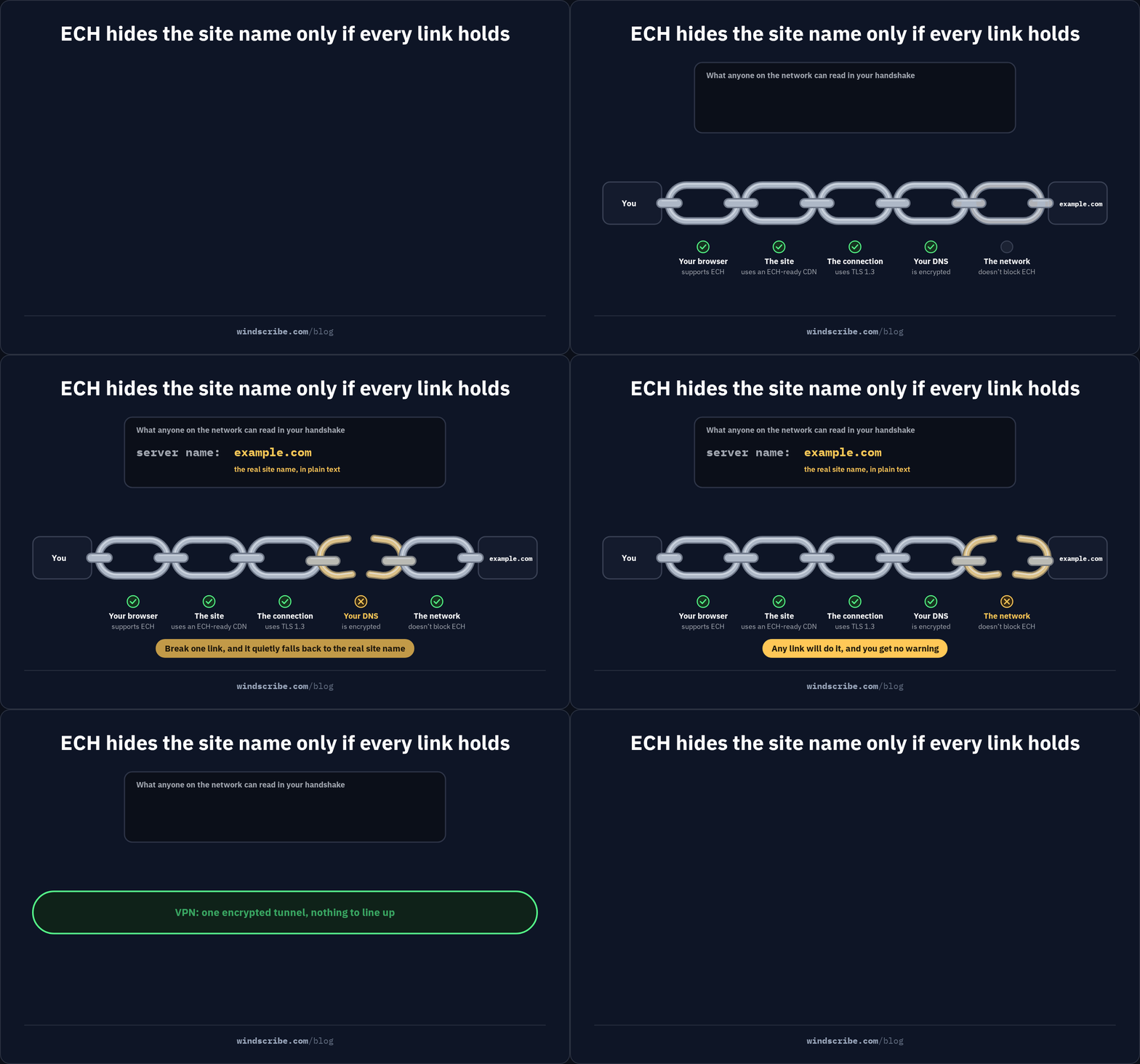
- Fragile and partial coverage: ECH requires a perfect chain: a browser that supports it, a site hosted on a supporting CDN, TLS 1.3, and active encrypted DNS. If any link in that chain breaks, the connection silently falls back to plaintext SNI, meaning you are exposed without any warning.
- Limited to web browsers: While your browser might handle ECH beautifully, the dozens of other background apps, game launchers, and system services on your device rarely do.
- Network-level blocking: A network administrator or a national firewall can simply block ECH traffic entirely, forcing your browser to downgrade to standard, readable TLS connections.
An encrypted VPN bypasses this fragile, step-by-step negotiation. Instead of hoping every site you visit supports the latest standards, a VPN wraps all traffic from your device into a single encrypted tunnel directed to one server, full stop. The local network sees one stream of encrypted data going to one IP address, leaving zero metadata for anyone to scrape.
When HTTPS Alone Is Enough, And When Do You Need a VPN
Yes, we’re a VPN company, and we’re here to tell you that you don’t always need to turn on a VPN. Despite what some marketing departments claim, there are plenty of times when HTTPS alone is more than enough to keep you safe.
HTTPS Is Enough When...
You’re perfectly fine relying solely on HTTPS when:
- You’re browsing from your own home Wi-Fi: If you trust your ISP enough to let them see which domains you’re visiting, and you’re not worried about local snoops on your router, HTTPS fully protects your passwords and data.
- You’re making a quick payment on a reputable site: If you’re buying something from a trusted online store while on a secure network, the TLS encryption built into HTTPS is doing the heavy lifting. A VPN doesn’t make the transaction "more secure" than TLS already does.
- You have zero metadata concerns: If you simply don’t care if someone knows you’re reading a recipe blog, looking at a weather forecast, or checking public transport schedules, HTTPS is completely sufficient.
Use a VPN When...
On the flip side, you genuinely need a VPN when:
- You’re on a network you don’t control: Airport Wi-Fi, hotel hotspots, local cafes, and campus or office networks are prime territory for snooping, DNS spoofing, and restrictive firewalls.
- Who you talk to matters as much as what you say: If you don’t want your ISP logging your domain history (and potentially selling it to advertisers), or if you live in a jurisdiction that actively monitors and restricts access to specific websites, HTTPS cannot hide your destinations.
- Your activity happens outside the browser: Standard HTTPS doesn’t touch your background applications, system services, or torrent clients.
- You need geo-sensitive access: If you’re trying to bypass regional network blocks, HTTPS has no way of changing your virtual location.
Why We Disguise Our VPN as HTTPS
Up to this point, we have treated HTTPS and VPNs as two entirely separate tools. But the truth is, they don’t compete. In fact, when the going gets tough on highly censored networks, we actually disguise our VPN traffic to look exactly like standard HTTPS.
Restrictive workplace firewalls, school networks, and national firewalls in countries like China or Iran use Deep Packet Inspection (DPI) to analyze the packets of data leaving your device. If a firewall detects the unique signature of standard VPN protocols like WireGuard or OpenVPN, it drops the connection instantly. To get around this, we built our Stealth protocol.
Instead of routing raw VPN traffic, our Stealth protocol wraps OpenVPN data in an extra TLS layer using Stunnel, directing it over port 443. Since port 443 is the exact port reserved for all secure HTTPS traffic, a snooping firewall looking at your connection sees nothing but regular, encrypted web browsing. Censors cannot easily block this traffic because doing so would mean blocking port 443 entirely, which would mean breaking the modern, secure internet for everyone on their network. Yes, breaking the internet. Literally.
We also use a sibling approach called WStunnel, which wraps the VPN tunnel inside a WebSocket connection to slip past strict corporate proxies that expect real-time WebSocket handshakes.
If you want to see this technology in action, you can try Windscribe for free! And don’t worry: no credit card is required.

Frequently Asked Questions
Do I still need a VPN if every site I use has HTTPS?
It depends entirely on your threat model. If you are browsing trusted sites on your secure home network and do not care if your ISP logs the domain names, HTTPS alone is perfectly fine. However, if you are on public Wi-Fi or need to hide your browsing destinations, a VPN remains essential.
Does a VPN replace HTTPS?
No, they are cooperative security layers. A VPN only encrypts your traffic up to the VPN server, leaving HTTPS to secure the final leg of the journey to the website. This end-to-end HTTPS encryption also prevents your VPN provider from seeing what you type into the site.
Is HTTPS safe enough for online banking?
Yes, but only on trusted networks and legitimate websites. HTTPS secures the transfer of your financial data, but it cannot protect you on hostile public Wi-Fi or stop you from typing your password into a clever phishing clone. The padlock proves the connection is encrypted, not that the site is honest.
Can my ISP see what I do on an HTTPS site?
They cannot read your messages, passwords, or specific actions, but they can see a lot of metadata. Your ISP still tracks the domains you visit, your connection times, and your data volume. While technologies like ECH reduce these leaks on supported sites, a VPN blocks this metadata collection entirely.
Is HTTP over a VPN secure?
Only partially. Your traffic is encrypted from your device to the VPN server, but it travels in plaintext from the VPN server to the website. While it is fine for casually reading public blogs, you should never type passwords or sensitive credentials into an HTTP page, even with a VPN.


