




A VPN encrypts your traffic and masks your IP so your ISP and local creeps can’t snoop on your data. A firewall is your network’s bouncer; it monitors traffic and kicks out anything that doesn't follow the house rules.
A lot of people think choosing between a VPN and a firewall is like choosing between a fork and a spoon. It's a dumb debate. They solve completely different problems, and relying on just one is a great way to leave a massive hole in your defenses. One protects your data while it’s moving; the other stops bad actors from kicking in your front door.
We’re breaking down how these tools actually work and why a layered approach is the only way to stay secure. Stop picking favorites and start actually protecting your digital ass-ets.
What Is a VPN?
Not to toot our own horn, but we’re the picture-perfect example of what a VPN should be, and if you’re reading this, you probably already know what a VPN is. But for the uninitiated: a VPN builds an encrypted tunnel between your device and a remote server. It uses encryption (usually AES-256) to scramble your data into total gibberish, so it can't be read in transit, and swaps your real IP address for the server’s IP.
This does three things at once: it uses protocols like WireGuard, OpenVPN, or IKEv2 to keep your ISP and local hackers from snooping, it forces websites to see our IP instead of yours to kill off third-party tracking, and it lets you spoof your location to bypass regional blocks or government censorship.
Windscribe pushes this further with obfuscation protocols like Stealth and WStunnel. These act as a digital camouflage, disguising your VPN traffic as standard, boring HTTPS web traffic so you can punch through networks that usually try to throttle or block VPN "doors" (aka ports).
While you’re likely using this for personal privacy, like making sure the guy sitting next to you at Starbucks isn't reading your emails, the same technology handles the heavy lifting for the corporate world.
It’s what allows a remote employee in London to securely access a file server in New York (Remote Access VPN) or lets two branch offices in different countries talk to each other as if they were on the same local network (Site-to-Site VPN). Whether you’re dodging a nosy government or just trying to finish a spreadsheet from home, the goal is the same: making the internet private, secure, and functional.
What Is a Firewall?
A firewall is your network’s personal bouncer, monitoring every scrap of incoming and outgoing traffic to make sure it follows the house rules. It sits right between your device and the chaos of the internet, acting as a gatekeeper that decides which connections are safe and which are digital trash.
This works through a few core methods: traffic filtering kills connections that don't match specific IPs or ports, threat detection scans for actual malware and intrusion attempts rather than just rule-breaking, and access control lets you decide exactly which apps are allowed to talk to the outside world.
You’ll find firewalls in a few different flavors. Most people use the software firewalls baked into Windows or macOS, while hardware firewalls live inside your router to protect everything in your house at once, which is exactly the component older VPN protocols need help getting past.
Then you have Next-Generation Firewalls (NGFWs) that do the heavy lifting, using Deep Packet Inspection (DPI) to sniff out suspicious software behavior before it can do any damage.
The technical divide comes down to the OSI layers. While a VPN handles the heavy lifting at Layers 3 and 4, firewalls can reach all the way up to Layer 7 to filter specific application behavior. This is why the "one or the other" argument is a myth. They operate at different depths of the network stack, protecting you from different angles of attack.
VPN vs Firewall: Key Differences
Privacy vs. Security
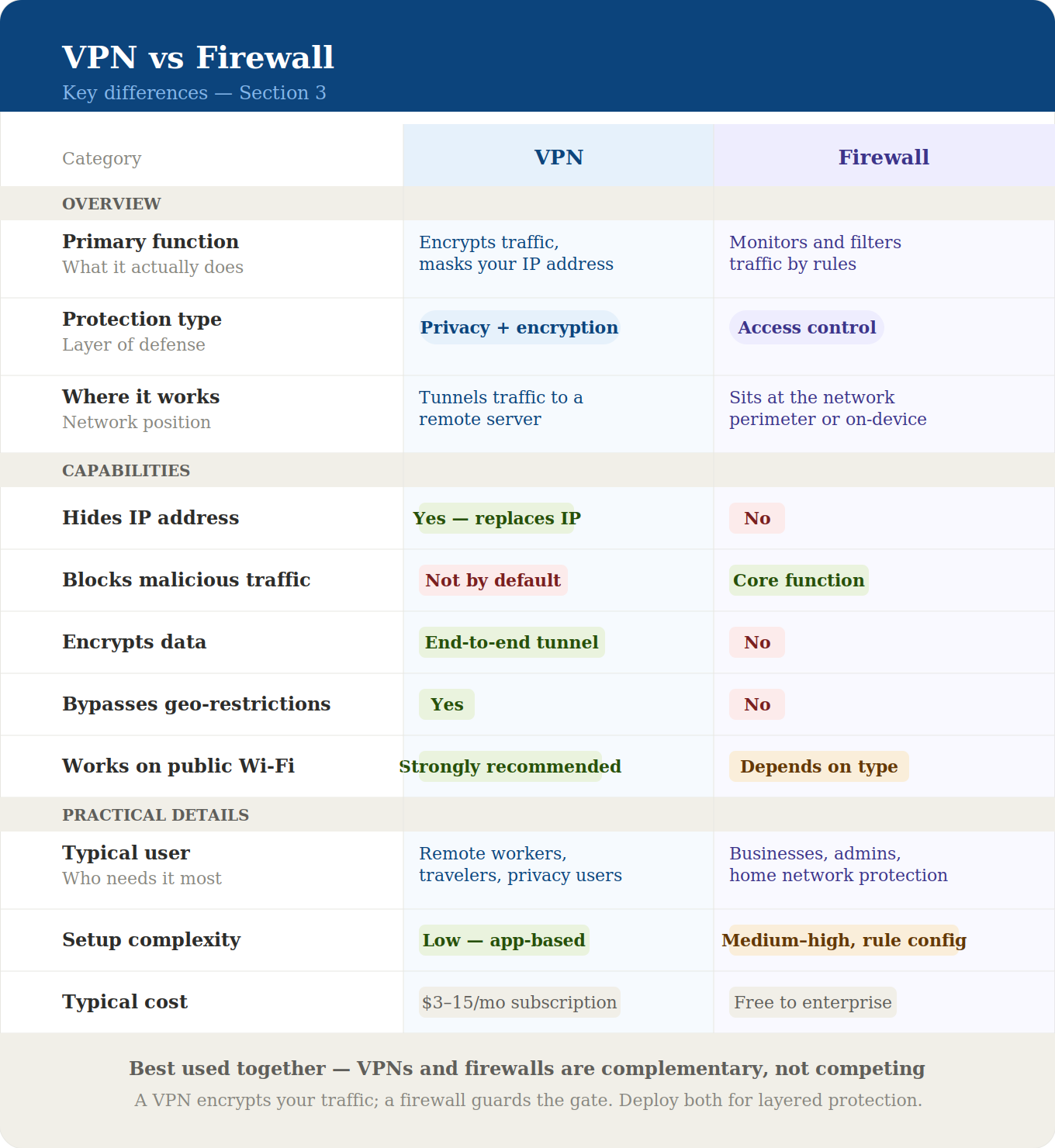
A VPN is a privacy tool that encrypts your traffic and hides your identity. A firewall is a security tool that filters out threats and blocks unauthorized access. Privacy without security means you’re browsing in the shadows, but any malware you accidentally download can still run wild on your device.
On the flip side, security without privacy means your network is a fortress, but your ISP, network admins, and every creep on public Wi-Fi can still see exactly what you’re doing.
Relying on just one is like locking your front door but leaving the windows wide open. One protects the data while it’s moving, and the other protects the device it’s moving to. You need both to stop being a target and start actually owning your digital space.
Where They Operate
Think of it like this: A VPN is like using a secret underground tunnel to move between buildings. No one on the street can see where you’re going or what you’re carrying in your bags. It’s all about privacy in transit.
A firewall, on the other hand, is the security guard standing at the door of your house. He doesn't care how you got home; he only cares about who is trying to follow you inside. He checks the IDs of every packet of data trying to enter your computer and says, "You’re an authorized email? Come on in. You’re a weird scanning probe from a botnet in another country? Get lost."
What They Cannot Do
A VPN is not a malware filter. Because it encrypts everything passing through the tunnel, it will happily encrypt a virus and escort it right to your front door along with your legitimate data. It’s a secure pipe, but it doesn't care if the water inside is poisoned.
If you download a suspicious "FreeMinecraftSkins.exe" from a sketchy forum, your VPN will protect your privacy while you download it, but it won't stop that file from wrecking your computer once you double-click it.
On the flip side, a firewall is powerless to hide your identity. It can stop a hacker from trying to brute-force their way into your laptop, but it can't stop your ISP from recording the fact that you spent four hours on a medical forum at 3:00 AM. That split is why the two tools cover different halves of the problem, and why a VPN protects you from hackers in ways a firewall never will. It protects the house, but it doesn't protect you from being spied on through the window.
Neither tool can do the other's job, so this isn't a "one or the other" situation. It’s a "both or you're exposed" situation.
Do You Need Both a VPN and a Firewall?
Using a VPN without a firewall (or vice versa) is basically an invitation for someone to ruin your day. If you skip the firewall, your traffic is encrypted, and your identity is hidden, but you’re effectively a man in a mask walking into a room full of people with the flu.
Because a VPN isn’t a content filter, it will gladly deliver a malicious file straight to your hard drive with a polite "here you go." It doesn't care what’s in the box, as long as the box is taped shut.
Skip the VPN, and you have the opposite problem. Your network might be a fortress, but the second you step outside, you're naked. Your ISP sees every site you visit, and every service you touch gets your real IP address on a silver platter. On public Wi-Fi, your data is just floating around in the air for any script kiddie to sniff.
A layered approach is the only way to cover your bases. The firewall acts as the bouncer for your local environment, while the VPN handles the encryption for everything in transit.
We’ve bridged this gap by baking a dedicated Firewall feature directly into the Windscribe app, alongside R.O.B.E.R.T., our DNS-level blocker. R.O.B.E.R.T. kills off ads, trackers, and malware domains before they even get a chance to knock on your door, giving you firewall-style protection without the headache of a manual setup.
Kill Switch vs. VPN Firewall: Why It Matters
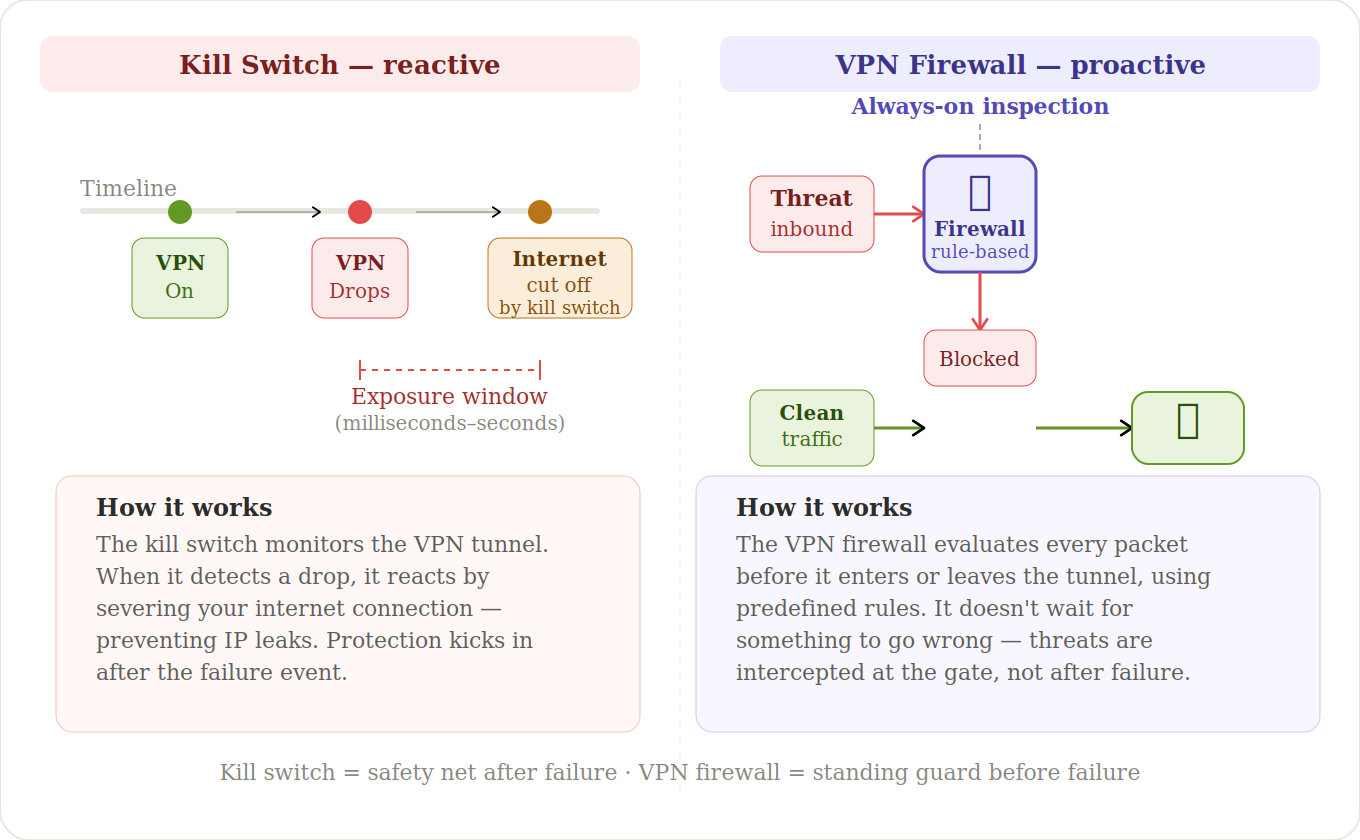
Most VPNs brag about their kill switch as if it were a groundbreaking innovation. In reality, a kill switch is just a reactive band-aid. It only activates after your VPN connection has already failed. In the milliseconds it takes for the software to realize the tunnel is down and engage the switch, your real IP, DNS queries, and traffic can leak.
This brief exposure is exactly how DNS, IPv6, and WebRTC leaks happen. It’s a plan B that hopes to catch the horse after the barn door is already open.
Windscribe doesn’t do reactive. Our built-in Firewall is proactive. Instead of waiting for a disconnect, it blocks all connectivity not routed through the encrypted tunnel from the moment you enable it. If the VPN drops, nothing leaks because the firewall never allowed unencrypted traffic to exist in the first place. This is a "fail-closed" system. There’s no reactive window because the protection is constant and absolute.
The Windscribe desktop app offers four modes for this. Automatic mode kicks in when you connect. Manual mode gives you the reins. Always On stays active even through app crashes and reboots. For those who want zero compromises, our maximum-security mode blocks absolutely everything outside the tunnel, including API calls.
What to Do When a Firewall Blocks Your VPN
A firewall becomes an obstacle when it’s controlled by the network you’re using: your office, school, hotel, airport, public Wi-Fi provider, ISP, or government-controlled network. That firewall is designed to enforce their rules, not protect your privacy.
So instead of blocking malware or unwanted inbound traffic, it may block VPN protocols, ports, domains, or traffic patterns it doesn’t like. More advanced networks go further by using Deep Packet Inspection (DPI) to sniff out VPN traffic by its packet signatures, then block or drop the connection before it even starts.
If you run into this problem, start with the standard fixes: adding the app as an exception in your local settings, switching ports, or cycling through basic protocols. Those are fine for basic blocks, but they’re usually useless against advanced network filtering.
When the standard stuff fails, you need obfuscation. Obfuscated protocols disguise your traffic to look like boring, normal HTTPS browsing to any DPI system trying to snoop on it. If the firewall can’t identify the traffic as a VPN, it can’t block it. It’s that simple.
Windscribe offers two protocols built specifically for these digital prison scenarios. Stealth disguises your VPN traffic as standard HTTPS, while WStunnel wraps your data inside a WebSocket connection. Both are engineered to punch through environments where traditional protocols get throttled or blocked entirely.
VPN vs Firewall Frequently Asked Questions
Can a VPN replace a firewall?
No. A VPN is a privacy tool that encrypts your traffic, but it’s completely blind to what that traffic actually contains. Because it’s just a secure tunnel, a VPN will happily transport a virus or a malicious payload directly to your device. It doesn't filter content; it just hides it from prying eyes.
A firewall is the gatekeeper that actually inspects the data and decides what is a threat. You need both to stay protected. Using a VPN without a firewall is like having a cloaking device on a ship with no shields. You’re hard to find, but you’re defenseless the second someone spots you.
Is a firewall better than a VPN?
Neither. Comparing a VPN to a firewall is like debating whether you need a locked front door or a paper shredder. One keeps people out of your house, and the other keeps them from reading your sensitive documents. They aren't competing for the same job. They’re two halves of the same security puzzle.
A firewall is your security bouncer, focusing on blocking threats and stopping unauthorized access to your network. A VPN is your privacy cloaking device, focusing on hiding your identity and scrambling your communications. If you actually care about your digital life, you don't pick a favorite. You use both. A layered defense is the only way to stay private without being a sitting duck for every script kiddie and ISP snoop on the web.
What's the difference between a VPN, a firewall, and an antivirus?
Yes. Think of them as three distinct layers of armor. A VPN encrypts your traffic while it’s moving, making it unreadable to snoops and your ISP. A firewall is your network’s bouncer, filtering out unauthorized connections and blocking threats before they even touch your device. Antivirus is your cleanup crew; it scans for and kills any malware that actually manages to land on your system.
One protects your data while it's in motion, one protects the "door" to your network, and one protects your files while they’re sitting on your hard drive. If you skip any of them, you’re just leaving a specific door open for someone to walk through.
Does Windows Firewall work with a VPN?
Absolutely. Windows Firewall lives at the operating system level and filters your traffic, while the VPN handles the encryption. They don’t fight for control because they’re doing two different jobs on two different parts of the connection. In fact, running them together is the smart move. It gives you local and network-level security at the same time.
If you run into any connectivity issues, it’s usually just the firewall being a bit too overzealous. You can fix that in seconds by adding your VPN app as an exception in the Windows Firewall settings. They’re built to work together, so let them.
Do VPNs have built-in firewalls?
Most don't, even if their marketing team tries to tell you otherwise. Most providers stop at a "kill switch," which is just a reactive safety net that only wakes up after your connection has already face-planted. It’s a Plan B that tries to catch data leaks in the milliseconds after you’ve already been exposed to the open web.
Windscribe is the exception. We include a proactive, built-in Firewall that blocks all non-VPN traffic the second you enable it. Instead of waiting for a disconnect to happen, it ensures that unencrypted data never has a chance to exist in the first place. We pair that with R.O.B.E.R.T., our DNS-level blocker, to kill off ads, trackers, and malware domains before they even reach your device. One waits for a mistake to happen; the other makes the mistake impossible.


