



You set up a game server or torrent client, added the forwarding rule, and gave your friend your IP, only to get hit with a connection timeout.
Most guides act like your router is the only variable, but it’s rarely the culprit. Port forwarding is a route with four distinct stops, and traffic must pass through every single one. Once you identify which stop is dropping the connection, the fix usually takes less than two minutes.
We offer Port Forwarding (ephemeral ports on Pro, permanent ones with a Static IP), so take this with the appropriate grain of salt. But we'd rather you fix your setup in five minutes than spend a weekend fighting the wrong problem.
What Port Forwarding Actually Does
On a typical IPv4 home network, every device behind your router shares one public IPv4 address. When your laptop loads a website, your router keeps track of who asked for what, so the reply finds its way back. That's Network Address Translation (NAT), and it works great for traffic you start.
Incoming traffic is a different story. When a stranger's device knocks on your public IP, your router has no idea which of your devices should answer. So by default, it doesn't let anyone in. If your router has a public IPv4 address, it needs a rule telling it which device gets that unsolicited traffic.
Port forwarding is the house rule that fixes that: "Anything that arrives on port 25565 goes to the gaming PC, port 25565." Every forward has two numbers:
- The external port: what the outside world connects to.
- The internal port: what the app on your device is actually listening on.
They're often the same number, but they don't have to be. And when they don't match what your app expects, things go quiet, fast.
Where Port Forwarding Breaks
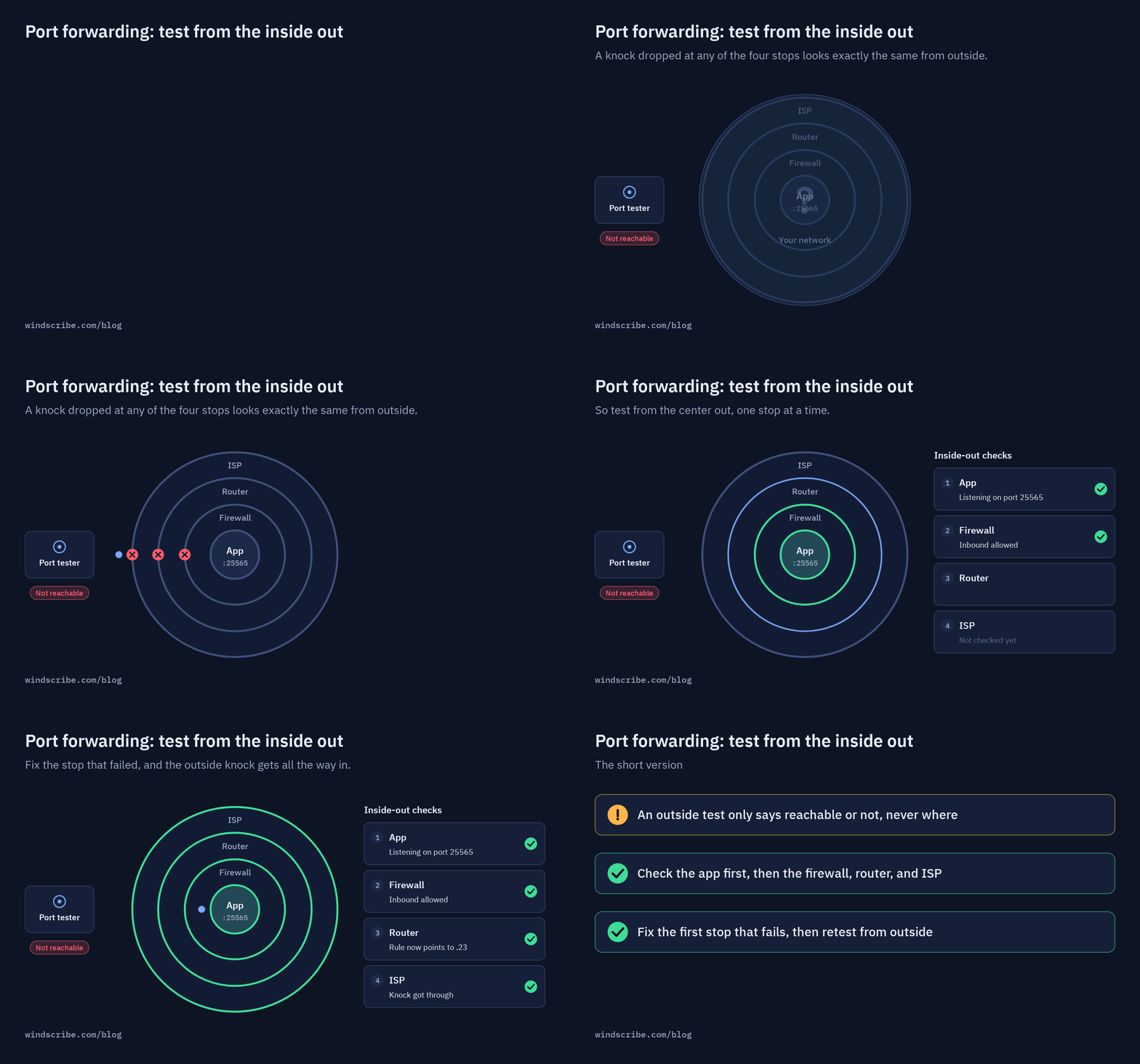
Incoming traffic has to pass through every stop below, in order. If any one of them says no, the connection fails.
| Stop | What can go wrong | How to check it |
|---|---|---|
| Your app | Not running, wrong port, listening on localhost only | Connect to it from another device on your local network |
| Your device's firewall | Inbound connection blocked or rejected | Check the app is allowed for inbound connections |
| Your router (or VPN server) | Missing or wrong forwarding rule, double NAT | Check the rule's device, local IP, and ports |
| Your ISP | CGNAT, blocked ports | Check your router's WAN IP |
A port forwarding tester only tells you if a port is open from the outside; it can't tell you where the connection failed. A dropped request looks identical whether your firewall blocked it or your app crashed. That’s why you must troubleshoot from the inside out: App -> Firewall -> Router -> ISP.
Why Your Port Forwarding Isn't Working
Ranked from "most common" to "the one nobody tells you about."
1. Nothing Is Listening on the Port
Port forwarding doesn't create anything to connect to. It just points traffic at a door. If the server isn't running, or crashed five minutes ago, there's nobody home. Start the app, then test it locally before testing from outside.
2. The Ports Don't Match (or the Device Moved)
If your rule sends port 32400 to the right device but the app is listening on 32401, traffic arrives at an empty room.
The other classic: your rule points at 192.168.1.20, but your router quietly gave that device a new local IP after a reboot. Now your forward points at your smart fridge. Give the device a reserved (static) local IP in your router settings, then update the rule.
3. The App Is Bound to Local Host
Some apps bind to 127.0.0.1 (localhost) by default. That means they only accept connections from the same machine, and to the rest of the world, the port looks closed.
Look for a "bind address" or "listen address" setting, and make sure the service is reachable on the intended network interface (all interfaces is often shown as 0.0.0.0), not just 127.0.0.1. Not every app exposes this setting.
4. Your Firewall Blocks Inbound Connections
A device firewall or security suite may be blocking inbound connections, sometimes without a useful prompt.
Allow the app through your firewall for inbound connections, then test again. On Windows with a VPN, there's an extra wrinkle: Windows treats VPN adapters as "Public" networks, so you need to allow your app on Public networks, not just Private ones.
5. You're Testing From Inside Your Own Network
This one fools a lot of people. You connect to your own public IP from a device on your home network, and it fails, even though the forward works fine.
Many routers don't support "NAT loopback" (also called hairpinning), so traffic aimed at your own public IP never makes the round trip. VPN port forwarding can trip the same wire: Windscribe's own setup guide notes that connecting to your forward from the device running Windscribe creates a routing loop. Testing from the same device or network can be misleading either way.
Test from outside instead: a phone on mobile data, a friend's connection, or an online port forwarding tester that checks from its own servers.
6. You've Got Two Routers (Double NAT)
If your ISP gave you a modem-router combo and you plugged your own router into it, you've got two layers of NAT. Your forward on the second router never sees traffic, because the first one drops it.
Check your router's WAN IP. If it starts with 192.168, 10., or 172.16 through 172.31, your router is behind another router. Either put the ISP's box in bridge mode, or add a matching forward on both.
7. Your ISP Uses CGNAT
This is the one nobody tells you about. With carrier-grade NAT (CGNAT), your ISP puts many customers behind one shared public IP. Your router doesn't have a public address of its own, so a forwarding rule on it has nothing to forward from. You can configure it perfectly and it will never work.
The strongest sign: your router's WAN IP falls between 100.64.0.0 and 100.127.255.255, the block reserved for carrier-grade NAT. A WAN IP that differs from the public IPv4 address websites see can also point to CGNAT, or to another layer of NAT upstream.
Your options: ask your ISP for a public IP (some offer one free or for a small fee), or forward the port through a VPN server instead. More on that below.
8. Your ISP Blocks the Port
Some residential ISPs block common server ports, especially SMTP port 25, and some restrict inbound server traffic on home connections. If one specific port never works but others do, try a different external port if your setup lets you choose one, or ask your ISP whether it's blocked.
How VPN Port Forwarding Gets Around CGNAT
Normal port forwarding needs a publicly reachable IP address that can pass inbound traffic to your device. Behind CGNAT, you don't have one.
VPN port forwarding flips the direction. Your device opens a VPN tunnel out to the VPN server, which CGNAT is perfectly happy to allow. The VPN server has a public IP. When someone connects to that IP on your forwarded port, the server carries the traffic through your active tunnel to your device. Your ISP's NAT never has to let anything in.
It's not magic, and it's not free of trade-offs. Your service now depends on the VPN connection staying up, the port you get may be assigned for you, and you're relying on the provider's network. But when your ISP won't give you a publicly reachable address, it can be a practical alternative.
Why Some VPNs Stopped Offering Port Forwarding
Not every VPN offers this, and some that did have pulled it.
Mullvad removed port forwarding in 2023, saying it was being used to host malicious services, which led to blacklisted IPs, law enforcement contacts, and hosting providers cancelling service. Proton VPN still offers it on paid plans, with a random port that usually changes when you reconnect.
The tension is real. Port forwarding is genuinely useful for game servers, media servers, and torrenting. It's also exactly what someone hosting something nasty would want. Every provider that offers it is making a call about how to balance the two.
The Security Trade-off Nobody Mentions
An open port is a public door. Once it's forwarded, anyone on the internet can knock, not just your friends. Automated scanners sweep the internet for open ports constantly, so assume someone will find yours.
That doesn't make port forwarding dangerous on its own. It makes the app behind the port the thing that matters:
- Use authentication. If the service supports a password or two-factor login, turn it on.
- Keep it updated. Old server software with known bugs is what scanners are looking for.
- Close what you don't use. A forward you set up for one weekend of gaming shouldn't still be open in six months.
- Share the right address. If you're forwarding through a VPN, keep it connected, and give people the VPN IP and external port, never your home address.
- Watch out for UPnP. Some apps and routers open ports automatically through UPnP. Handy, but it means ports can open without you deciding to.
A VPN can keep your home IP out of the picture, but it doesn't make an insecure app secure. The lock still has to be on the app.
How Port Forwarding Works at Windscribe
We offer two kinds, and both are paid features. They work through the Windscribe app (permanent forwards also support a manual OpenVPN configuration), not the browser extension.
| Dimension | Ephemeral port forwarding | Permanent port forwarding |
|---|---|---|
| Who gets it | Pro plan | Anyone with a Static or Residential IP (purchased separately) |
| How long it lasts | Seven days, then request a new one | Permanent while you have the IP |
| Ports | One at a time, on any Windscribe location: a matching port, or a specific internal port you choose | External ports from 1024 to 45000, TCP, UDP, or both |
| Set it up | My Account > Port Forwarding > Request Port | My Account > Port Forwarding > Static Port Forwards |
For ephemeral forwarding, connect the Windscribe app to any location on the device running your service, then connect from another device to the Windscribe IP shown in the app, followed by your external port. Permanent forwarding also supports routers and other devices through a manual OpenVPN configuration.
Our Own Catch
Fair's fair. Here's where our setup has limits:
- It's paid only. Free users don't get port forwarding, and Build A Plan doesn't include ephemeral port forwarding.
- Ephemeral ports expire. They last seven days so reserved but unused ports don't keep other Pro users from requesting them. If your forward stops working after a week, check "Expires in" in My Account.
- One ephemeral port at a time. If you need a persistent forward, a Static or Residential IP with permanent port forwarding is the option, and it costs extra.
- Not every location allows P2P. Port forwarding is great for torrent clients, but some locations block P2P traffic, including all US and Canadian Residential Static IPs. Check before you pick a location for it.
- The VPN has to stay connected. If the app disconnects, so does your forward.
- We can't secure your app for you. We forward the traffic. What answers the door is up to you.
Be Smart
Before you rebuild your router config from scratch, run a port forwarding test. If the port isn't reachable, work from the app outward instead of starting with the router.
- App not running or on the wrong port? Often a quick fix.
- Firewall or double NAT? Fixable in your settings.
- CGNAT? For inbound IPv4 forwarding, no router setting will fix it. Ask your ISP for a public IP, or forward through a VPN.
And once it's open, remember the door works both ways. Lock it.

Frequently Asked Questions
Why is my port forwarding not working?
Usually the app isn't running, the internal port doesn't match the app's port, a firewall is blocking inbound connections, or the device's local IP changed. If none of those fix it, check for double NAT or CGNAT.
How do I know if my port is open?
Use a port forwarding tester that checks from outside your network. Testing from inside your own network often fails even when the forward works, because many routers don't support NAT loopback.
What is CGNAT, and how do I know if I have it?
CGNAT is when your ISP puts many customers behind one shared public IP. If your router's WAN IP is between 100.64.0.0 and 100.127.255.255, you're probably behind it. A WAN IP that doesn't match the public IP websites can see indicates CGNAT or another upstream NAT.
Can I port forward behind CGNAT?
Not on your router, because it doesn't have a public IP to forward from. Your options are asking your ISP for a public IP or forwarding through a VPN server that supports port forwarding.
Is port forwarding safe?
It's as safe as the app behind the port. A forwarded port is publicly reachable, so use authentication, keep the app updated, and close forwards you no longer use.
Does a VPN support port forwarding?
Some do, some don't, and availability varies by provider, plan, and location. Mullvad removed it in 2023. Proton VPN and Windscribe offer it on paid plans (as of October 2026), with different rules for how ports are assigned and how long they last. Check the provider's current documentation.
Does Windscribe offer free port forwarding?
No. Ephemeral Port Forwarding is included with Pro, and permanent forwarding requires a Static or Residential IP.


