



We just shipped a new way to use Windscribe if you hate the usual “email and password” routine.
You can now create an Anonymous Account that logs in with a 32 character hash instead of a traditional username and password. No email. No username. Just a single secret that proves the account is yours.
Simply go our Sign Up page, click on Hashed:
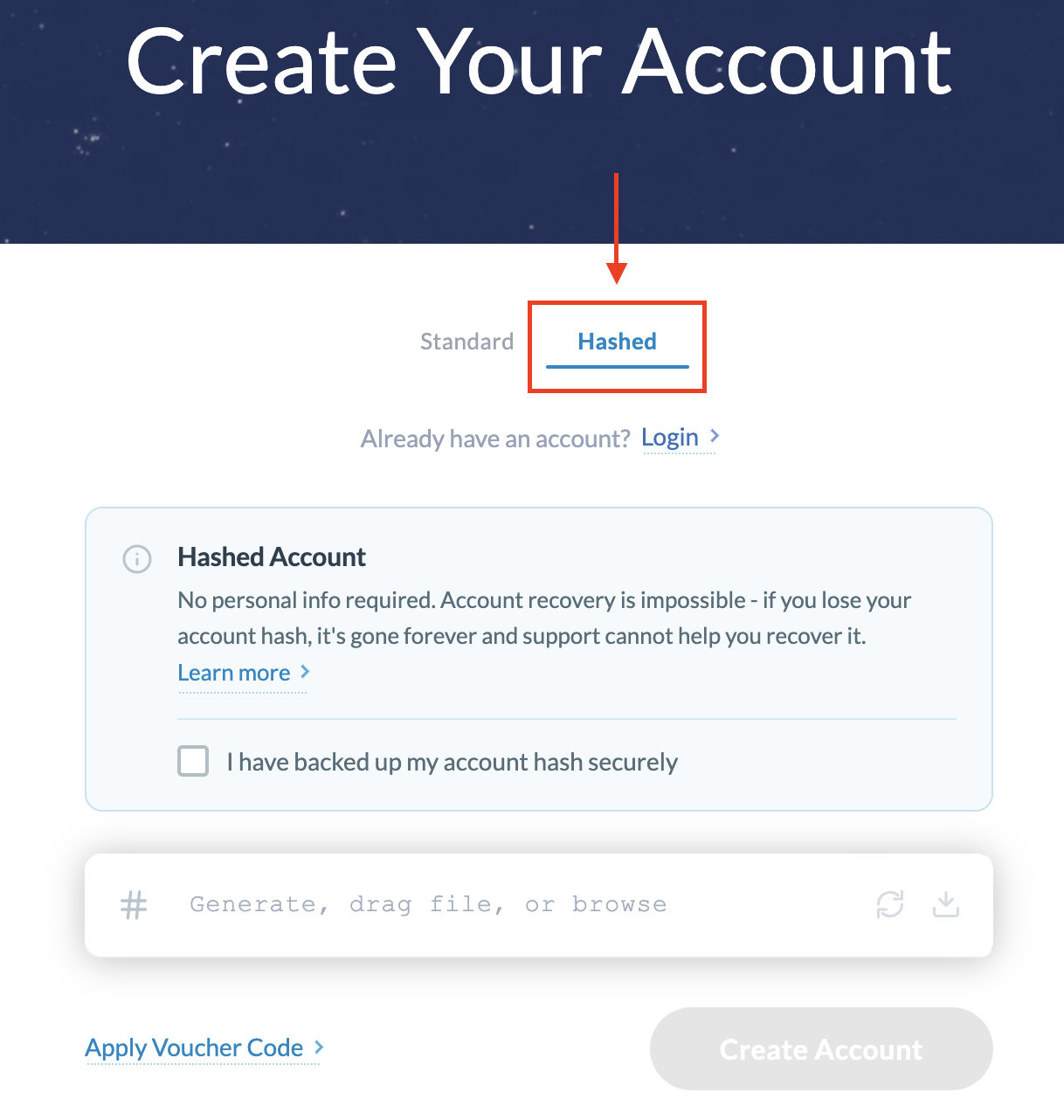
You can use a randomly generated hash, your own hash, or a file-based hash.
If you want the full how-to, it can be found in our Knowledge Base: Hashed Login / Anonymous Account guide
What is an Anonymous Account?
Short version:
- You pick Anonymous Account during setup.
- Windscribe gives you a 32 character account hash.
- That hash is your entire login on all devices.
You can get that hash in two ways:
- Random hash generated by Windscribe.
- Hash from an image (or any file) you upload.
If you go the image route, the image must be unique and private. Not your profile picture, not a common meme, not a stock wallpaper. If other people have the same file and know what you are doing, they can generate the same hash. Treat that image like a key, not decoration.
No email is required. Just like before, Windscribe does not need your inbox to function.
Why did we build this?
Because some of you want your VPN account to be as anonymous as your browsing habits.
Anonymous Accounts are for people who think:
- “I do not want my VPN tied to an email at all.”
- “I do not want to invent another password.”
- “I am fine being responsible for my own secret.”
Hashed login gives you:
- Less personal data on file. Your account is basically a secret and a subscription.
- No password reuse problems. The hash is already high entropy.
- Privacy hard mode. Great if you already use password managers, burner payments and other paranoia-friendly tools.
If you are happy with a normal login, that is fine too. This feature is an option, not a forced lifestyle.
Important tradeoff: there is no recovery
Here is the part you must actually read.
If you choose an Anonymous Account:
- Losing the hash means losing the account.
- Support cannot reset it.
- Support cannot look it up.
- There is no “forgot my password” link.
So you must store the hash somewhere safe:
- Password manager.
- Secure notes app.
- Written down and kept far away from the recycling bin.
If someone else gets the hash, they can log in as you. If you lose it, no one can help you.
Is this better than a regular login?
Not automatically. It is just different.
For most people, a regular login with a strong password and 2FA enabled is already extremely solid security and privacy (using a random username and password). It also lets you recover access when you forget your password, which you probably will (if you don’t use a password manager).
So:
- Choose regular login + 2FA if you want strong security with a safety net.
- Choose Anonymous Account if you want minimal data on file and you are confident you can protect a single secret. You can optionally enable 2FA also.
Same encryption. Same servers. Same VPN. Just a different way to prove you are you.
Ready to try hashed login on Windscribe?
Here comes the juicy part.
If this sounds like your flavor of paranoia, you can start using hashed login in Windscribe right now:
- Create a free Windscribe account
Go here to Create a Windscribe account. You can get started for free and upgrade later if you want more data and locations.
- Grab the apps
Install Windscribe on all your devices from the Download page.
- Pick your login style and connect
Choose between classic login with 2FA or the new hashed login, then connect to any location on our VPN servers list.
Sign up for Pro and get access to more features that preserve your privacy.



